Superflows AI Review 2026 - Features, Pricing & Deals

Last Updated
Feb 14, 2026

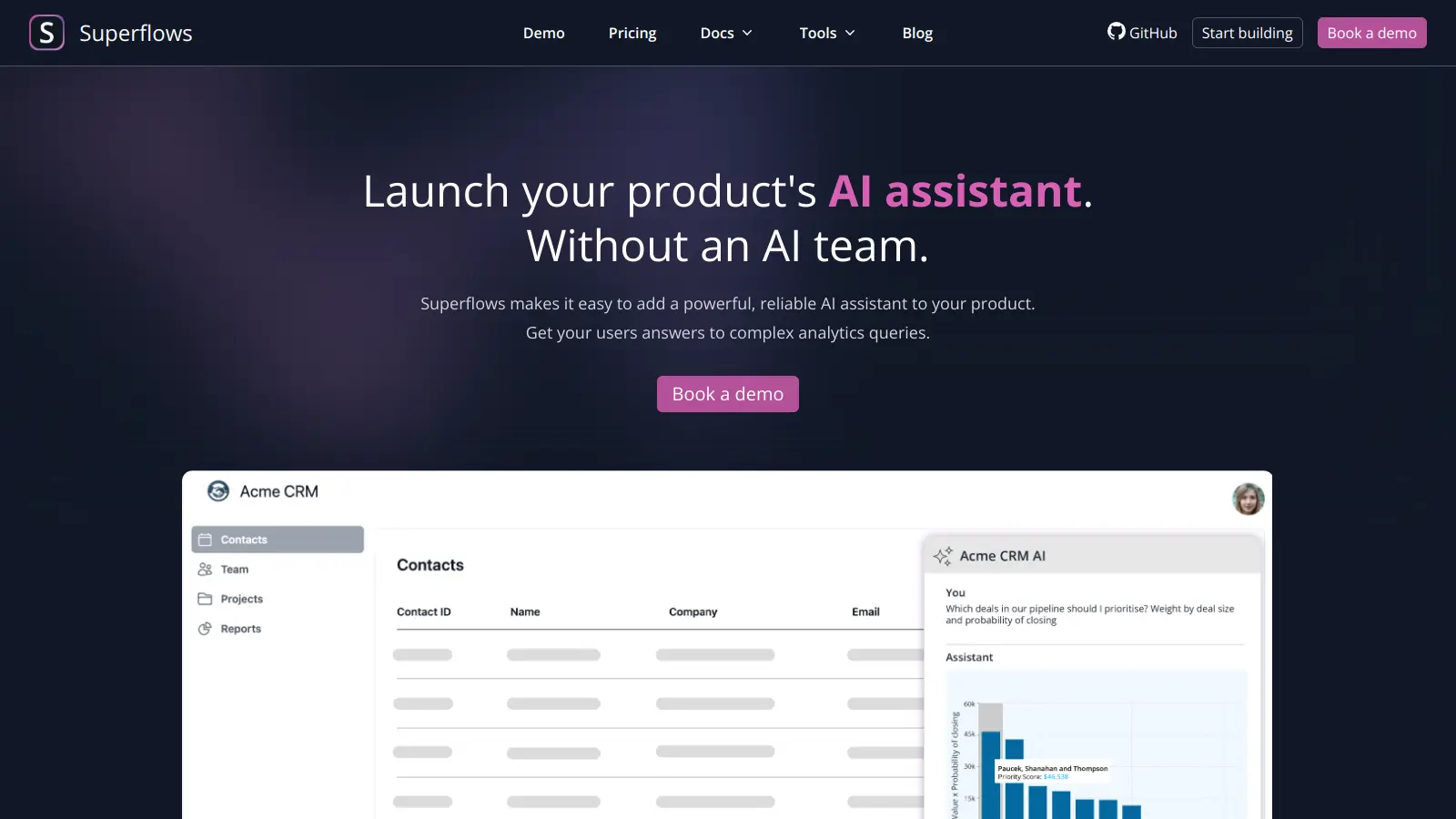
Superflows helps SaaS companies add AI assistants to their products quickly. It lets users talk to their software naturally to get analytics insights, create data visuals, and complete tasks, all without needing an in-house AI team.

The platform connects with existing APIs through a developer dashboard where you configure endpoints using OpenAPI specs. You can test everything in a playground with mock responses before going live. Users can ask questions in plain language and get instant answers about their data, while product managers keep control over what the AI can and can't do.

What makes Superflows practical is its simple setup. Companies can add it to their product with just one line of code or use React UI components available on GitHub. The platform includes built-in security controls and lets teams customize the AI assistant's personality to match their brand. It supports multiple LLMs and offers stateful streaming for smooth conversational interactions.

Teams use Superflows to make CRM systems smarter, create automatic dashboards, and help users find information in product documentation through RAG (retrieval-augmented generation). It makes complex data easier to understand through visualizations and generates code for analytics on the fly.

The platform offers a free testing tier for those just starting out. The Scale plan costs $999/month, with enterprise options available for larger companies with custom needs.

Who is Superflows AI for?

Superflows is for SaaS product teams wanting to add AI capabilities without building everything from scratch.

  • Product Managers who need to add AI features to their roadmap without extensive technical resources or AI expertise
  • SaaS Founders looking to make their products more intuitive through conversational AI without hiring ML engineers
  • Development Teams with limited AI experience who want to implement advanced features quickly
  • Customer Success Managers and Technical Support Specialists seeking to reduce support tickets by handling user inquiries more efficiently
  • Business Analysts and Sales Reps who need quick access to analytics and data insights through natural language queries
  • Customer Service Representatives looking to provide faster, more accurate responses to customer questions

Superflows is used across business software categories, including analytics platforms, CRMs, financial tools, and enterprise dashboarding applications.

Online Reviews (Last 6 Months Summarised)

There's limited public feedback available for Superflows at this point. The tool launched on Product Hunt with positive early responses, where users praised the documentation quality and quick setup process. Some early adopters found it easy to build AI apps without extensive coding, and the community support received favorable mentions.

Users on Reddit mentioned bugs in beta features and noted that pricing might be steep for smaller teams. Some reported occasional latency during peak usage. The lack of extensive reviews just reflects that it's still building its user base.

Features

  • API Integration: Connects with existing APIs through a developer dashboard where you configure endpoints using OpenAPI specs, enabling complex analytics and product actions through natural language interactions.
  • Analytics Processing: Automates data analysis by generating code for analytics and creating instant visualizations and insights, helping users quickly understand complex data without manual processing.
  • Action Execution: Allows AI assistants to complete tasks on behalf of users, with built-in confirmation mechanisms to ensure safe and controlled interactions.
  • Documentation Access: Provides instant help with product documentation using RAG (retrieval-augmented generation), guiding users through complex software features and reducing learning curves.
  • Customization Controls: Enables product managers to tailor AI assistant behaviors, adjust personas, and define specific interaction parameters to match product requirements, with multi-LLM support.
  • Playground Testing: Offers a testing environment with mock responses where teams can validate configurations and interactions before deploying to production.
  • One-Line Integration: Offers simple frontend implementation with just a single code snippet or open-source React UI components from GitHub, dramatically reducing development time and complexity.
  • User Feedback Collection: Tracks user interactions and feedback, helping teams continuously improve the AI assistant's performance and user experience.

Pricing

  • Testing tier is free and designed for initial integration and evaluation of the platform's capabilities.
  • Scale plan costs $999 per month and is designed for growing SaaS companies with increasing AI assistant needs.
  • Enterprise solution provides custom pricing tailored to specific business requirements and larger-scale implementations.
  • Self-hosting options are available for teams with specific infrastructure or compliance needs.

Frequently Asked Questions

What can I do with Superflows AI assistant?

Superflows lets you add an AI assistant to your product that can analyze data, create charts, answer questions, and perform actions. Users can ask questions in plain English to get instant insights from your data or complete tasks without leaving your app. For example, they can ask "Show me revenue by region for last quarter" or "Schedule a meeting with this client" and the assistant will handle it. It's like giving your users their own product expert that works 24/7.

How long does it take to integrate Superflows?

Most teams can add Superflows to their product in just a few weeks. The actual frontend integration takes minutes with just one line of code or React UI components. The setup process involves connecting your APIs through the developer dashboard using OpenAPI specs and testing in the playground with mock responses. This is much faster than building an AI assistant in-house, which typically takes 6+ months and requires specialized AI talent.

Is Superflows secure with my company data?

Yes, Superflows was built with security in mind. Your data doesn't train any AI models and isn't stored permanently. You control which API endpoints the assistant can access, and users need proper authentication to use those endpoints. The system requires user confirmation before completing any actions, and you can set up approval workflows for sensitive operations. Many companies in regulated industries use Superflows after their security teams review it.

Do I need AI expertise to use Superflows?

No AI expertise needed. That's one of the main benefits of Superflows. Your product and engineering teams can set everything up without hiring AI specialists or data scientists. The platform handles all the complex AI interactions while you focus on connecting your existing APIs and documentation. The control dashboard makes it easy to customize how the assistant behaves and looks, so your team can manage it without special AI knowledge.

What AI models does Superflows support?

Superflows supports multiple LLMs out of the box, giving you flexibility to choose the model that works best for your use case. The platform handles the complexity of working with different models, so you can switch between them without rebuilding your integration. This multi-LLM support means you're not locked into one provider and can adapt as new models become available.

Other Tools To Check Out

Best Deal

Start Automating with 400 Free Credits Monthly - No Credit Card Required

Redeem Now

Best Deal

Try Kissflow Starting at $2,500/month – Discounts Available for Annual Subscriptions

Redeem Now

Best Deal

Try Mixo free for 7 days and experience AI-powered website creation.

Redeem Now

Find Out How Best To Utilise Tools

Our newsletter comes with exclusive discounts, trials and practical insights from within the industry

Sign Up Today