ChatFlow Review 2026 - Features, Pricing & Deals

Last Updated
Feb 14, 2026

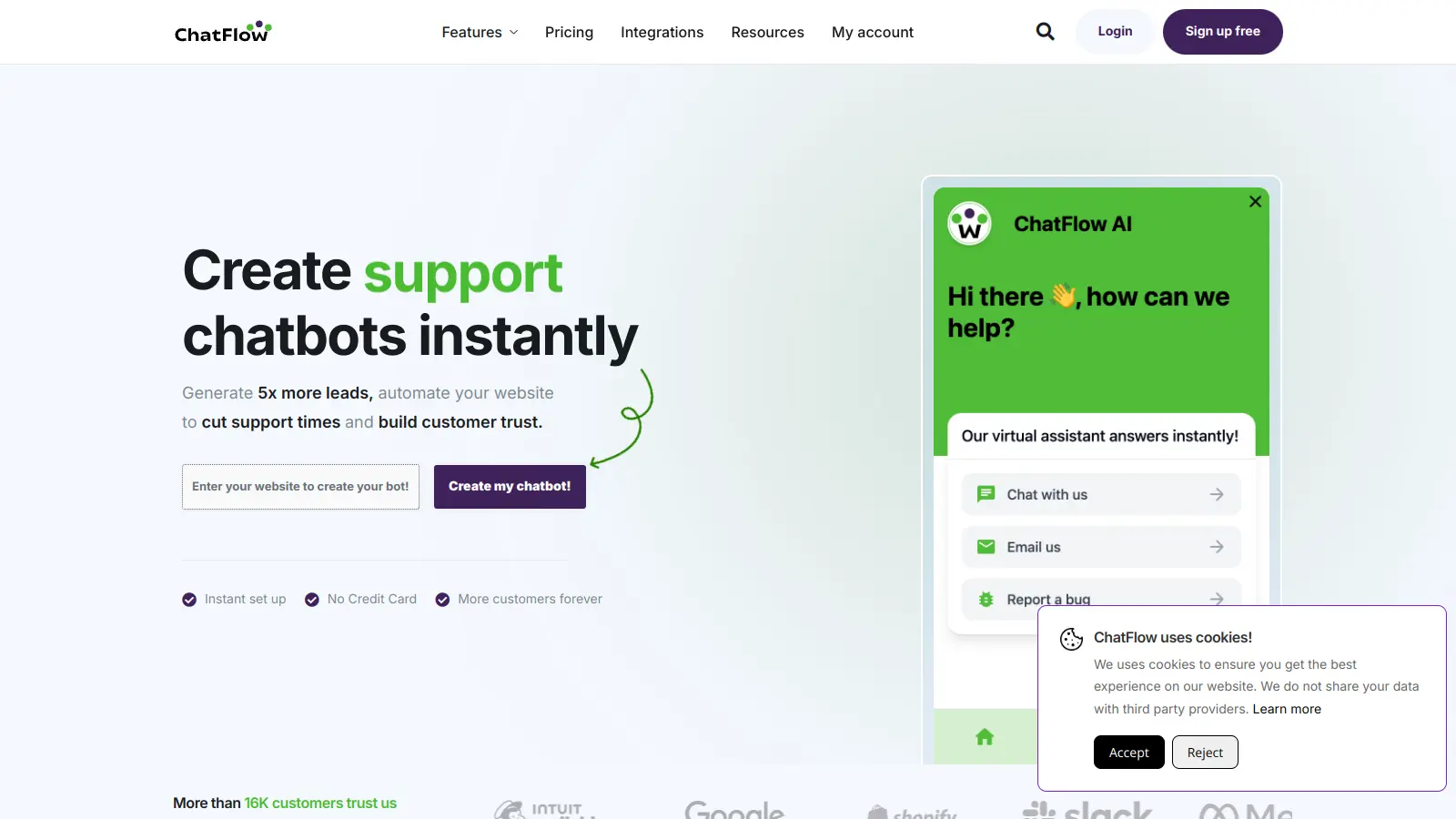
ChatFlow is an AI-powered chatbot platform that helps businesses automate their customer interactions through intelligent conversation flows. The tool combines natural language processing with customizable workflows to create chat experiences that can be embedded directly into websites.

At its core, ChatFlow enables users to build and manage automated conversations by training chatbots on multiple data sources. You can feed it your website content, documents, videos, audio files, PDFs, Excel spreadsheets, or FAQ lists. The platform offers intuitive interfaces for creating chat flows and customizing how your bot responds, including tone, response length, and appearance.

The tool includes sentiment analysis and real-time emotion detection to help bots understand user feelings during conversations. When queries get too complex, ChatFlow can hand off the conversation to a human agent. The platform supports over 100 languages and maintains 99.99% uptime for reliable 24/7 availability. Integration is simple with a single HTML script or iframe snippet that you paste into your website.

Pricing starts with a free plan that covers basic features. Paid plans begin at $19 per month for the Starter tier, which includes 2 chatbots and 1,000 monthly messages. The Growth plan at $79 per month offers 10 chatbots and 10,000 messages, while the Business plan at $299 per month provides 50 chatbots and 50,000 messages with dedicated support.

Whether you're looking to provide round-the-clock customer support, recommend products in e-commerce, or handle routine inquiries, ChatFlow offers the flexibility to train bots on your specific content. The platform works for businesses of all sizes, from startups testing chatbot automation to enterprises managing personalized customer interactions at scale.

Who is ChatFlow for?

ChatFlow works for business teams looking to improve customer service while saving time and resources. This tool helps companies automate conversations across multiple channels without requiring technical skills, delivering faster response times and consistent customer experiences.

  • Customer Service Managers who handle high volumes of inquiries can automate routine questions while focusing human agents on complex issues through the human handoff feature.
  • Small Business Owners with limited staff can provide 24/7 support without hiring additional team members, starting with the affordable free plan.
  • E-commerce Businesses can guide shoppers through product selection, provide personalized product recommendations, answer FAQs, and increase conversions with real-time support.
  • International Companies will value the multilingual support capabilities that allow them to engage with customers across 100+ languages without language barriers.
  • Startups to Enterprises will find scalable options that grow with their needs, from the free tier up to the Business plan with 50 chatbots and dedicated support.
  • Content-Rich Websites can train chatbots on existing documentation, videos, and audio files to turn static content into interactive support.
  • Teams Focused on User Experience can use sentiment analysis and emotion detection features to help chatbots respond appropriately to customer feelings.

From retail and financial services to healthcare and hospitality, ChatFlow serves any industry that wants to reduce wait times and operational costs.

Online Reviews (Last 6 Months Summarised)

Public discussion about ChatFlow is fairly limited at the moment. There aren't many reviews on major software review sites or detailed user testimonials available online. This isn't unusual for chatbot platforms that may serve niche markets or focus on direct sales rather than public marketing campaigns.

The lack of widespread feedback doesn't necessarily indicate quality issues. It could simply mean the tool is newer, serves a specific audience, or hasn't built a large public user base yet. If you're considering ChatFlow, you'll likely need to rely on their free tier or demo to evaluate whether it fits your needs, rather than depending on extensive third-party reviews.

Features

  • Multiple Training Data Sources: Train chatbots on websites, documents, videos, audio files, PDFs, Excel spreadsheets, and FAQs to create bots that understand your specific content.
  • One-Click Website Integration: Connect with your website using a single HTML script or iframe snippet that takes minutes to set up.
  • Multilingual Support: Communicate globally with support for over 100 languages, ensuring broader customer engagement across different regions.
  • Customizable Appearance and Tone: Adjust the chatbot's look, conversational tone, and response length to match your brand's style and voice.
  • Sentiment Analysis and Emotion Detection: Understand customer feelings in real-time by detecting emotional cues during conversations.
  • Human Handoff: Transfer complex queries to human agents automatically when the chatbot encounters situations that require personal attention.
  • 24/7 Availability: Provide round-the-clock support with 99.99% uptime, ensuring customers get help whenever they need it.
  • AI-Powered Responses: Use OpenAI and other AI technologies to deliver accurate, contextual responses based on your training data.

Pricing

  • Free plan includes basic features with lower limits on chatbots and messages, no credit card required to get started.
  • Starter Plan offers 2 Chatbots, 1,000 Messages per month, 10 SEO Insights, 50 Push Notifications per month, 2 Workspaces and Teams, 60 Days Data Retention, Unlimited Training data (5 MB Per File), 10,000 words of AI text usage per month, and basic content optimization at $19 monthly.
  • Growth Plan provides 10 Chatbots, 10,000 Messages per month, 100 SEO Insights, 100 Push Notifications per month, 10 Workspaces and Teams, 180 Days Data Retention, Unlimited Training data (10 MB Per File), 200,000 words of AI text usage per month, and expert content optimization with personalization at $79 monthly.
  • Business Plan includes 50 Chatbots, 50,000 Messages per month, 500 SEO Insights, 500 Push Notifications per month, 50 Workspaces and Teams, 1 Year Data Retention, Unlimited Training data (50 MB Per File), all features, and dedicated support at $299 monthly.

Frequently Asked Questions

What's the difference between a chatbot and a chatflow?

A chatbot is a program that simulates conversation, while a chatflow is the designed conversation path your users follow. Think of a chatbot as the entire system, and a chatflow as the roadmap it follows. With ChatFlow, you can create multiple conversation paths that guide users through different scenarios based on their responses, making interactions more helpful than basic chatbots that simply respond to keywords.

Can I use ChatFlow with my existing website?

Yes! ChatFlow works with almost any website platform. You simply copy and paste a small HTML script or iframe snippet into your site, and you're ready to go. There's no need for complex technical knowledge or developer help. The tool works well with WordPress, Shopify, Wix, and most other popular website builders. Your chatbot will appear as a small icon that visitors can click to start a conversation.

How hard is it to set up my first chatbot?

You don't need coding skills to get started. You can train your chatbot by feeding it your website content, documents, videos, PDFs, or FAQ lists. The platform handles the rest, using AI to understand your content and respond to visitor questions. Most users can get a basic chatbot running quickly by uploading their existing support materials.

Will ChatFlow work when I'm not online?

Absolutely! That's one of its best features. Your chatbot will run 24/7 with 99.99% uptime, helping visitors even when you're sleeping or busy. You can set up automatic responses to common questions, collect contact information, or guide users through basic processes without any human involvement. For complex issues, the chatbot can hand off the conversation to a human agent when you're available.

How do I train my chatbot to answer questions correctly?

Training your chatbot is straightforward with ChatFlow. You can upload content including websites, documents, videos, audio files, PDFs, Excel spreadsheets, or FAQs. The AI learns from these resources to provide accurate responses. The platform uses AI like OpenAI to understand your content and generate contextual answers. You can also customize the tone and response length to match your brand's voice.

Other Tools To Check Out

Best Deal

7-day free trial on Basic plan, or start with the Free Plan: 20 message credits and up to 50 product pages per bot.

Redeem Now

Best Deal

Get Started with Talkdesk Express — $25/Month for Small Businesses with $100 Free Credit

Redeem Now

Best Deal

Start with Genesys Cloud 1 voice plan at $75/month per user - minimum commitment $2,000, includes 250 AI Experience tokens

Redeem Now

Find Out How Best To Utilise Tools

Our newsletter comes with exclusive discounts, trials and practical insights from within the industry

Sign Up Today