Claude vs GitHub Copilot: Which Is Better for Devs? (2026)
Editorial note: originally published in april of 2026

quick verdict
GitHub Copilot is the better pick for most working developers because it lives inside your editor, delivers instant inline completions, and costs $10/month. It reduces friction for the daily coding work that actually takes up most of your time.
If you're tackling repo-scale refactoring, complex multi-file reasoning, or tasks that need deep written explanation alongside the code, Claude is the stronger choice because its reasoning depth and 200K context window (with 1M available) handle that kind of work more reliably.
choose Claude if you need a thinking partner for complex, multi-file or cross-system problems
visit claudechoose GitHub Copilot if you want AI suggestions woven directly into your editor as you type
visit github copilotpick your side
Claude and GitHub Copilot are both AI tools for developers, but they approach the job from opposite directions. Copilot sits inside your IDE and suggests code as you type. Claude is a general-purpose AI assistant you talk to, with a coding tool (Claude Code) that runs agentic tasks across your whole repository from the terminal or a VS Code extension.
This comparison covers pricing, code generation quality, agentic and autonomous workflows, editor integration, context handling, and which tool makes more sense depending on how you actually work. Both have real strengths; the right answer depends on whether you want in-flow completions or deep reasoning on demand.
feature comparison
We collect first-hand reviews from people who use these tools every day — what works, what doesn't, whether it's worth paying for. We research pricing, features, and comparisons so that feedback has real context behind it. For this comparison, we prioritised feedback from developers who had used both tools on production codebases rather than toy projects, with particular attention to agentic workflow experiences. Read our full research methodology.
pricing
GitHub Copilot winsFree tier; Pro at $20/mo
Free tier; Pro at $10/mo
GitHub Copilot has a more accessible entry point for individual developers. The free plan gives 2,000 inline suggestions per month, 50 Copilot Chat messages, and 50 premium requests. The Pro plan is $10/month or $100/year, which is half the cost of Claude Pro. For teams, Copilot Business is $19 per user per month and Copilot Enterprise is $39 per user per month, with enterprise features like knowledge bases and policy controls.
Claude's free plan covers web, iOS, Android, and desktop access with 30 to 100 daily messages depending on complexity. Claude Pro costs $20/month and unlocks higher usage limits and access to Sonnet and Opus models. Claude Max tiers start at $100/month for 5x usage and go to $200/month for 20x. There is no built-in team plan at the same price point as Copilot Business.
For solo developers who want AI coding help without spending much, Copilot Pro at $10/month wins on pure price. Claude is the better deal if you also need the tool for writing, analysis, and reasoning tasks beyond code, since you get that breadth at $20/month without paying for separate tools.
editor integration
GitHub Copilot wins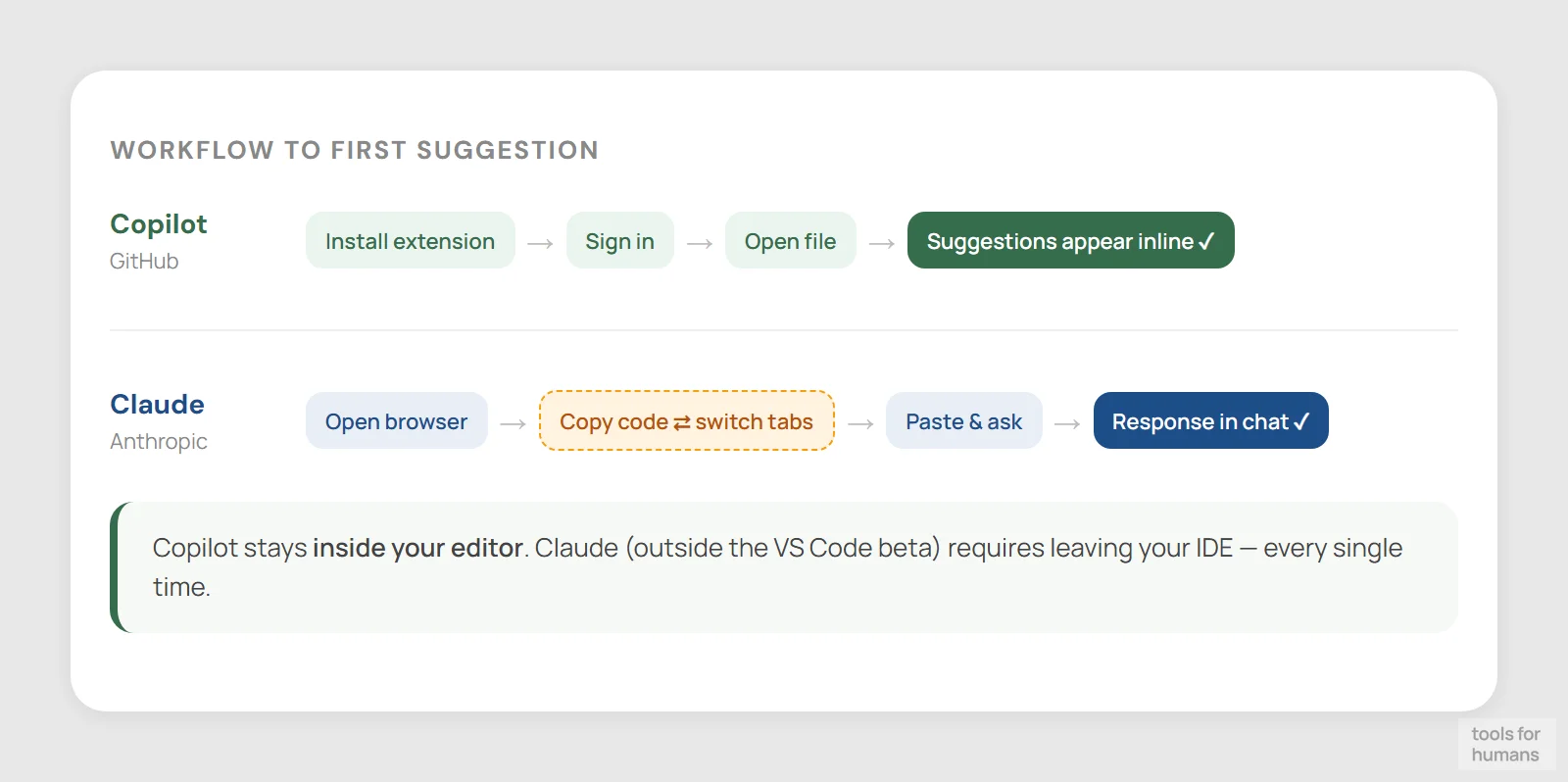
VS Code extension (beta, late 2025)
VS Code, JetBrains, Neovim, Xcode
GitHub Copilot is purpose-built for the editor. It has deep, native integrations with VS Code, JetBrains IDEs, Neovim, Xcode, and Visual Studio. Suggestions appear inline as you type, tab-complete accepted, no context switching required. The Copilot Chat panel lets you ask questions without leaving the IDE, and agent mode in VS Code can now make multi-file edits and run terminal commands while you watch the changes appear.
Claude's primary interface is a web or desktop app, not your editor. Claude Code adds terminal-based agentic coding, and as of late 2025 there is a native VS Code extension in beta that shows Claude's changes in a sidebar with inline diffs. That's a meaningful improvement, but it is still newer and less mature than Copilot's VS Code integration, which has had years of refinement.
If staying in your editor with minimal friction is the priority, Copilot is clearly ahead. Claude Code's VS Code extension closes the gap somewhat, but for pure inline-completion-style editor integration, Copilot has the deeper, more polished implementation.
agentic and autonomous workflows
Claude winsTerminal-native; MCP; multi-repo tasks
Agent mode in VS Code; GitHub Actions agent

Claude Code was designed from the ground up for agentic operation. It runs in the terminal or VS Code sidebar, reads your whole codebase, edits files across multiple directories, runs tests, creates commits, opens pull requests, and connects to external tools via the Model Context Protocol (MCP). MCP lets Claude Code pull from Jira, Google Drive, Slack, databases, and custom APIs during a session. The Claude Agent SDK lets teams build custom agentic pipelines on top of the same infrastructure.
GitHub Copilot has added agent mode and a coding agent that works inside GitHub Actions for background autonomous tasks. You can assign tasks to Copilot agents, as well as third-party agents including Claude and OpenAI Codex, through the GitHub interface. Agent mode in VS Code handles multi-file edits and can run terminal commands, but it's a newer capability built on top of a tool originally designed for inline completions.
For complex, multi-step autonomous coding tasks that span an entire repository, Claude Code's architecture gives it a structural advantage. Copilot's agent mode is useful and improving, but Claude Code's terminal-native design and MCP integration make it more capable for genuine delegation-style workflows right now.
code generation quality
drawStrong on complex reasoning; verbose output
Fast inline completions; drops off for niche languages
For everyday coding tasks like autocomplete, boilerplate generation, test scaffolding, and documentation, Copilot is fast and accurate in popular languages like Python, TypeScript, JavaScript, and Java. It uses context from open files and surrounding code to make suggestions that fit your style. Quality drops for niche languages and highly domain-specific code, and accepted suggestions sometimes need editing for correctness.
Claude's code generation quality is high, particularly for problems that need explanation alongside the solution. It tends to write cleaner, more readable code with better inline comments, and it's more likely to explain trade-offs rather than just output a block of code. For complex algorithms, architecture decisions, and situations where you need to understand the code you're shipping, Claude's output is often more useful.
The honest comparison: Copilot wins on speed and in-context relevance for routine work. Claude wins when correctness, readability, and reasoning through the problem matter more than raw completion speed. Most developers who write production code benefit from both modes depending on the task.
context window and file handling
Claude wins200K tokens standard; 1M available
Workspace-scoped; no published token limit
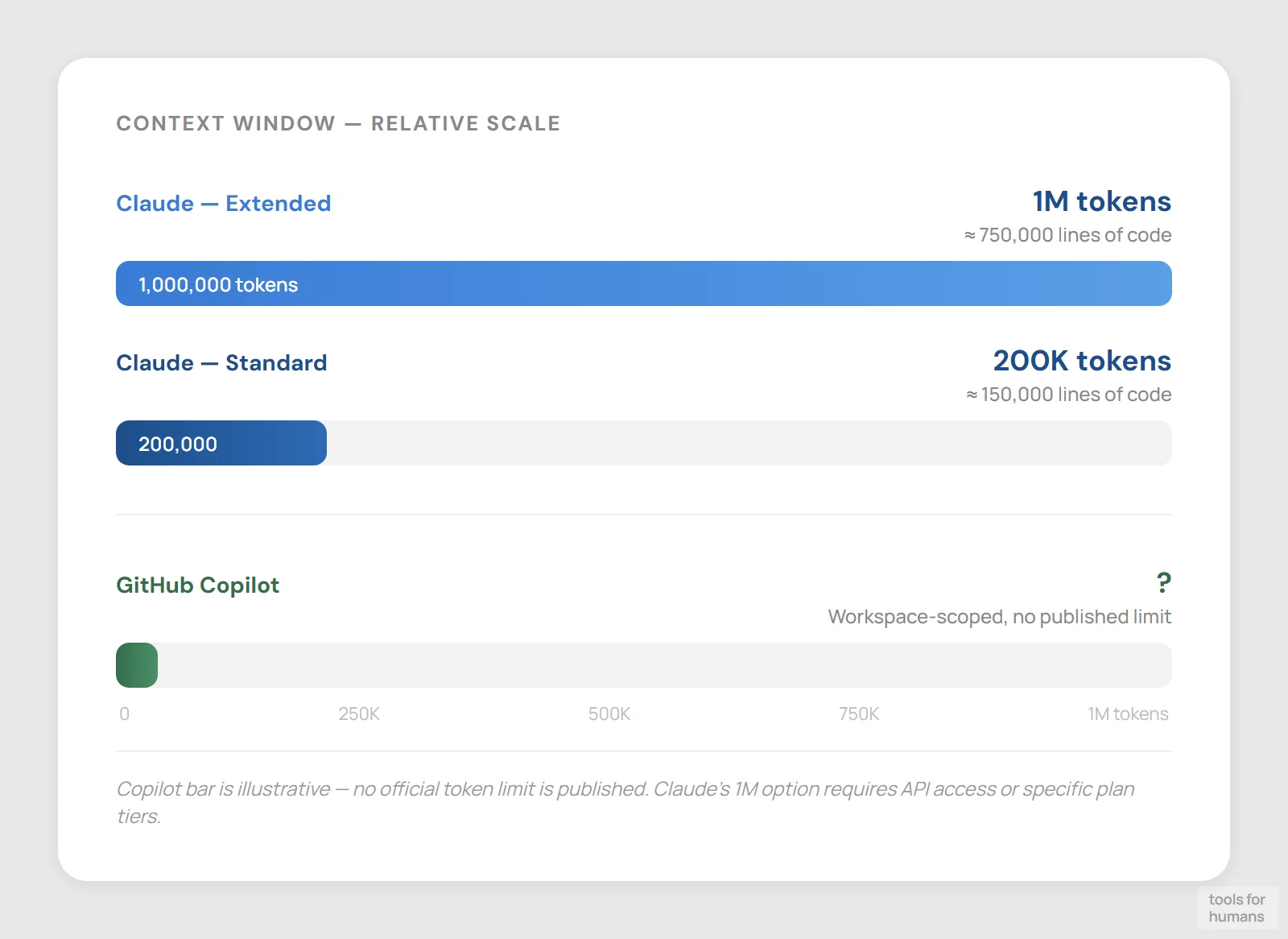
Claude has a 200K token context window with a 1 million token option available. In practice this means you can paste entire files, large codebases, and long conversation histories into a single session. Context compaction summarizes older parts of the conversation to extend working memory further. For tasks like reviewing a large pull request, analyzing a full module, or cross-referencing multiple files, this matters a lot.
GitHub Copilot's context handling is scoped to the IDE: it reads open files, recently viewed files, and the active workspace. For inline completions this is appropriate and efficient. For deeper repository-wide questions, the context is shallower and you'll hit limits faster on large codebases. Copilot Chat can be given specific files, but there's no equivalent to Claude's ability to load tens of thousands of lines into one conversation.
If your work involves understanding or modifying large, unfamiliar codebases, Claude's context window is a practical advantage. For most day-to-day editor work on files you already have open, Copilot's scoped context is sufficient and less expensive to run.
multi-model support
GitHub Copilot winsAnthropic models only (Haiku, Sonnet, Opus)
Claude, Gemini, GPT-4o via premium requests
GitHub Copilot has an advantage here that's easy to miss. As of 2025, Copilot supports multiple underlying AI models including Claude (Anthropic), Gemini (Google), and GPT-4o (OpenAI), selectable through a premium request system. This means you can use Claude Sonnet inside Copilot for certain tasks while still benefiting from Copilot's editor integration. It's a meaningful flexibility advantage for teams that want to pick the best model per task.
Claude only runs on Anthropic's own models. You get Haiku, Sonnet, and Opus tiers depending on your plan, but there's no option to switch to a GPT or Gemini model. This makes Claude a single-vendor experience. For most users that's fine because the models are strong, but organizations with specific model preferences or compliance requirements may find Copilot's multi-model approach more practical.
The nuance worth flagging: Claude Sonnet accessed through Copilot behaves differently than through Claude Code or Claude.ai because each tool constructs context differently. You're getting the model but not the full Claude experience.
team and enterprise features
GitHub Copilot winsEnterprise API; no turnkey team coding plan
Business $19/seat; Enterprise $39/seat
GitHub Copilot Business at $19 per user per month and Copilot Enterprise at $39 per user per month include policy controls, audit logs, IP indemnification, and the ability to build organizational knowledge bases that Copilot draws on during completions. Enterprise also integrates with GitHub's pull request review and Issues workflows, which matters for larger engineering organizations already on GitHub.
Claude's team and enterprise options are less clearly structured for engineering teams specifically. The Claude API supports enterprise use cases, and Anthropic has enterprise agreements, but there's no equivalent to Copilot's turnkey knowledge base feature or tight pull request integration at a per-seat price that scales predictably. Claude's Constitutional AI safety guardrails are often cited as a reason regulated industries prefer it, but that's a compliance argument rather than a collaboration feature.
For engineering teams already on GitHub who want AI integrated into their existing code review and project management workflows, Copilot Enterprise is a better-packaged offering. For individuals and smaller teams, this distinction matters less.
non-coding use cases
Claude wins
Writing, analysis, research, and code
Coding tasks only; Chat for general Q&A
Claude is a general-purpose AI assistant. Beyond code it handles long-form writing, document analysis, legal and regulatory text, research synthesis, and nuanced Q&A at a quality level that Copilot doesn't match. If you're a developer who also writes technical documentation, internal specs, customer-facing content, or needs to analyze non-code documents, Claude at $20/month covers all of that in one tool.
GitHub Copilot is a coding-specific tool. Copilot Chat can answer general questions and explain concepts, but it's not designed or optimized for long-form writing, document analysis, or general productivity work. Using it as a general assistant gives noticeably weaker results compared to Claude for anything outside a technical coding context.
This is the clearest category separation between the two tools. If you only need help with code, Copilot is sufficient and cheaper. If you need both coding help and a capable general assistant, Claude's $20/month Pro plan delivers more total value than paying $10 for Copilot and separately subscribing to another AI tool for writing and analysis.
the verdict
Choose Claude if you work on complex, multi-file problems that need deep reasoning, want a single tool for both code and general writing or analysis, or are doing serious agentic work with Claude Code across large repositories. The 200K context window and agentic terminal tool make a real difference for that kind of work.
Choose GitHub Copilot if you want AI suggestions directly inside your editor as you type, you're on a team already using GitHub's workflows, or you want the flexibility to choose between Claude, Gemini, and GPT-4o models without switching tools. At $10/month it's the lower-risk starting point for developers who just want faster coding.
For most working developers who spend the majority of their time writing and editing code inside an IDE, GitHub Copilot is the practical default. It's cheaper, lives where you work, and integrates with the tools most engineering teams already use. Come to Claude when the problem is hard enough to need a thinking partner rather than an autocomplete.
frequently asked questions
humans
toolsforhumans editorial team
Reader ratings and community feedback shape every score. Since 2022, ToolsForHumans has helped 600,000+ people find software that holds up after launch. The picks here come from that.
keep reading

best GitHub Copilot alternatives
7 GitHub Copilot alternatives compared, including Cursor, Tabnine, and Cody. Ranked by pricing, features, and ease of switching for developers in 2026.

claude code vs cursor
Claude Code vs Cursor: real comparison of pricing, autonomy, context windows, and workflows. Which AI coding tool fits your work style in 2026?

claude vs chatgpt
Claude vs ChatGPT: honest side-by-side comparison of pricing, writing quality, code help, context windows, and which tool fits your actual workflow.

best ChatGPT alternatives
7 ChatGPT alternatives including Claude and Perplexity, ranked by pricing, features, and use case fit. For writers, developers, and privacy-focused users.

best Replit alternatives
7 Replit alternatives compared, including Bolt and GitHub Codespaces, ranked by pricing, features, and real limitations. For developers and non-technical builders.

best ai tools for coders: top picks for developers
8 AI coding tools compared: GitHub Copilot, Cursor, Tabnine, and more, ranked by output quality, pricing, and workflow fit for working developers.