Claude Code vs Cursor: autonomous vs IDE-first coding (2026)
Editorial note: originally published in april of 2026

quick verdict
Claude Code is the better pick for most developers who want AI to do heavy lifting across large codebases autonomously. It has a reliable 200K context window, a 1M token beta, and a CLI-first agent model that handles multi-file refactors without constant hand-holding.
If you prefer staying inside a familiar VS Code-style editor and want to approve every change inline, Cursor is the stronger choice. Its multi-model flexibility and tight visual diff UI keep you in control of every edit.
choose Claude Code if you run agentic, parallel tasks on large codebases
visit claude codechoose Cursor if you want IDE-native editing with multi-model options and inline review
visit cursorpick your side
Claude Code and Cursor are both AI coding tools, but they are built around opposite philosophies. Claude Code is an agent-first CLI from Anthropic that can run autonomously across your terminal, VS Code, JetBrains, and the web. Cursor is a VS Code fork rebuilt around AI assistance, where you stay in the driver's seat and the AI suggests, completes, and edits alongside you.
This comparison covers pricing, context window reliability, agentic capabilities, editor integration, multi-model access, and workflow fit. Both tools have converged on overlapping features in 2026, so the meaningful differences are now about workflow philosophy, not raw capability.
We looked at real pricing pages, community reports on usage limits, and hands-on workflow patterns from engineers using both tools daily.
feature comparison
We collect first-hand reviews from people who use these tools every day — what works, what doesn't, whether it's worth paying for. We research pricing, features, and comparisons so that feedback has real context behind it. For this comparison, we focused on context window reliability and recent pricing structure changes. Read our full research methodology.
pricing
Claude Code winsPro $20/mo, Max from $100/mo
Free tier, Pro $20/mo, Ultra $200/mo
Claude Code is available through Anthropic's Claude plans. The Pro plan is $20/month and includes Claude Code access. The Max plans start at $100/month and offer higher usage limits with priority access to Opus 4. Teams and Enterprise pricing is available separately. There is no free tier for Claude Code itself, though Claude.ai has a free tier that does not include Claude Code.
Cursor has a Free tier with limited completions, a Pro plan at $20/month, and an Ultra plan at $200/month introduced in June 2025. That Ultra pricing update caused significant backlash. Developers on the Pro plan reported that what was advertised as unlimited usage was effectively capped, with 500 requests reportedly dropping to around 225 under the new compute-limit model. The lack of clear communication around the change triggered mass cancellations.
At the $20/month level, both tools cost the same. But Cursor's pricing credibility took a hit in mid-2025, and Claude Code's usage limits are more predictably tied to Anthropic's published tier structure. If you need heavier usage, Claude Code Max at $100/month is a clearer upgrade path than Cursor Ultra at $200/month.
autonomy and agentic workflows
Claude Code wins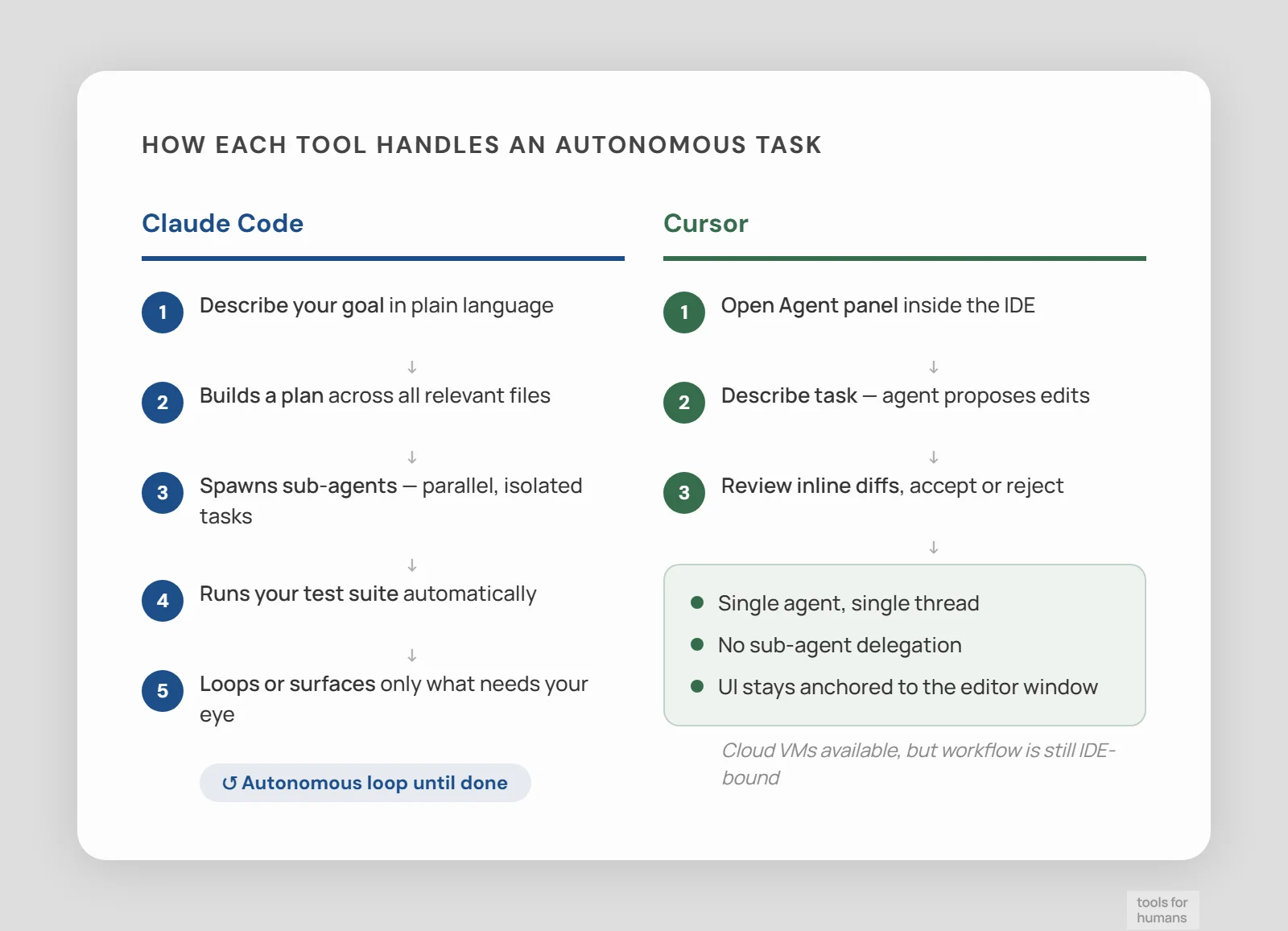
Sub-agents, hooks, CI/CD integration
Agent mode, cloud VMs, IDE-bound UI
Claude Code was designed agent-first. You describe a goal, it builds a plan, executes across files, runs your test suite, and loops until the task is done or it needs your input. It supports sub-agents with per-agent model selection, parallel task execution, hooks for custom automation, and integration with GitHub Actions and CI/CD pipelines. The CLI model means it can run as a background worker while you do other things.
Cursor added its Agent mode (renamed from Composer in version 0.46) and background agents running on cloud VMs with internet access. The agent capability is real, but the UI constrains it. Agent interactions are crammed into a panel that takes up roughly one-third of the screen. Users report the agent sometimes silently waits for input while appearing to work, and accepting changes across multiple files requires navigating multiple approval buttons.
For parallel, multi-file, multi-agent workflows, Claude Code is clearly stronger. It was built for this use case from the start. Cursor's agent mode is capable for focused tasks, but the IDE-first layout creates friction when you want autonomous operation across a large codebase.
context window and file handling
Claude Code wins200K reliable, 1M token beta on Opus 4
200K advertised, 70K-120K effective
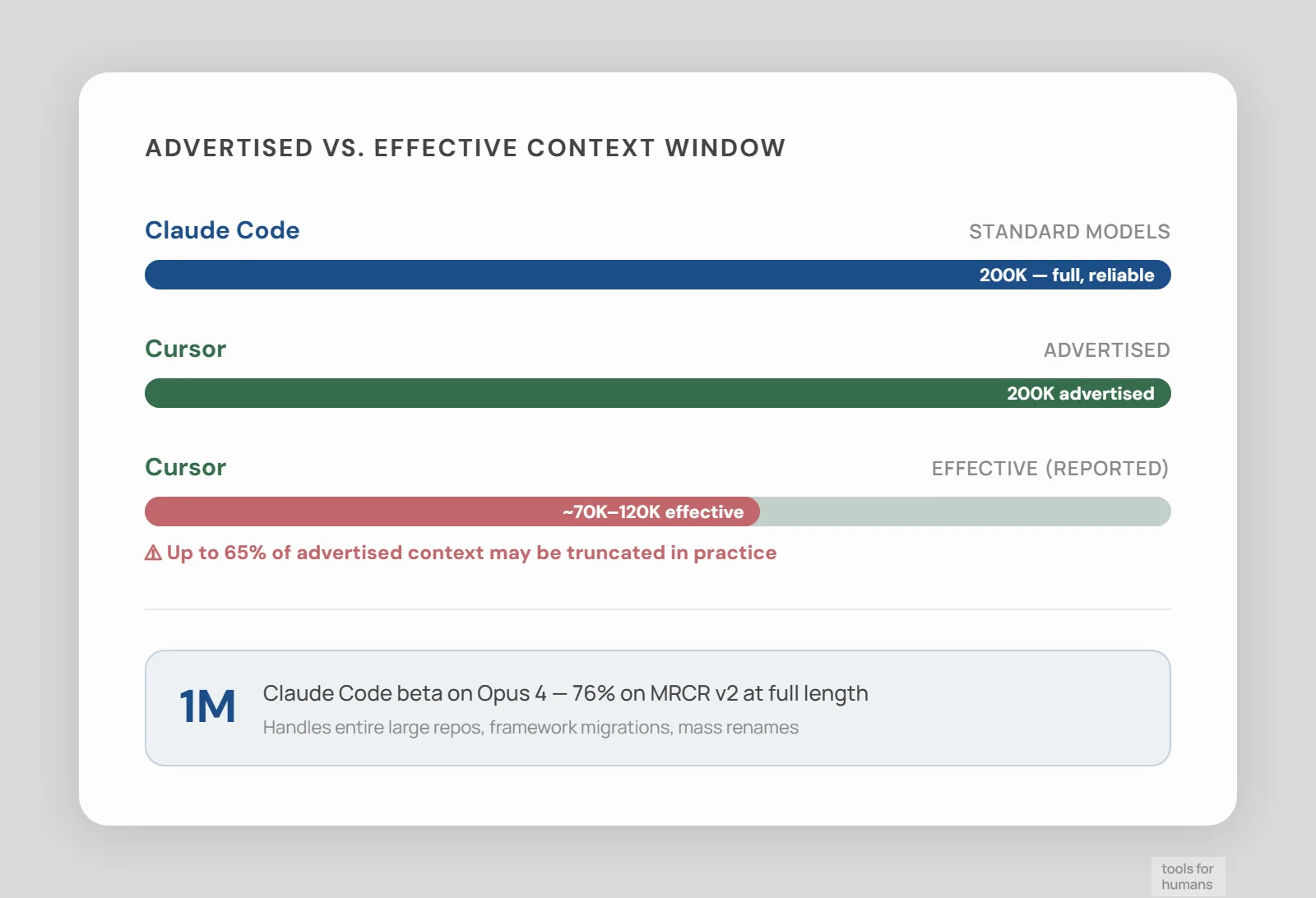
Claude Code delivers 200K tokens of context reliably on standard Claude models, with a 1M token beta available on Opus 4 that scores 76% on the MRCR v2 benchmark at full length. For large codebase refactors, framework migrations, or renaming a concept across hundreds of files, that full context is available when you need it.
Cursor advertises 200K context windows, but community reports consistently describe usable context closer to 70K-120K after internal truncation. For most day-to-day coding, 70K is enough. For a large refactor where you need the model to hold dozens of files in context simultaneously, that gap matters.
For typical feature work on a mid-sized codebase, both tools are fine. For production-scale refactors or migrations across large repos, Claude Code's reliable full-context delivery is a real advantage. The 1M token beta is not production-ready for all use cases, but the standard 200K is more trustworthy than Cursor's effective ceiling.
editor integration and UX
Cursor winsCLI, VS Code ext, JetBrains, desktop app
Full VS Code fork, native IDE experience
Cursor is a VS Code fork, which means you get the full VS Code experience: extensions, keybindings, themes, the file explorer, and the integrated terminal, all in a single window. If your team already works in VS Code, the switch to Cursor is minimal. Tab completions, inline suggestions, and diff views are built directly into the editing surface. This tight integration is Cursor's biggest advantage for developers who want AI assistance without changing their mental model of how an IDE works.
Claude Code runs in your terminal as a CLI, but it also integrates with VS Code and JetBrains as an extension, and has a desktop app for managing parallel tasks, visual diffs, and PR status. The desktop app and IDE extensions are more capable than they were a year ago. That said, if you are used to an IDE-first workflow, Claude Code's interface feels different. It expects you to think in terms of tasks and agents, not cursor position and file tabs.
Cursor wins on immediate UX familiarity for VS Code users. Claude Code wins for developers comfortable with the terminal who want to run agents without an IDE in the way.
model access and flexibility
Cursor winsClaude models only (Haiku, Sonnet, Opus 4)
GPT-5.3, Claude, Gemini 3, Cursor model
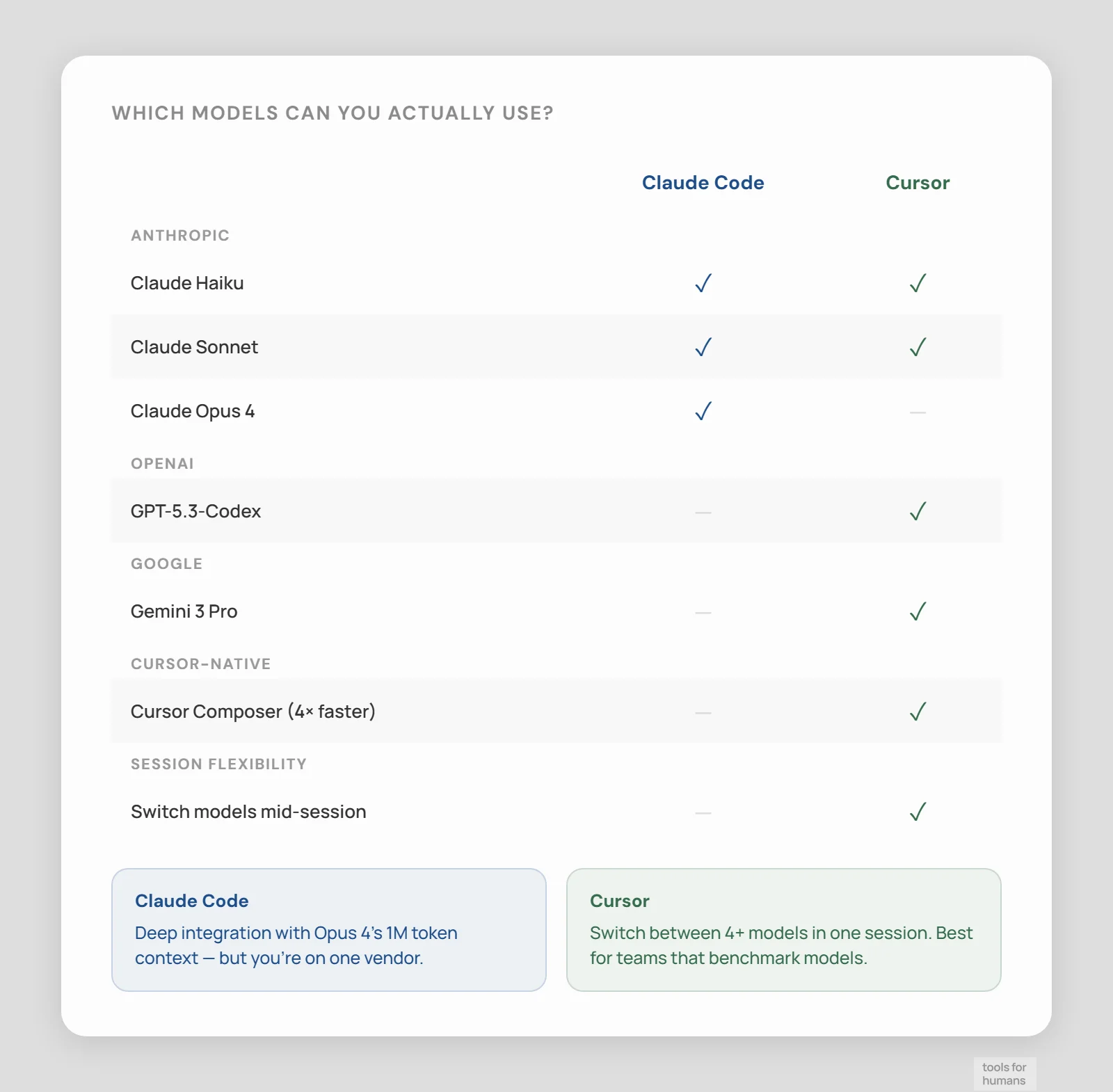
Cursor supports multiple AI models within the same session. You can switch between GPT-5.3-Codex, Claude Sonnet, Gemini 3 Pro, and Cursor's own Composer model depending on the task. The Composer model is reportedly 4x faster than comparably capable models, which helps when you need quick interactive completions. This multi-model flexibility is useful if you want to pick the right model for the right job, or if you want to avoid being locked into one provider.
Claude Code runs Anthropic's Claude models exclusively. You get access to Sonnet, Haiku, and Opus 4 depending on your plan, and sub-agents can use different Claude models within the same workflow. Extended thinking is available on Opus. There is no option to use GPT or Gemini through Claude Code.
If model choice matters to you, Cursor is the clear winner. If you are happy with Claude models and want the deepest possible integration with a single provider, Claude Code is consistent. The single-provider constraint is a real limitation for teams who have already standardized on non-Anthropic models.
MCP and tool integrations
Claude Code winsPer-agent MCP config, no tool cap
One-click MCP, 40-tool hard limit
MCP (Model Context Protocol) support exists in both tools, but the implementations are different in important ways. Claude Code treats MCP as a core part of its architecture. Each sub-agent can have its own MCP configuration, tool search is built in, and custom CLI-first tools integrate naturally. If you run a complex toolchain with custom scripts and internal APIs, Claude Code's MCP integration is more flexible.
Cursor supports MCP as a plugin system with a hard cap of 40 tools. Setup is simpler, with one-click installation from a curated list. That curated list covers most common use cases. The 40-tool limit is rarely hit in practice, but it can become a constraint for teams with large internal tool ecosystems.
For standard development setups, Cursor's MCP integration is easy to get started with. For teams with complex, custom CLI workflows and many internal tools, Claude Code's deeper MCP architecture is worth the additional setup.
learning curve and onboarding
Cursor wins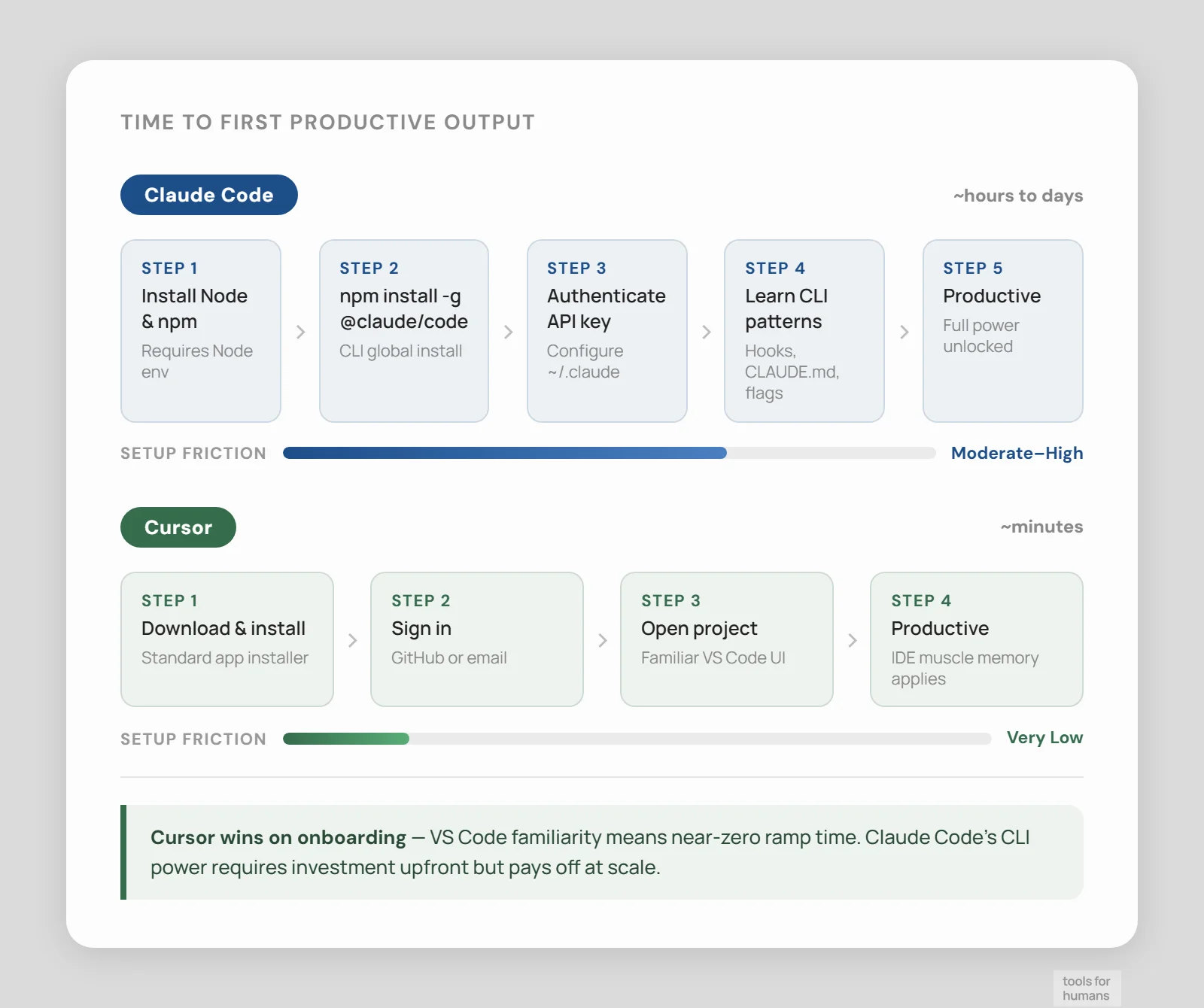
npm install, CLI-first, steeper curve
VS Code fork, productive in under an hour
Cursor's learning curve is low for VS Code users. You install it, sign in, and your existing workflow mostly continues. Tab completions work immediately, and Agent mode is accessible from the same panel you already use for chat. Most developers are productive in Cursor within an hour of installing it. The main friction is understanding how to write effective prompts for agent tasks, which is true of every AI coding tool.
Claude Code requires more onboarding. You install it via npm, authenticate with your Anthropic account, and then run it from the terminal. Getting the most out of it means understanding how to structure tasks for autonomous execution, how to configure sub-agents, and how to use hooks for automation. The payoff is higher capability, but the startup cost is real. Developers coming from a GUI-first background will find the CLI-first model unfamiliar.
For a team that wants to be productive quickly with minimal disruption, Cursor is the easier starting point. Claude Code rewards investment but asks for more upfront.
team and collaboration features
drawTeams/Enterprise, GitHub Actions agents
Business $40/user/mo, SSO, admin tools
Claude Code has Teams and Enterprise plans with centralized billing and admin controls. Its integration with GitHub Actions means agents can run in CI/CD pipelines as part of a shared workflow, which is useful for teams automating code review, migrations, or test generation at scale. The ability to run multiple agents in parallel maps well to multi-developer team workflows.
Cursor has a Business plan at $40 per user per month that adds SSO, centralized billing, and admin dashboards. For VS Code-native teams, rolling out Cursor is straightforward because the tool itself is familiar. There is no native CI/CD agent integration comparable to Claude Code's GitHub Actions support.
For teams that want IDE standardization and simple admin control, Cursor's Business plan is easier to deploy. For teams that want AI agents baked into their CI/CD pipeline and automated workflows, Claude Code's integration options go further.
the verdict
Choose Claude Code if you work on large codebases where multi-file refactors, framework migrations, or parallel agent tasks are part of your regular workflow. The reliable 200K context, CI/CD integration, and agent-first architecture justify the steeper learning curve.
Choose Cursor if you are a VS Code user who wants AI assistance without changing your editing workflow. Its multi-model flexibility, inline diff review, and low onboarding cost make it the better daily driver for developers who want to stay in control of every change.
Choose Cursor if you are just getting started with AI coding tools. Its free tier, familiar interface, and immediate productivity make it the right entry point. Graduate to Claude Code when you need autonomous agents running complex tasks across your codebase.
frequently asked questions
humans
toolsforhumans editorial team
Reader ratings and community feedback shape every score. Since 2022, ToolsForHumans has helped 600,000+ people find software that holds up after launch. The picks here come from that.
keep reading

best GitHub Copilot alternatives
7 GitHub Copilot alternatives compared, including Cursor, Tabnine, and Cody. Ranked by pricing, features, and ease of switching for developers in 2026.

best Replit alternatives
7 Replit alternatives compared, including Bolt and GitHub Codespaces, ranked by pricing, features, and real limitations. For developers and non-technical builders.

claude vs chatgpt
Claude vs ChatGPT: honest side-by-side comparison of pricing, writing quality, code help, context windows, and which tool fits your actual workflow.

custom ai agents vs. chatgpt: when to build vs. when to subscribe
A practical decision framework for choosing between a ChatGPT subscription and a custom AI agent, with real numbers on cost, ROI, and when each approach actually makes sense.