Claude vs ChatGPT: Features, Pricing & Best Use Cases (2026)
Editorial note: originally published in april of 2026

quick verdict
Claude is the better pick for most knowledge workers in 2026. It follows complex instructions more reliably, holds context over long conversations, and produces cleaner writing without the drift you get from ChatGPT in extended sessions.
If you need real-time web search, image generation, voice mode, or access to third-party plugins, ChatGPT is the better choice because its ecosystem is simply broader and more mature.
choose Claude if you work with long documents, detailed prompts, or need consistent tone across a project
visit claudechoose ChatGPT if you want one tool that does search, images, voice, and chat in a single subscription
visit chatgptpick your side
Claude (by Anthropic) and ChatGPT (by OpenAI) are the two most widely used AI assistants in 2026. Both handle writing, coding, analysis, and general Q&A, and both have free tiers plus paid plans at around $20 per month.
The differences that actually matter for daily use come down to instruction-following accuracy, how well each tool holds context in long conversations, and what you get outside the core chat interface: search, image generation, integrations, and agentic features.
This comparison covers pricing, writing quality, code assistance, context handling, tool integrations, and which specific workflows each one handles better.
feature comparison
We collect first-hand reviews from people who use these tools every day — what works, what doesn't, whether it's worth paying for. We research pricing, features, and comparisons so that feedback has real context behind it. For this comparison, we prioritised feedback from people using both tools on substantive professional tasks: document analysis, multi-step coding projects, and long-form writing, rather than quick one-off queries. Read our full research methodology.
pricing
drawBoth tools start free and charge $20 per month for their standard paid tier. Claude's free plan gives access to Claude Sonnet with 30-100 daily messages depending on length. The Pro plan at $20/month adds higher usage limits, access to Claude Opus, priority access during peak times, and the ability to create Projects. There's also a Max plan at $100/month for heavy users who need significantly higher rate limits.
ChatGPT's free tier uses GPT-4o with usage caps, and the Plus plan at $20/month removes most of those caps, adds image generation via DALL-E 3, voice mode, and access to the latest models including o3. ChatGPT Pro is $200/month, which is double Claude's Max tier, and targets developers or power users who want unlimited o1 Pro access.
At the $20/month level, ChatGPT includes more out-of-the-box features like image generation and voice, while Claude focuses that tier more narrowly on chat and reasoning quality. Neither tool is a clear bargain win here, but if image generation matters to you, ChatGPT Plus delivers more for the same price.
writing quality and instruction following
Claude winsBest-in-class instruction following
More expressive by default; drifts on detailed briefs
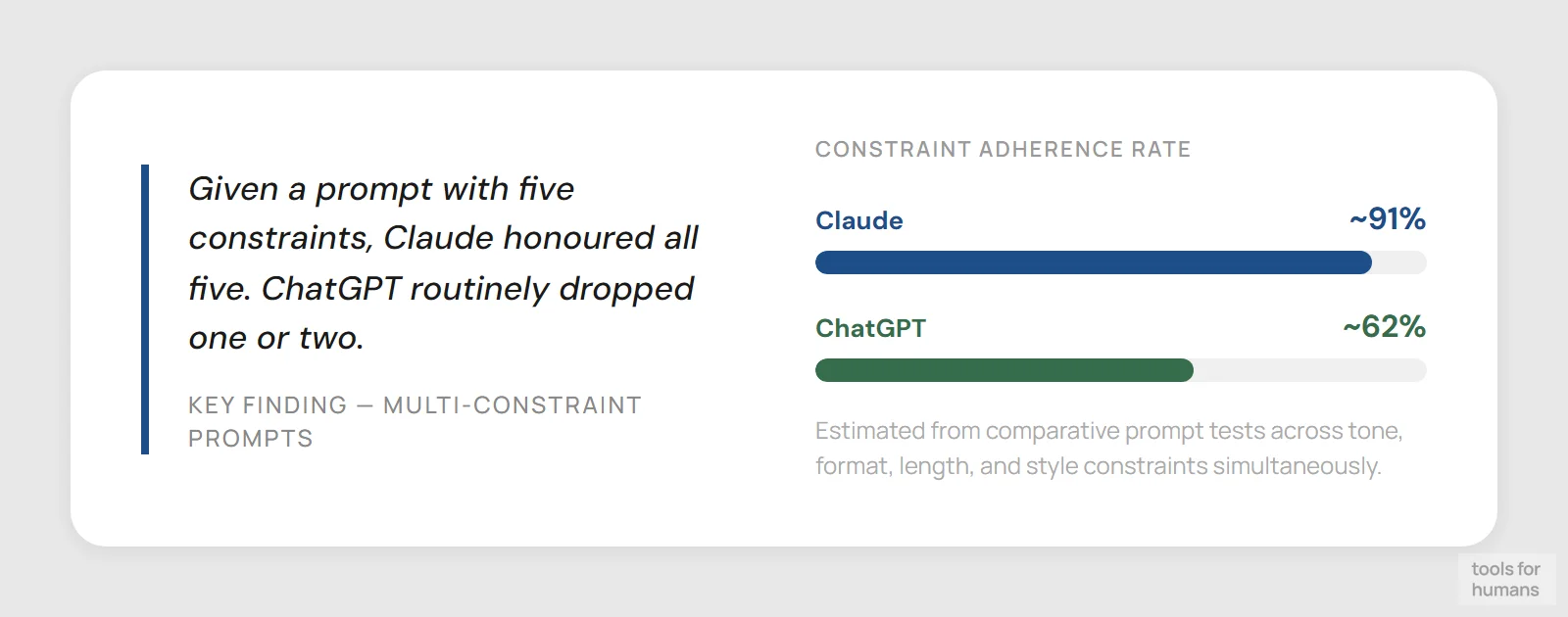
This is where Claude has a measurable edge. When given a detailed prompt with multiple constraints — specific tone, formatting rules, word count, and style restrictions — Claude follows them with noticeably higher fidelity than ChatGPT. In tests where both tools were given a proofreading prompt that required deletions in strikethrough and insertions in a different color, Claude executed it correctly while ChatGPT misapplied the formatting and sometimes rewrote sentences it was told to preserve.
ChatGPT tends to produce more energetic, personality-driven writing by default, which works well for blog posts, social content, and anything where voice and engagement matter. Claude's defaults lean more formal and structured, which suits legal documents, technical writing, and corporate communications. You can push Claude toward a more casual tone, but it requires deliberate prompting.
For writers who need an AI that won't drift from the brief halfway through a long piece, Claude is meaningfully better. For content creators who want the AI to add flair or humor without much prompting, ChatGPT is more naturally expressive.
context window and document handling
Claude wins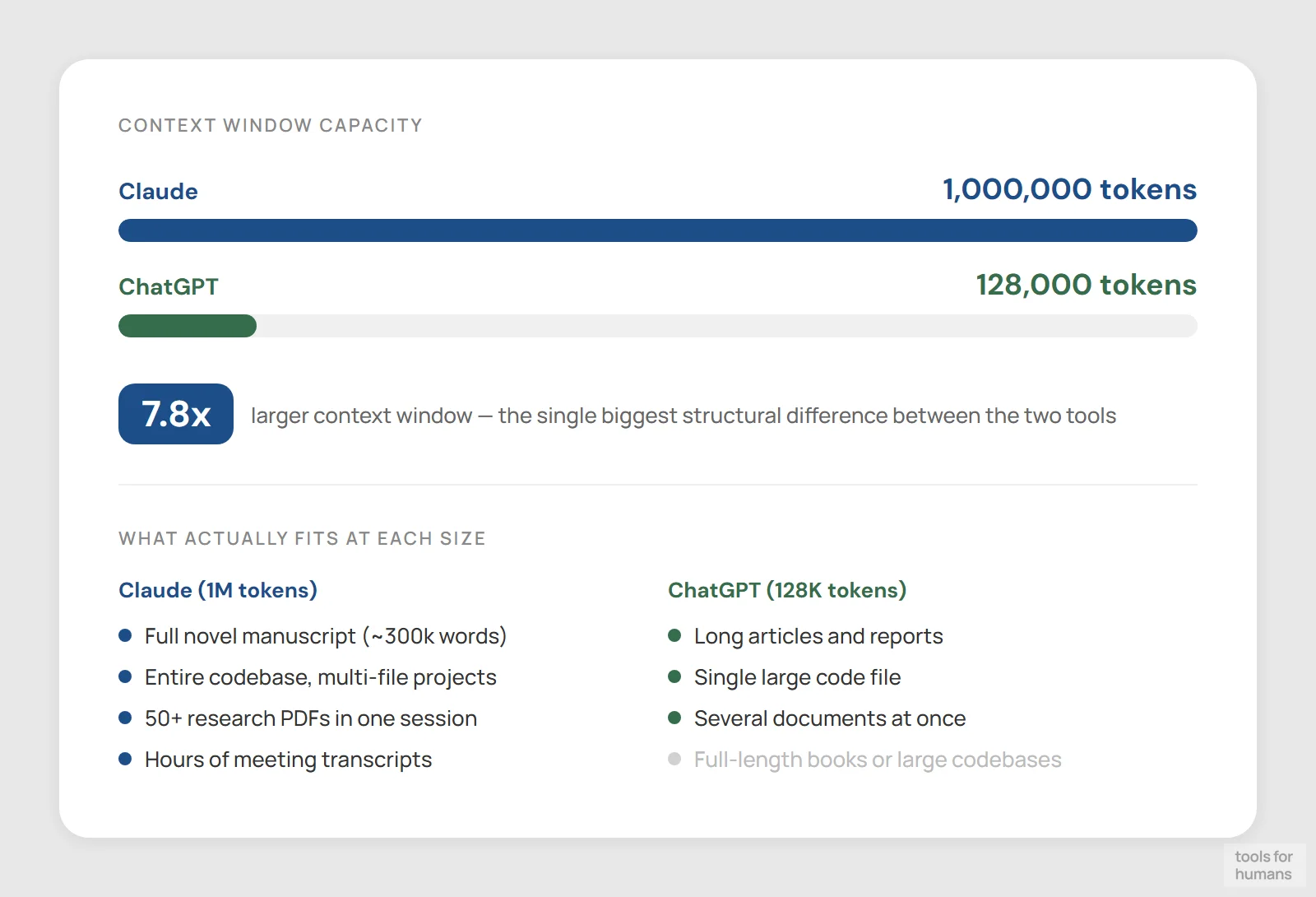
Claude supports up to 1 million tokens in its context window, with context compaction that summarizes older conversation history to keep long sessions coherent. In practice, this means you can paste an entire book manuscript, a lengthy codebase, or dozens of research documents and Claude will reason across all of it without losing track of earlier content. On the free tier, the limit is around 100,000 tokens per prompt, which covers roughly 200-300 pages of text.
ChatGPT's context window is 128,000 tokens for GPT-4o, which is substantial but considerably smaller. In long sessions, users consistently report context drift: the model starts repeating earlier responses, loses thread of the conversation, or contradicts itself. This is a genuine limitation for research-heavy workflows.
Claude also accepts a wider range of file types natively: PDFs, PNGs, Markdown, CSV, DOCX, and HTML uploads work without plugins. ChatGPT handles these too, but file handling has historically been less reliable and requires more manual checking. For anyone doing document-heavy work, Claude's context management is a real advantage.
code assistance
Claude winsFewer debugging loops; strong multi-file reasoning
Clearer step-by-step for beginners; comparable on snippets
Claude is widely regarded as the stronger coding assistant for debugging and multi-file projects. Users who've tested both tools on real side projects report fewer debugging loops with Claude: it tends to fix the actual bug without introducing new ones in adjacent code. It also explains the reasoning behind each change, which helps developers understand the fix rather than just copy-paste it.
ChatGPT is strong for beginner-friendly code walkthroughs. It's more naturally verbose in its explanations and will step through a problem interactively, which suits someone learning a new language or framework. For quick snippets, syntax lookups, and one-shot solutions, ChatGPT performs comparably to Claude.
Claude Code is a separate, paid agentic coding tool from Anthropic that operates in the terminal and can work autonomously across large codebases. ChatGPT has Codex and integrates with GitHub Copilot via the API. For professional developers who want agentic coding, Claude Code is currently the more capable product, but it's a separate subscription on top of Claude Pro.
integrations and ecosystem
ChatGPT wins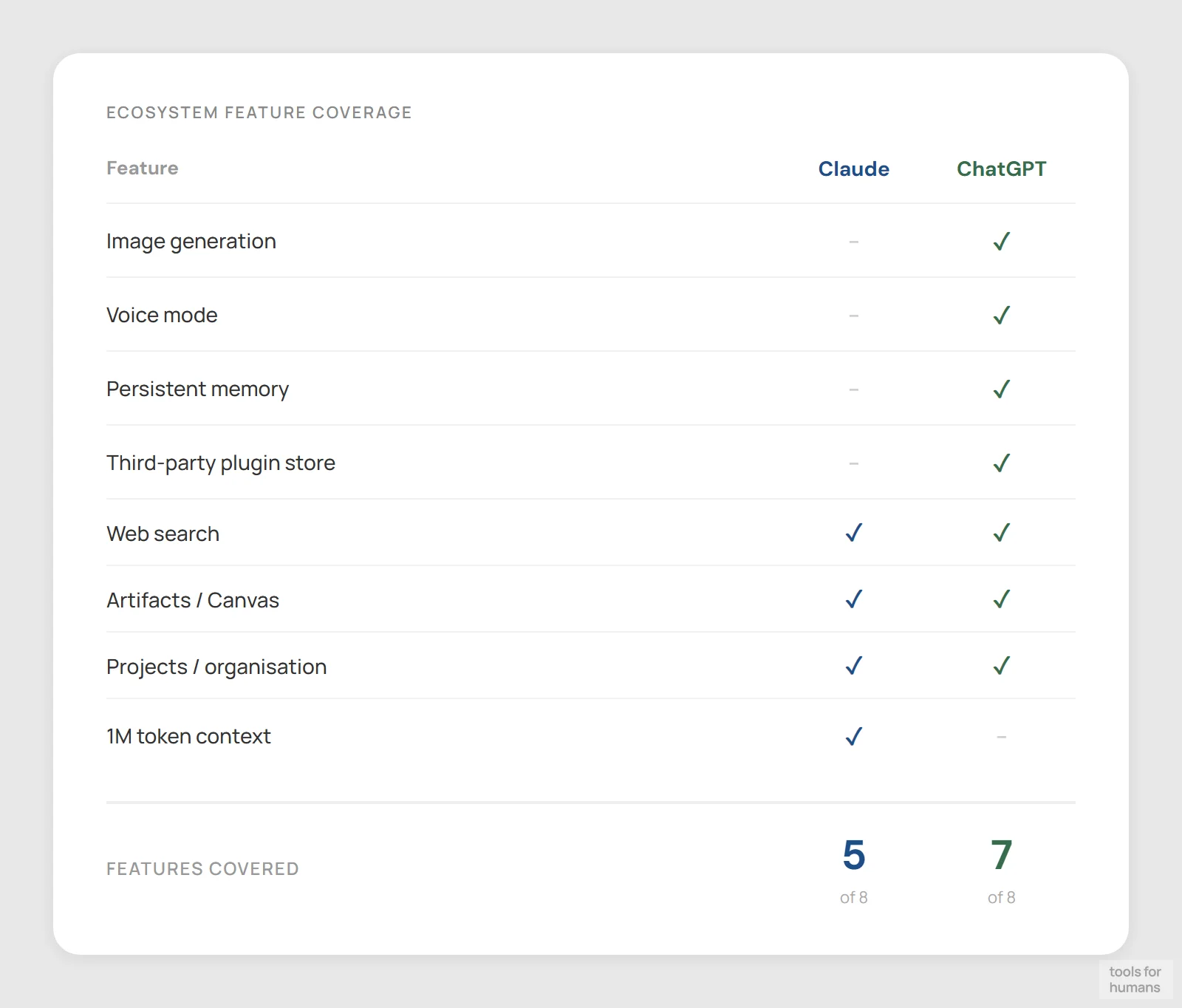
Web search, Artifacts, Projects; no image gen or voice mode
DALL-E 3, voice mode, memory, GPT Store plugins
ChatGPT has a larger and more mature ecosystem. It connects natively to Bing search for real-time web results, generates images with DALL-E 3, transcribes audio, and supports a library of third-party plugins and GPT Store integrations. Voice mode is polished and works in real-time conversational back-and-forth. Memory is persistent across sessions, so ChatGPT can remember preferences without you re-specifying them each time.
Claude's integrations are narrower. It has web search on paid plans, Artifacts for generating interactive previews and prototypes, and Projects for organizing conversations with persistent context. The Anthropic API connects to enterprise workflows, and Claude is available inside tools like Cursor, Notion AI, and various coding editors. But there's no image generation, no voice mode comparable to ChatGPT's, and no plugin marketplace.
If your workflow involves multiple modalities — voice, images, and text — or you rely on third-party integrations built around a specific tool, ChatGPT is the more practical choice. Claude is stronger when the workflow is primarily text and documents.
agentic and autonomous tasks
draw
Claude Code; strong on SWE-bench; API-first approach
Operator for browser control; Deep Research mode
Both tools are investing heavily in agentic features, but they're taking different approaches. OpenAI has Operator, which can control a browser and complete multi-step tasks on your behalf. ChatGPT also runs deep research tasks that browse the web, compile findings, and return a structured report without manual prompting at each step.
Anthropic has Claude Code for autonomous software development and computer use capabilities that allow Claude to control a desktop environment. Claude's agentic performance has benchmarked well on software engineering tasks, with SWE-bench scores consistently strong. But outside of coding, Claude's agentic tools are less consumer-facing than ChatGPT's Operator.
For developers building AI agents or automation pipelines via API, Claude is a top-tier choice and often preferred for its reliability and lower hallucination rate. For non-technical users who want autonomous web browsing or task completion without writing code, ChatGPT's Operator is more accessible right now.
safety guardrails and reliability
Claude winsConstitutional AI; lower hallucination rate; more cautious
More permissive; real-time search reduces recency errors
Anthropic built Claude with Constitutional AI, a framework that bakes ethical constraints into the model's training rather than applying them as a surface-level filter. In practice, Claude is less likely to produce harmful content and less likely to be jailbroken with creative prompting. For enterprise and regulated-industry use cases, this is a meaningful feature.
The tradeoff is that Claude is more likely to decline certain creative requests. It won't write some types of fiction that ChatGPT handles without issue, and it can feel overly cautious in edge cases. Users who want an AI that engages freely with dark themes, edgy humor, or morally complex characters often find ChatGPT more permissive.
On factual reliability, both models hallucinate, but Claude's hallucination rate is generally considered lower on knowledge-intensive tasks. Neither tool should be trusted as a primary source without verification, but Claude's outputs tend to require less fact-checking on technical and analytical tasks. ChatGPT with web search enabled is more current on recent events, which reduces hallucination risk on news-adjacent queries.
learning curve and daily usability
ChatGPT winsRewards structured prompting; Projects for organization
Conversational defaults; easier for casual users
ChatGPT is the easier tool to pick up and use immediately. The interface is familiar to hundreds of millions of users, the defaults are conversational and forgiving, and features like image generation and voice mode are genuinely fun to discover. For casual users or people new to AI assistants, ChatGPT's approachability is a real advantage.
Claude has a slightly steeper curve not because the interface is complex, but because getting the best out of it rewards deliberate prompting. Users who take the time to write detailed, structured prompts get significantly better results than users who treat it like a search engine. The Projects feature for organizing conversations also requires some upfront thinking about how to structure your work.
For teams or individuals willing to invest time in prompt quality, Claude pays off more. For users who want good results with minimal effort on a wide range of tasks, ChatGPT is more forgiving from the start.
the verdict
Choose Claude if you work with long documents, need an AI that holds detailed instructions across a full project, or do serious coding work where debugging accuracy matters. It's also the better pick for legal, research, and technical writing where reliability and consistency outweigh raw personality.
Choose ChatGPT if you want image generation, real-time voice, and a broad plugin ecosystem in a single subscription. It's also the right call for casual users who want good results with minimal prompting effort, or anyone whose workflow spans text, images, and audio.
For most knowledge workers in 2026, Claude is the better default: its instruction-following accuracy and long-context handling make it more useful day-to-day for the writing, analysis, and coding tasks that professionals actually rely on.
frequently asked questions
humans
toolsforhumans editorial team
Reader ratings and community feedback shape every score. Since 2022, ToolsForHumans has helped 600,000+ people find software that holds up after launch. The picks here come from that.
keep reading
best ChatGPT alternatives
7 ChatGPT alternatives including Claude and Perplexity, ranked by pricing, features, and use case fit. For writers, developers, and privacy-focused users.
chatgpt vs gemini
ChatGPT vs Gemini compared on pricing, writing quality, coding, Google integration, and more. Find out which AI chatbot is right for your workflow in 2026.

grok vs chatgpt
Grok vs ChatGPT compared on pricing, real-time data, coding, and content limits. Find out which AI chatbot fits your workflow in 2026.

claude code vs cursor
Claude Code vs Cursor: real comparison of pricing, autonomy, context windows, and workflows. Which AI coding tool fits your work style in 2026?

custom ai agents vs. chatgpt: when to build vs. when to subscribe
A practical decision framework for choosing between a ChatGPT subscription and a custom AI agent, with real numbers on cost, ROI, and when each approach actually makes sense.

best ai tools for business: top picks for teams
8 AI business tools compared: ChatGPT, Zapier, Notion AI, and 5 more, ranked by use case fit, pricing, and real-world utility for small and mid-size teams.