Claude vs Gemini: Which AI Assistant Wins in 2026?
Editorial note: originally published in april of 2026
quick verdict
Claude is the better pick for most solo users, writers, and developers. It follows instructions more precisely, writes with more natural voice, and handles complex multi-step reasoning better than Gemini across nearly every category we tested.
If you're already deep in Google Workspace — using Gmail, Docs, and Sheets daily — Gemini is the better choice because its native integration cuts actual friction out of your workflow in ways Claude can't match.
choose Claude if you need precise writing, coding, or document analysis
visit claudechoose Gemini if Google Workspace is your primary work environment
visit geminipick your side
Claude and Gemini are two of the most capable AI assistants available in 2026, but they're built around different priorities. Claude, made by Anthropic, is optimised for reasoning depth, instruction following, and writing quality. Gemini, made by Google, is built around multimodal input and deep integration with the Google ecosystem.
This comparison covers pricing, writing quality, coding ability, context handling, agentic features, and Google Workspace integration so you can decide which tool actually fits how you work.
feature comparison
We collect first-hand reviews from people who use these tools every day — what works, what doesn't, whether it's worth paying for. We research pricing, features, and comparisons so that feedback has real context behind it. For this comparison, we prioritised real-world writing, coding, and document handling tasks over benchmark scores alone. Read our full research methodology.
pricing
Gemini winsBoth tools have free tiers, but the value differs significantly. Claude's free plan gives access to the Sonnet model with 30-100 daily messages depending on message length. Claude Pro costs $20/month and adds higher usage limits, access to Opus (the most capable model), and priority access when servers are busy. A Max plan is available at higher tiers for heavy users.
Gemini's free tier uses Gemini Flash with daily usage limits. Google AI Plus costs $7.99/month, which is meaningfully cheaper than Claude Pro, and includes Gemini Pro in the Gemini app plus access to Flow's filmmaking tools and research features. Google One AI Premium bundles Gemini Advanced with 2TB of Google Drive storage and Workspace AI features for $19.99/month.
If you're already paying for Google One, Gemini Advanced can come essentially bundled with storage you'd pay for anyway. Claude Pro makes more sense if you're not in the Google ecosystem and want the best standalone AI reasoning model. At the entry paid tier, Gemini's $7.99 plan undercuts Claude Pro substantially.
writing quality
Claude winsClaude is widely regarded as the strongest of the major AI assistants for writing tasks. It preserves tone and voice better than Gemini when asked to edit rather than rewrite, and it follows specific style instructions with more consistency. In tests asking models to proofread with tracked-change-style formatting, Claude correctly applied the requested format while Gemini tended to simplify or ignore formatting details.
Claude's outputs tend to read more like a skilled human writer: varied sentence rhythm, appropriate word choice for context, less tendency toward generic phrasing. Gemini's writing is competent but defaults to a flatter, more formal register that often needs editing.
For content creators who care about voice and style precision, Claude is the clear choice. Gemini is adequate for drafting functional documents, emails, and summaries, but if the writing itself is the product, Claude produces work that needs less revision.
coding ability
Claude winsClaude is generally the stronger coding assistant, particularly for complex, multi-file work where explanation depth and correctness across a long context matters. It can hold a larger codebase in context, reason about how changes in one file affect another, and produce cleaner explanations of why code works the way it does. Claude Sonnet and Opus consistently rank highly on coding benchmarks.
Gemini is competitive for single-file code generation and is particularly cost-effective via the API. Gemini 2.5 Pro has strong benchmark scores and has impressed in head-to-head single-task tests like building a simple game from a one-shot prompt. For developers on a budget who need API access, Gemini's pricing is more favourable.
For production-level coding work, Claude edges ahead on reliability and reasoning depth. Gemini is a viable option for scripting, quick prototyping, and use cases where API cost is a real constraint. Neither is a complete replacement for a real code review process.
google workspace integration
Gemini wins
This is Gemini's clearest advantage. Gemini is built directly into Gmail, Google Docs, Sheets, Slides, and Meet. You can ask it to summarise a long email thread, draft a reply, analyse spreadsheet data, or generate a slide deck without leaving the app you're already in. This is a genuine workflow difference, not a superficial feature.
Claude has no native integration with Google Workspace. You can paste content into Claude manually, or use third-party automation tools to connect them, but it adds steps. Claude integrates well with developer tools and has API access that's widely used in custom workflows, but it doesn't compete with Gemini inside Google's own apps.
If Google Workspace is where most of your work happens, Gemini is the practical choice. The time saved by having an AI assistant inside Docs and Gmail, rather than switching to a separate tab, compounds over a working week. For teams standardised on Google Workspace, this alone can justify choosing Gemini.
multimodal and media analysis
Gemini wins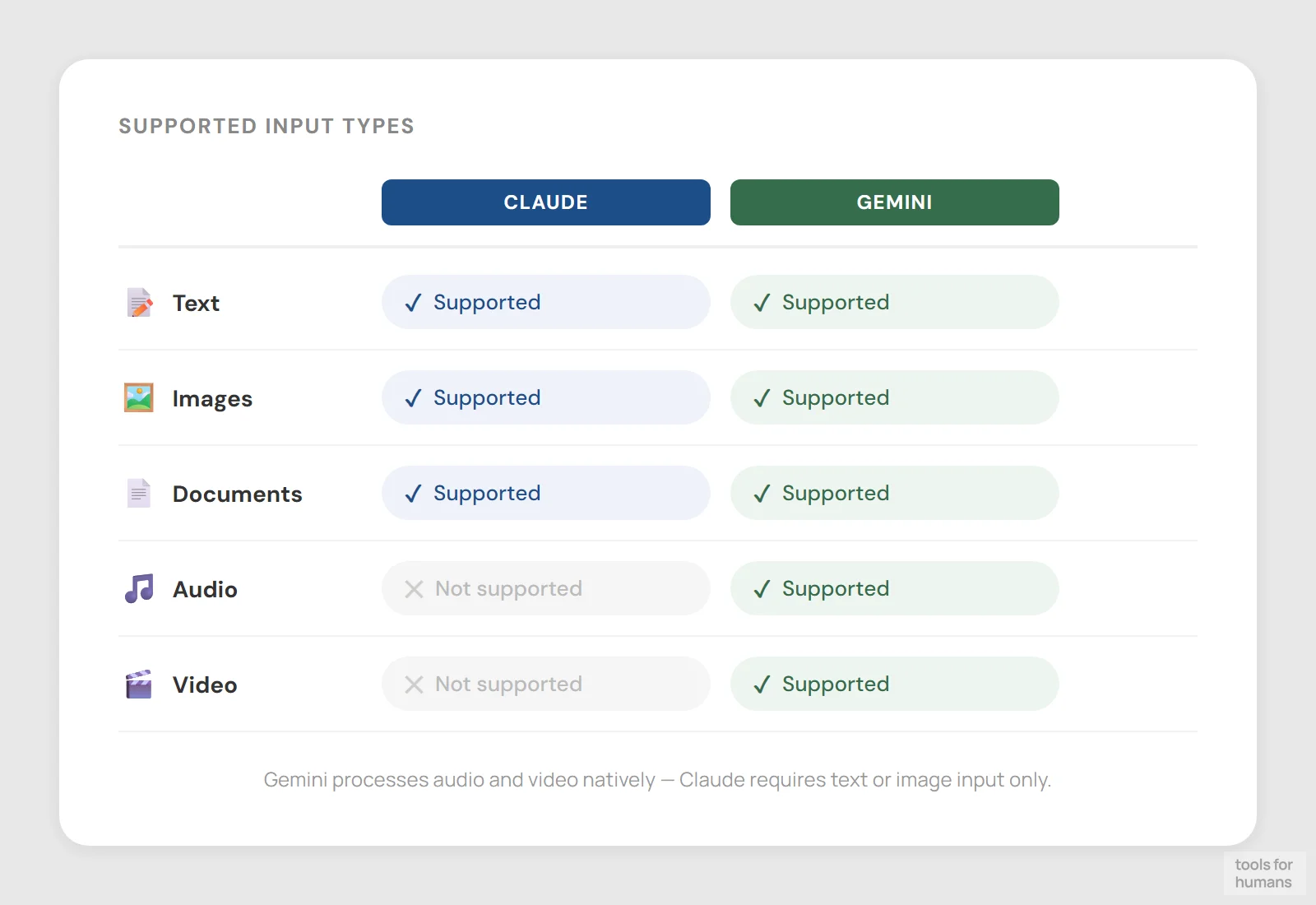
Gemini handles a broader range of media types than Claude. It can analyse video files directly, process audio recordings, and handle images natively. In tests, Gemini has provided feedback on video footage of physical activity and transcribed or analysed audio speech, including pronunciation feedback. This is a genuine capability gap that Claude doesn't close.
Claude can process images and PDFs, and it handles document analysis very well. But it can't ingest video or audio files. If your workflow involves reviewing recorded meetings, analysing video content, or working with audio, Gemini is the only option between these two.
For text and image-heavy work, the difference is smaller. Claude's image understanding is solid for document analysis, chart reading, and screenshot-based queries. But for anyone who regularly works with video or audio media, Gemini's multimodal range is a practical requirement Claude can't meet.
context window and long documents
Claude winsClaude supports up to 1 million tokens in a single conversation, which is one of the largest context windows of any AI assistant. In practice, this means you can load very long documents, entire codebases, or lengthy conversation histories without losing earlier context. Claude also uses context compaction to summarise older parts of a conversation when needed, helping maintain coherence across long sessions.
Gemini 1.5 and 2.0 models also support up to 1 million tokens, and Gemini 1.5 Pro has been available with this window for some time. So the raw token count is similar. The practical difference is that Claude tends to use that context more reliably, staying consistent with instructions and details set earlier in a long conversation. Gemini can drift or lose track of constraints set many turns back.
For legal document analysis, long-form research, or large codebase review, Claude's 1M token context paired with its stronger instruction-following makes it the more reliable option in practice, even though both tools advertise similar limits.
agentic and autonomous tasks
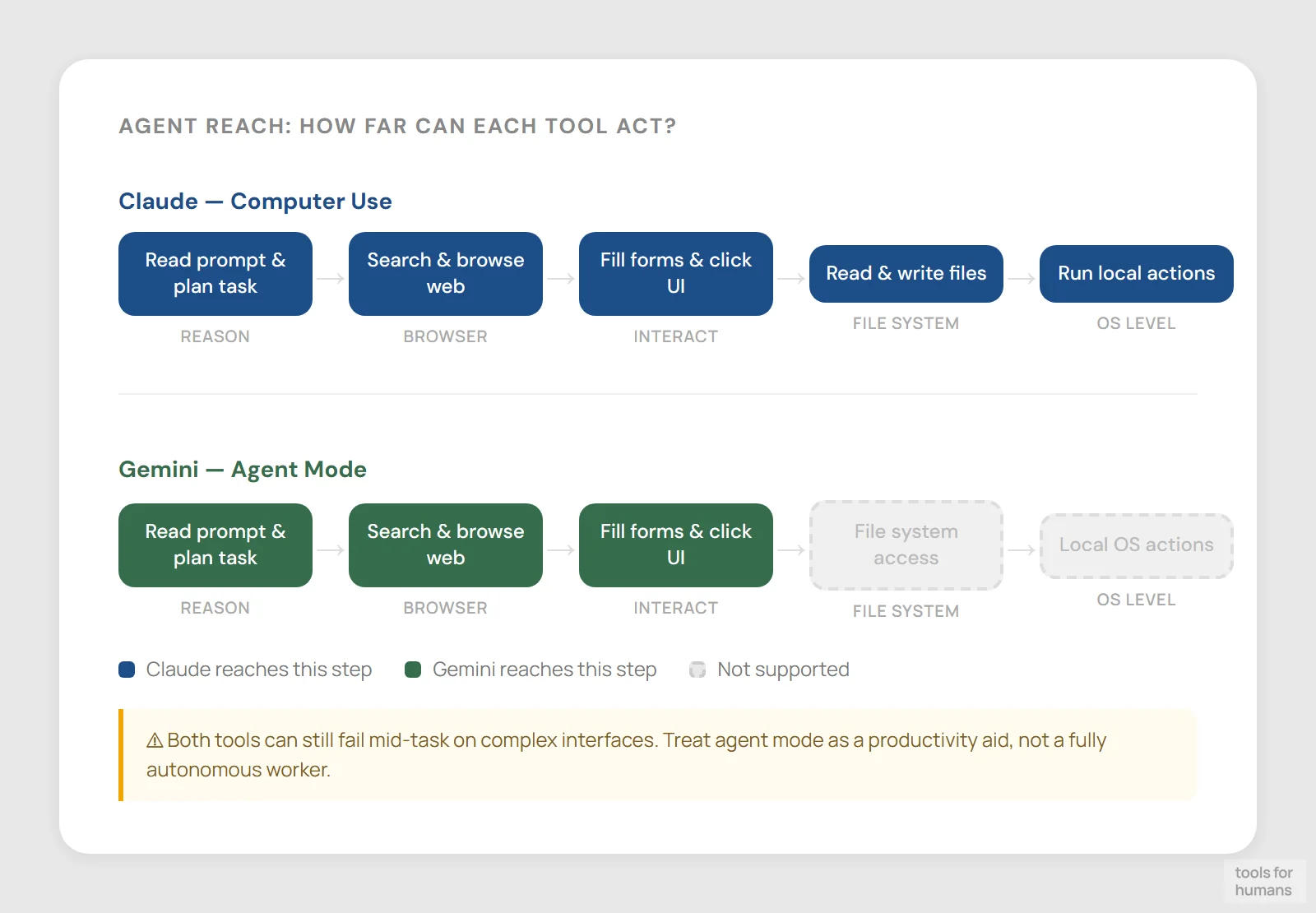
Claude winsBoth Claude and Gemini have agent modes that can control a browser to perform tasks like searching, filling forms, or booking things. Neither is fully reliable at this yet. Both tools can get stuck mid-task or misclick on complex interfaces. Treat these as productivity aids rather than fully autonomous workers.
Claude has a distinct advantage here: Claude Computer Use (available via the API and through certain integrations) can interact with your computer's actual file system, not just a browser. It can open folders, manage files in your Downloads or Desktop, and execute multi-step tasks that span applications. Gemini's agent mode is browser-only.
For power users who want AI that can take real desktop-level action, Claude's computer use capability is the more capable option. Gemini's agent mode is easier to access and doesn't require API setup, which makes it more practical for everyday browser-based tasks without a technical setup burden.
daily usage limits
Gemini wins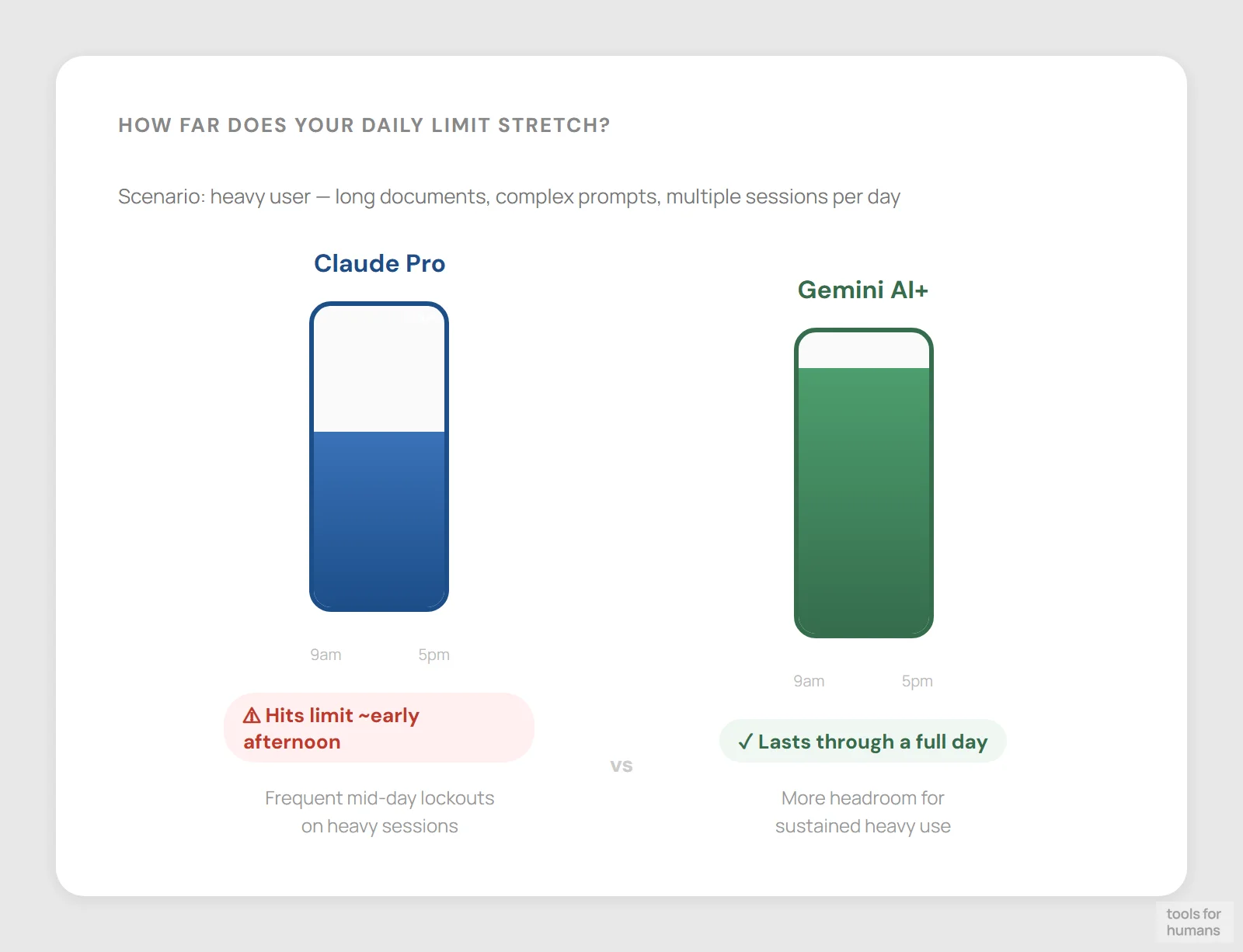
This is a real practical limitation for Claude. Even on Claude Pro at $20/month, daily message limits are noticeably tighter than comparable paid tiers on ChatGPT or Gemini. Heavy users routinely hit Claude's limits mid-day, especially when working with long documents or complex prompts that consume more of the quota. This is a consistent complaint from active Claude users.
Gemini's paid tiers are more generous with daily usage, and the free tier's limits are less restrictive for casual users. If you use AI for several hours a day across multiple tasks, Gemini is less likely to cut you off before the end of your working day.
Claude's Max plan exists for heavy users, but it costs significantly more than Pro. If uninterrupted daily access matters as much as output quality, Gemini's higher daily limits are a meaningful advantage, particularly for users who would otherwise need to manage or ration their Claude usage throughout the day.
the verdict
Choose Claude if writing quality, instruction precision, or complex reasoning is central to your work. It's the better tool for developers handling multi-file codebases, writers who need their voice preserved, legal and research professionals working with long documents, and anyone who needs an AI to follow detailed formatting or style instructions without interpretation errors.
Choose Gemini if you work primarily inside Google Workspace. The native integration with Gmail, Docs, and Sheets is a genuine time-saver that Claude can't replicate without workarounds. Gemini is also the right pick if you need audio or video analysis, want higher daily usage limits on a budget, or already pay for Google One storage.
For the majority of knowledge workers who want the best AI assistant and aren't locked into Google's ecosystem, Claude is the stronger choice on output quality, but the $7.99 Gemini AI Plus plan is hard to ignore if budget is tight.
frequently asked questions
humans
toolsforhumans editorial team
Reader ratings and community feedback shape every score. Since 2022, ToolsForHumans has helped 600,000+ people find software that holds up after launch. The picks here come from that.
keep reading
best Gemini alternatives
7 Gemini alternatives compared, including ChatGPT and Claude, ranked by pricing, features, and use case fit. For professionals switching from Google's AI assistant.

claude vs chatgpt
Claude vs ChatGPT: honest side-by-side comparison of pricing, writing quality, code help, context windows, and which tool fits your actual workflow.
chatgpt vs gemini
ChatGPT vs Gemini compared on pricing, writing quality, coding, Google integration, and more. Find out which AI chatbot is right for your workflow in 2026.
best ChatGPT alternatives
7 ChatGPT alternatives including Claude and Perplexity, ranked by pricing, features, and use case fit. For writers, developers, and privacy-focused users.

best ai tools for business: top picks for teams
8 AI business tools compared: ChatGPT, Zapier, Notion AI, and 5 more, ranked by use case fit, pricing, and real-world utility for small and mid-size teams.