ChatGPT vs Gemini: features, pricing & best use cases (2026)
Editorial note: originally published in april of 2026
quick verdict
ChatGPT is the better default choice for most people. Its instruction-following is more reliable, its creative writing output is stronger, and its model options (including GPT-4o and o3) cover a wider range of task types than Gemini's current lineup.
If you live inside Google Workspace and pay for a Google One or Workspace subscription, Gemini is the better pick because it works directly inside Gmail, Docs, and Sheets without copy-pasting anything.
choose ChatGPT if you want the most capable general-purpose AI assistant
visit chatgptchoose Gemini if your work revolves around Google's productivity suite
visit geminipick your side
ChatGPT and Gemini are the two most widely used AI chatbots in 2026. OpenAI's ChatGPT runs on the GPT model family and is available as a standalone web app, mobile app, and desktop client. Google's Gemini runs on its own model family and plugs directly into Gmail, Docs, Drive, and the rest of Google Workspace.
Both handle text, images, and code. Both have free tiers and paid plans starting around $8-20 per month. But they make different trade-offs, and the right one depends heavily on how you already work.
This page compares them on pricing, writing quality, coding, Google ecosystem fit, multimodal capabilities, and context handling, with a direct verdict on which to choose for each scenario.
feature comparison
We collect first-hand reviews from people who use these tools every day — what works, what doesn't, whether it's worth paying for. We research pricing, features, and comparisons so that feedback has real context behind it. For this comparison, we prioritised practical workflow differences over benchmark scores, with a focus on writing quality, coding reliability, and Google ecosystem fit. Read our full research methodology.
pricing
Gemini winsFree tier; Plus at $20/mo; Pro at $200/mo
Free tier; AI Plus at $7.99/mo; AI Ultra at $249/mo

Both tools have free tiers with meaningful restrictions. ChatGPT Free gives access to GPT-4o with usage limits; once you hit the cap, it falls back to GPT-4o mini. ChatGPT Plus costs $20 per month and unlocks higher usage limits on GPT-4o, access to o3 and o4-mini for reasoning tasks, and DALL-E image generation. ChatGPT Pro sits at $200 per month and is aimed at power users who need maximum compute.
Gemini's free tier uses Gemini Flash with daily limits. Google AI Plus is $7.99 per month and includes Gemini 2.5 Pro access in the Gemini app plus Google's AI filmmaking tool Flow. Crucially, Gemini plans bundle Google One cloud storage starting at 15GB free, which ChatGPT has no equivalent for at any price.
For a pure dollar-per-feature comparison, Gemini AI Plus at $7.99 undercuts ChatGPT Plus at $20 by a wide margin, and the included storage and Workspace integrations add real value. If you're already paying for Google One, Gemini's AI features may come with your existing plan at no extra cost.
writing quality
ChatGPT winsStronger on tone control and long-form drafting
Better for summarising inside Docs and Gmail
ChatGPT consistently produces more polished long-form writing. Its instruction-following is tighter: give it a specific tone, format, or word count, and it sticks to it more reliably than Gemini does. For content creators, marketers, and anyone drafting documents from scratch, that precision matters. ChatGPT's creative fiction and persuasive writing outputs also tend to feel more natural and varied in sentence structure.
Gemini's writing is competent and often fast, but it has a tendency to pad responses with filler phrases and can drift from specific instructions in longer outputs. Where Gemini does well is in summarisation tasks, particularly when the source material is already inside Google Docs or Gmail, because it can pull directly from those files without you needing to paste anything.
For standalone writing tasks, ChatGPT is the stronger tool. For summarising or redrafting content that lives inside Google's ecosystem, Gemini's in-app integration makes it faster in practice, even if the raw output quality is slightly lower.
coding assistance
ChatGPT winsCode Interpreter (sandboxed Python execution), o3 model
No sandboxed execution; strong on current library docs
ChatGPT has a well-established reputation for coding help, and for good reason. GPT-4o handles multi-file context, debugging explanations, and code refactoring reliably. The o3 model, available on Plus and above, is specifically strong at multi-step reasoning tasks including algorithmic problems. ChatGPT also has a Code Interpreter tool in the paid tier that can actually run Python in a sandboxed environment and return real output, not just guessed results.
Gemini 2.5 Pro is competitive on coding benchmarks and performs well on standard tasks like generating functions, explaining syntax, and writing unit tests. Its real-time web access means it can reference current library documentation without relying on training data cutoffs. However, it doesn't have an equivalent to ChatGPT's Code Interpreter for running code directly in the chat.
For most developers, ChatGPT is still the safer default for complex coding work, especially when you need explainability or sandboxed execution. Gemini is a viable alternative for everyday coding questions, particularly if you want up-to-date library references.
Google ecosystem integration
Gemini wins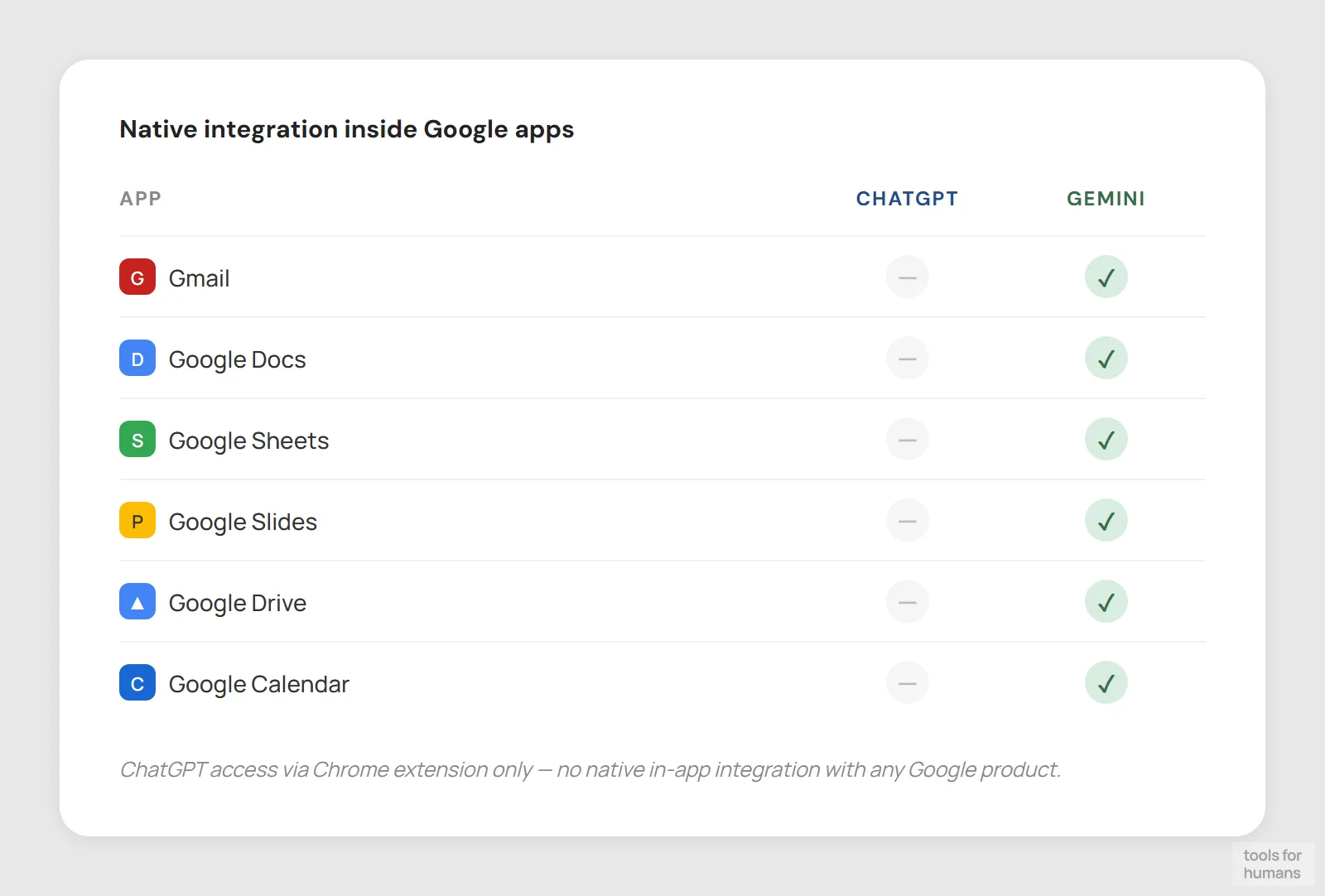
Chrome extension only; no native Google app integration
Native in Gmail, Docs, Sheets, Slides, Drive, Calendar
This is Gemini's clearest advantage and the main reason to choose it over ChatGPT. Gemini works directly inside Gmail, Google Docs, Sheets, Slides, Drive, Calendar, and Maps. In Gmail, it can draft replies, summarise long threads, and extract action items. In Docs, it can rewrite selected text, generate first drafts, or summarise the whole document without you leaving the app. In Sheets, it can build formulas and analyse data with natural language prompts.
ChatGPT has no native integration with Google's apps. You can use the ChatGPT Chrome extension to add some in-browser capabilities, and there are third-party integrations via Zapier and the API, but nothing that competes with Gemini's direct presence inside the tools themselves.
If you spend your working day in Gmail and Google Docs, the friction reduction from Gemini's native integration is real. You don't have to switch tabs, copy text, or paste results back. That workflow benefit can outweigh raw quality differences for day-to-day tasks.
multimodal capabilities
Gemini wins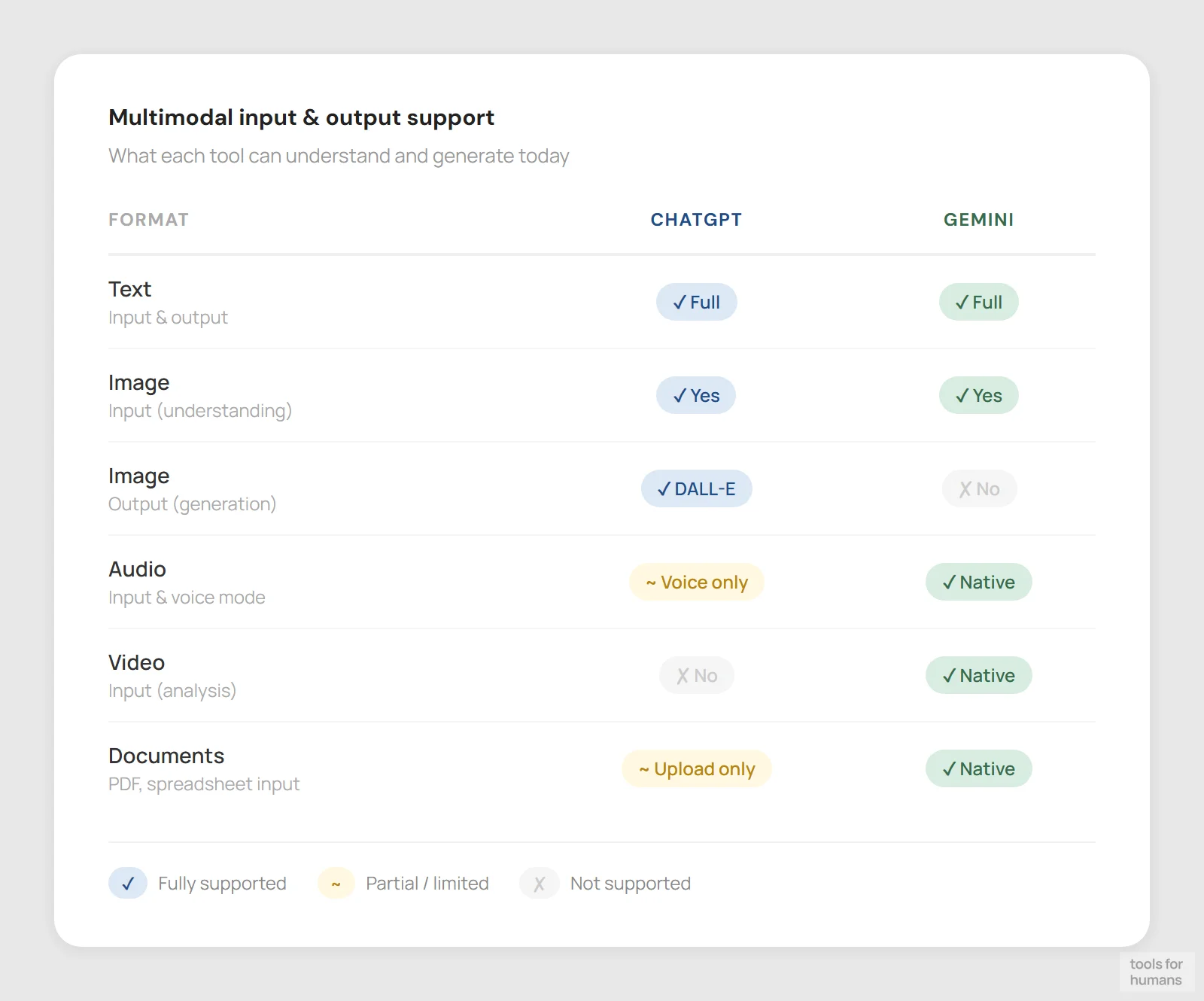
Image input + DALL-E generation; GPT-4o voice mode
Text, image, audio, video, and document input natively
Both tools handle image input in their current versions. You can upload a photo or screenshot to either and ask questions about it. ChatGPT Plus users also get DALL-E image generation built in, plus voice mode with GPT-4o that supports real-time back-and-forth conversation rather than just typed input.
Gemini's multimodal strengths go wider. It can process audio files, video (including YouTube links), and documents without needing a third-party plugin. The Gemini app on Android is deeply integrated with the camera and Google Lens, making it more practical for on-the-go image tasks. Gemini also has access to Google's image generation model (Imagen) for paid users.
For video and audio analysis, Gemini is ahead. For voice interaction on desktop and image generation quality, ChatGPT's DALL-E produces more controllable results than Imagen for most creative prompts. If you regularly work with mixed media files, Gemini's broader input support is the practical winner here.
context window and memory
Gemini wins128K token context; mature cross-session memory
1M token context (2.5 Pro); cross-session memory less developed

ChatGPT Plus gives you a 128K token context window with GPT-4o, which handles most long documents and code files without truncation. ChatGPT also has a persistent memory feature that stores facts about you and your preferences across sessions. You can view, edit, and delete what it remembers, giving you control over how it personalises responses over time.
Gemini 2.5 Pro has a 1 million token context window, which is far larger and means you can feed in entire codebases, lengthy reports, or multiple long documents in a single session. However, Gemini's cross-session memory is less developed than ChatGPT's, and the feature availability varies depending on which tier you're on.
For single-session tasks involving very large files, Gemini's 1M token window is a significant practical advantage. For ongoing projects where you want the AI to remember your preferences, style, and history, ChatGPT's memory system is more mature and transparent. Neither tool has perfect recall, but they fail in different ways.
web access and real-time info
Gemini winsWeb browsing included; search quality inconsistent
Backed by Google Search; fresher, more reliable live data
ChatGPT has web browsing built into the free and paid tiers, but it's not always on by default and the results can vary. It searches the web and cites sources, but the search quality and ability to pull specific live data has been inconsistent in testing compared to purpose-built search tools.
Gemini has a structural advantage here because it runs on Google's search infrastructure. Its web results are fresher, its citations link to real sources reliably, and its ability to surface current news, stock data, or recent events is more dependable. For research tasks that require up-to-date information, Gemini's search integration feels more trustworthy.
The difference matters most for time-sensitive queries: recent product releases, current pricing, ongoing events, or newly published research. For tasks where the training cutoff doesn't matter, both perform comparably. But if real-time accuracy is important to your work, Gemini's Google Search backbone is a meaningful edge.
platform availability
ChatGPT winsWeb, iOS, Android, macOS, Windows desktop apps
Web, iOS, Android; deep integration on Pixel/Android devices
ChatGPT is available as a web app, iOS app, Android app, macOS desktop app, and Windows desktop app. There's an official Chrome extension and API access for developers. OpenAI is also building Atlas, an AI-native web browser. The desktop apps let you use ChatGPT outside the browser, with keyboard shortcuts and system-level integration that Gemini doesn't currently match.
Gemini is available as a web app and through iOS and Android apps. It doesn't have standalone desktop apps, but it integrates directly into Chrome and appears across Google's app ecosystem on Android devices, including Pixel phones where it acts as the default assistant. For Android users, especially on Pixel, Gemini's system-level presence is deeper than anything ChatGPT offers.
On desktop, ChatGPT has more surface area. On Android (particularly Pixel), Gemini has the advantage. If you primarily work on a Mac or Windows machine and want AI accessible across apps, ChatGPT's desktop clients are the better current option.
the verdict
Choose ChatGPT if you want the most capable general-purpose AI for writing, coding, and reasoning tasks. Its instruction-following is more reliable, its desktop apps give it a wider platform footprint, and Code Interpreter is a genuine differentiator for anyone who needs to run and verify code without leaving the chat.
Choose Gemini if your work lives inside Google Workspace. The native integration with Gmail, Docs, and Sheets removes friction that no amount of ChatGPT's raw quality advantage can fully compensate for in day-to-day use. The lower price point and 1M token context window are also hard to ignore.
For most people who aren't deeply invested in Google's ecosystem, ChatGPT is still the stronger default in 2026, but Gemini has closed the gap and wins on price and integration for Google-first workflows.
frequently asked questions
humans
toolsforhumans editorial team
Reader ratings and community feedback shape every score. Since 2022, ToolsForHumans has helped 600,000+ people find software that holds up after launch. The picks here come from that.
keep reading
best ChatGPT alternatives
7 ChatGPT alternatives including Claude and Perplexity, ranked by pricing, features, and use case fit. For writers, developers, and privacy-focused users.

claude vs chatgpt
Claude vs ChatGPT: honest side-by-side comparison of pricing, writing quality, code help, context windows, and which tool fits your actual workflow.

custom ai agents vs. chatgpt: when to build vs. when to subscribe
A practical decision framework for choosing between a ChatGPT subscription and a custom AI agent, with real numbers on cost, ROI, and when each approach actually makes sense.

best ai tools for business: top picks for teams
8 AI business tools compared: ChatGPT, Zapier, Notion AI, and 5 more, ranked by use case fit, pricing, and real-world utility for small and mid-size teams.