WebCull Review 2026 - Features, Pricing & Deals

Last Updated
Feb 14, 2026

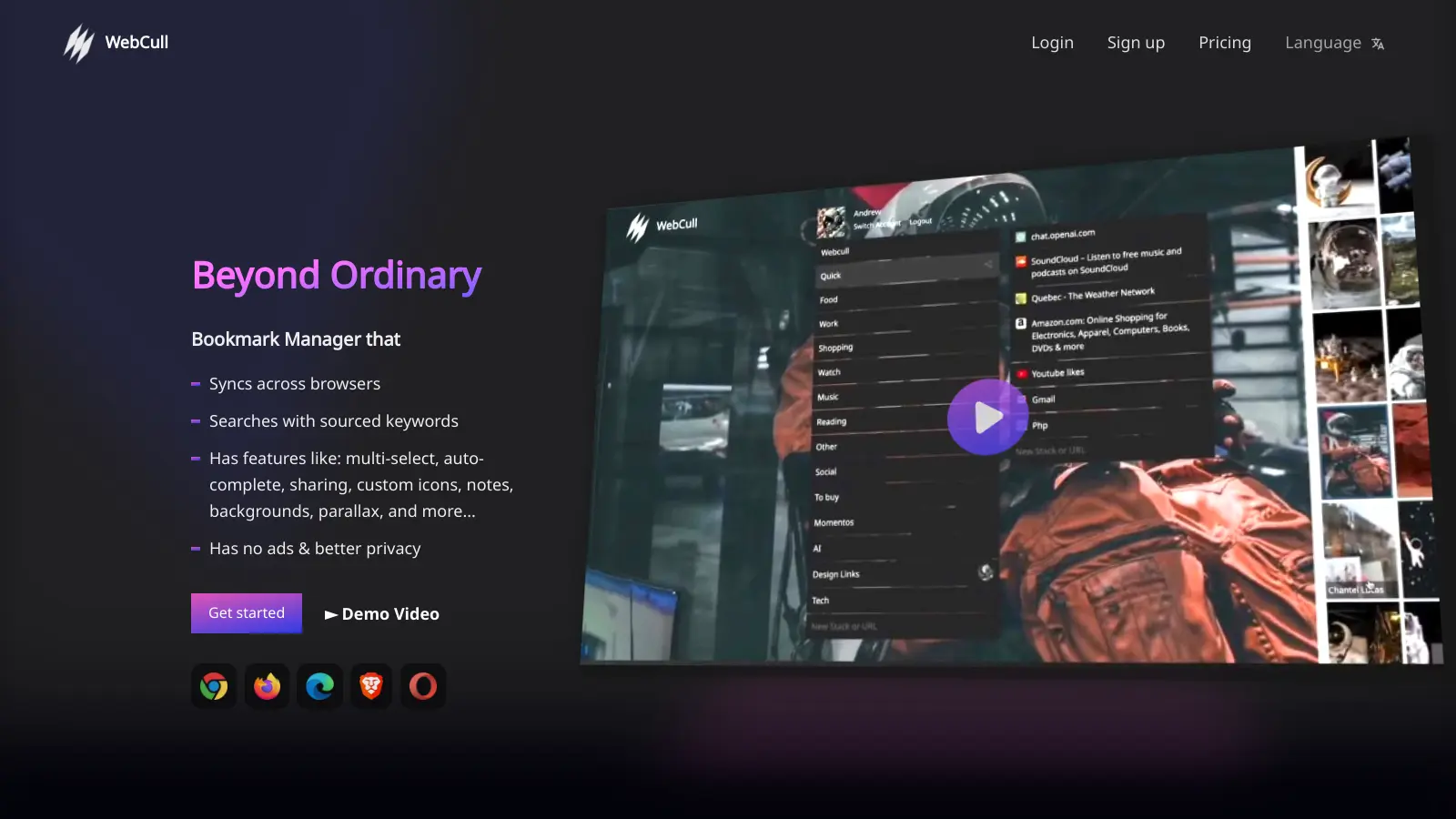
WebCull is a bookmark manager that puts privacy and organization at the forefront. It helps users collect, sort, and access their web links across any browser or device. The service has a clean interface and strong security features, including end-to-end encryption in its paid plans.

You can organize bookmarks into folders that appear as parallel stacks for simple navigation. The search function looks through bookmark titles, URLs, tags, notes, and the content within saved pages. A keyword heatmap shows where your search terms appear.

The free version includes up to 500 bookmarks and basic features. Paid plans start at $4 per month for the Premium plan with unlimited bookmarks and end-to-end encryption, while the Advanced plan at $7 per month adds unlimited shareable folders and priority access. The Pro plan at $12 per month includes everything with faster support.

Access it through any modern browser, install it as a progressive web app, or use browser extensions for quick saving. The platform supports importing from Chrome, Firefox, Safari, Edge, Pocket, and Raindrop.io.

Who is WebCull for?

WebCull is for people and teams who need to organize their digital resources across multiple devices.

  • Users with large bookmark libraries who need strong search tools to find specific links quickly
  • Privacy-conscious individuals who want ad-free, encrypted storage without their data being sold
  • Content creators and researchers who collect large amounts of reference material
  • Research teams and study groups who need to collaborate and share collections with password-protected access
  • People who frequently switch between computers, phones, and tablets
  • Information professionals who need to search not just bookmark titles but the content within saved pages
  • People migrating from other bookmark services like Raindrop.io, Pocket, or browser bookmarks who want more control and privacy

This includes educators, journalists, marketers, researchers, and anyone who relies heavily on web resources for their work.

Online Reviews (Last 6 Months Summarised)

WebCull has limited public discussion online right now. There aren't many user reviews on major software review sites or detailed feedback in forums. This could mean it's newer or simply hasn't gained traction yet with tech reviewers and bookmark management enthusiasts.

The absence of user feedback makes it hard to gauge real-world performance and satisfaction. If you're considering WebCull, take advantage of the 15-day trial to test it yourself. The lack of online buzz doesn't necessarily indicate problems with the tool, just that it hasn't built a vocal user community yet.

Features

  • Stacked Folder Organization: Organize web links into unlimited folders displayed as parallel stacks like a kanban board, with drag-and-drop and multi-select for quick rearranging.
  • Advanced Search with Keyword Heatmap: Search through URLs, titles, keywords, tags, notes, and link content with a heatmap that shows where your search terms appear, plus autocomplete suggestions.
  • Cross-Device Syncing and PWA Support: Access your bookmarks from any browser or device automatically, with the option to install as a progressive web app on mobile, tablet, or desktop.
  • End-to-End Encryption: Protect your links with encryption that ensures only you can access your bookmark collections, available on Premium and Pro plans.
  • Browser Import and Export: Import bookmarks from Chrome, Firefox, Safari, Edge, Pocket, and Raindrop.io with duplicate detection, and export in HTML, CSV, or JSON formats.
  • Shareable Password-Protected Collections: Create custom URLs for specific bookmark folders with optional password protection to collaborate with colleagues or friends.
  • Visual Customization and Bulk Editing: Personalize with visual thumbnails, custom backgrounds, grid or list views, keyboard shortcuts, and multi-select bulk editing tools.

Pricing

  • Free version includes up to 500 bookmarks, 50 folders, 1 shareable collection, basic organization, standard search, browser extensions, and single device sync.
  • Premium Plan at $4 per month offers unlimited bookmarks and folders with end-to-end encryption.
  • Advanced Plan at $7 per user monthly provides unlimited bookmarks, folders, shareable folders, priority access, additional display preferences, and 24-hour support response time.
  • Pro Plan at $12 per user monthly includes end-to-end encryption, unlimited everything, all display preferences, and faster 12-hour support response time.
  • Team Plan at $12.99 per user monthly adds all Pro features plus team management and analytics.
  • 15-day trial available, with pricing based solely on user subscriptions and no data selling practices.

Frequently Asked Questions

What browsers can I use WebCull with?

WebCull works with any modern browser through its web-based platform. You can import bookmarks from Chrome, Firefox, Safari, Edge, Pocket, and Raindrop.io. The service syncs automatically across all your devices, and you can also install it as a progressive web app on mobile, tablet, or desktop for quick access. Your bookmarks are available no matter which browser or device you're using.

Is WebCull actually private? How do they make money?

Yes, WebCull is genuinely private. It's completely ad-free and doesn't sell your data to third parties. They make money solely through their subscription plans. The free plan is limited to 500 bookmarks but functional, while paid plans offer more features. For maximum privacy, the Premium plan ($4/month) and Pro plan ($12/month) include end-to-end encryption, which means only you can access your bookmark data.

How is WebCull different from just using my browser's bookmarks?

WebCull goes beyond browser bookmarks. You can search not just titles and URLs but also within the content of bookmarked pages, with a keyword heatmap showing where your search terms appear. Your bookmarks sync automatically across all devices and browsers without managing multiple accounts. You can also create shareable collections with password protection, organize with drag-and-drop stacked folders, use bulk editing tools, and get visual thumbnails. All this comes with privacy features that browser bookmarks don't offer.

Can I import my existing bookmarks from other services?

Yes! WebCull supports importing from Chrome, Firefox, Safari, Edge, Pocket, and Raindrop.io. When you import, WebCull keeps your existing folder structure intact and has duplicate detection to avoid clutter. You can also export your bookmarks in HTML, CSV, or JSON formats. This makes switching to WebCull smooth, even if you have hundreds of bookmarks already organized.

What happens if I exceed the free plan limits?

The free plan limits you to 500 bookmarks, 50 folders, and 1 shareable collection. If you reach these limits, you'll need to upgrade to a paid plan to add more. WebCull won't delete your existing bookmarks if you hit the limit, but you won't be able to add new ones until you either delete some or upgrade your account. The Premium plan ($4/month) removes the bookmark limits, while the Advanced plan ($7/month) adds unlimited shareable folders.

Other Tools To Check Out

Best Deal

Join the #100DaysOfCode Challenge for free and start building your daily coding habit today!

Redeem Now

Best Deal

Get 50% off the Super Learner plan with yearly billing: unlimited study material generations for $5/month

Redeem Now
Online Buzz
0 Searches
Trend (1M)
0%
Green arrow going upred arrow going down

BetterTerminal

Best Deal

Try BetterTerminal for just $3.99 - custom your Mac Terminal in minutes

Redeem Now

Find Out How Best To Utilise Tools

Our newsletter comes with exclusive discounts, trials and practical insights from within the industry

Sign Up Today