Juno reviews — what users really think

last reviewed 24 march 2026
how we review

We start with direct ratings from our readers, then look at what real users are saying in practitioner forums and community spaces. We pair that with search demand data and profession-level persona analysis.

full methodology →

Editorial note: this was originally published in august of 2024

quick take

  • Best for: professionals wanting tasks, calendar, and email in one place
  • Skip if: you need a stable, fully-documented tool with proven reliability
  • £Best value: monthly at $7.50 (beta) until annual plans are verifiable
½2.5/ 5 — editorial rating

based on real user feedback, community sentiment, pricing value, and fit for target audience. see our full methodology

used Juno? we'd love to know your thoughts

reader ratings shape our score

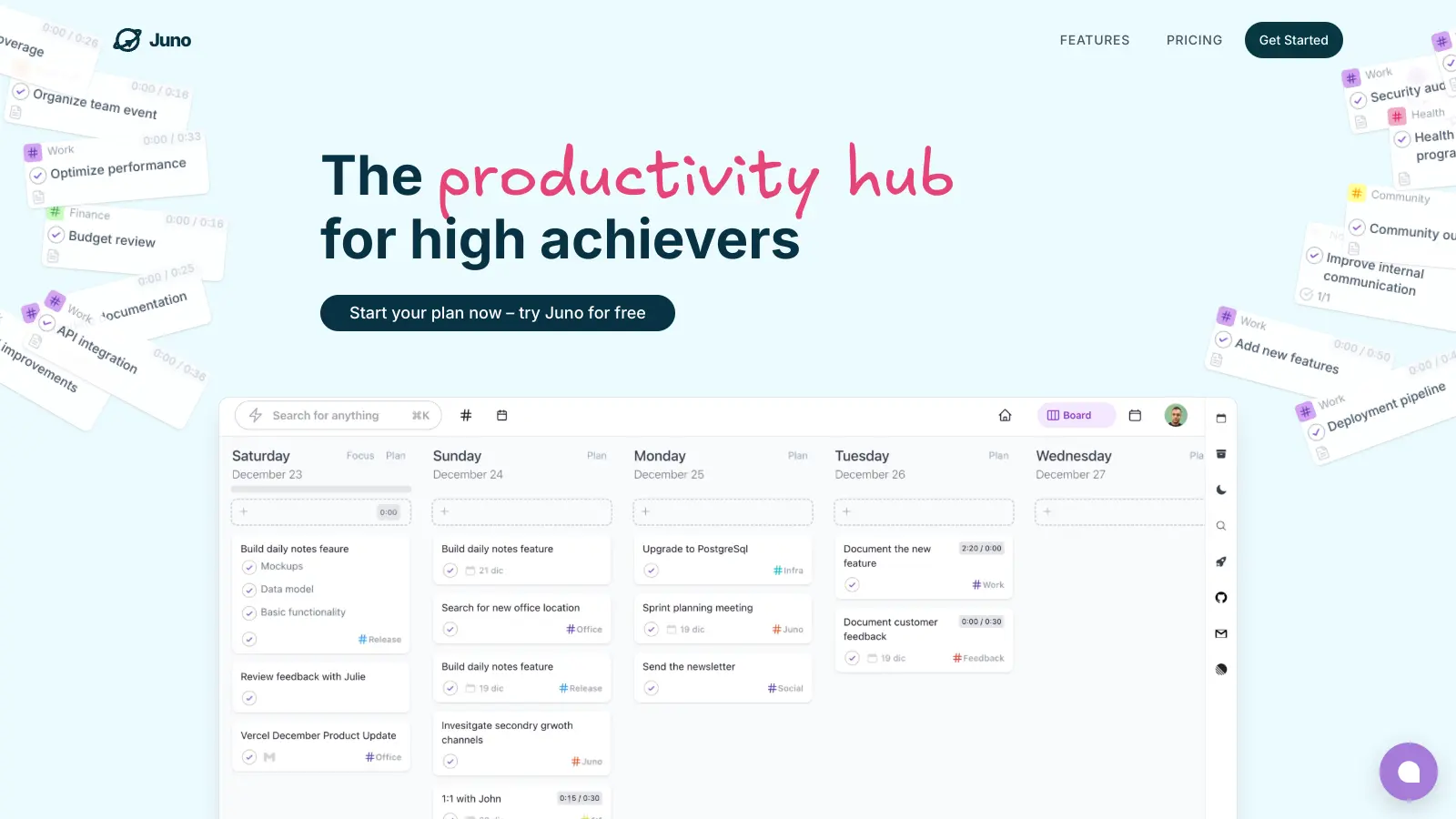
Juno is a task-and-calendar productivity app that also pulls in email, aiming to replace the app-switching loop between your to-do list, your calendar, and your inbox. It's built for professionals and small teams already running across tools like Asana, Notion, Linear, and Slack who want a single coordinating layer rather than four separate tabs. The tradeoff is straightforward: you get potential consolidation, but you're doing it with a beta product that has no established community track record and some basic product pages that currently don't load.

Beta pricing sits at $7.50 per month or $75 per year, both discounted 50% from standard rates. It's a web-based tool. The one thing to know before trying it: the features and pricing pages return 404 errors at time of writing, so you'll be signing up with incomplete information. Start on the monthly plan, not the annual one, until those pages are stable and you've tested the core workflow yourself.

how popular is Juno?

monthly search interest

135k/mo now

0132k264k400k2023202420252026
peak interest368k/moNov 2024
searches now135k/moFeb 2026
1-month change18%vs prev month

Juno's search volume has been oscillating between 165k and 368k since early 2022 without a clear sustained growth trajectory, which suggests the tool is capturing a keyword with mixed intent rather than building a loyal and expanding user base. The recent drop from a late-2024 spike back to baseline levels is consistent with a product that generates curiosity in waves but hasn't yet converted that interest into a committed following. That's worth knowing: you're not missing a runaway hit, and the hype window has already passed.

who is Juno for?

Whether Juno is worth it depends almost entirely on what you're trying to consolidate and how much beta-stage roughness you're willing to tolerate. Pick your role below to see the honest breakdown.

what users are saying

The pricing page throwing a 404 error means you're being asked to pay for something you can't fully evaluate before committing.

The community discussion around Juno the productivity app is almost nonexistent in available sources. The only indexed content surfacing under a "Juno review" search is a mattress review from an unrelated product entirely, which tells you something useful: this tool hasn't built enough of a public conversation to generate independent coverage, forum threads, or critical write-ups yet. That's not automatically a dealbreaker for a tool in beta, but it does mean there's no external validation to lean on. What's available on the homepage suggests a task-and-calendar integration tool aimed at reducing app-switching, with beta pricing at $7.50 per month or $75 per year. The pricing page and features page both return 404 errors, which is a real problem for anyone trying to evaluate what they're actually paying for.

Our take: Juno is a beta-stage productivity tool with a reasonable enough premise: tasks, calendar, and email in one place. But the pricing page throwing a 404, features documentation being inaccessible, and zero independent community coverage means you're being asked to pay for something you can't fully evaluate before committing. At $7.50 a month on beta discount, the risk is low, but tools like Notion, Todoist, or even Apple's own Calendar-plus-Reminders stack offer more documented track records. Don't subscribe until the core pages work and there's at least some independent user feedback to check against.

features

  • Be productive, Be Focused: Juno helps you stay productive and focused on your goals. You can use this tool to prioritize your tasks and manage your workflow more effectively. It’s all about accomplishing more with less effort!
  • Tasks and Calendar Integration: This feature allows you to coordinate your tasks and calendar events in one place. No need to juggle between multiple apps anymore!
  • Emails as Tasks: Get an email, add it to your to-do list. Juno allows you to manage your emails as tasks, big or small. This makes it easier to track and handle your important emails.
  • App Integration: You can integrate Juno with your favourite apps to manage your tasks more effectively. This feature enables you to consolidate all your tasks in one list, making it easier for you to prioritize.
  • Recurring Tasks: Juno also supports recurring tasks, which come handy when dealing with routines or tasks that you need to undertake regularly.
  • Simple Pricing, Clear Value: With affordable monthly and yearly pricing plans, Juno provides clear value to its users. Discounts are also available for students and nonprofits.
  • Free 30-day trial: Juno offers a free 30-day trial, no credit card required. You also gain access to future updates automatically and can cancel your subscription anytime.

pricing

  • Juno provides a productive and integrated workflow environment for task and calendar management. The monthly pricing is set at $15 but with a Beta discount offer, you can save 50% and get it for $7.50.
  • For yearly commitment, Juno offers a reduced cost of $75 per year, again with a Beta discount offer saving you 50% compared to the regular price of $150. This plan not only offers the same features as the monthly subscription but also grants you two months free and saves you $30 in comparison to the monthly subscription over a year.
  • A 30-day free trial offered by Juno requires no credit card information and provides access to all features with automatic future updates. Users also have the flexibility to cancel their subscription anytime they desire.
  • For students or non-profit organizations, Juno also provides additional discounts. Details can be learned by directly consulting with the Juno team.

frequently asked questions

At $7.50 a month (beta discount from $15), the entry cost is low enough to test without much pain. But the pricing page returns a 404 error, so you can't verify what's included in each tier before paying. Until the product pages are stable and there's independent user feedback available, hold off on the annual plan at $75, even with the discount. Monthly only until you've actually tested it.

Based on what the homepage shows, Juno is aimed at professionals and small teams who want tasks, calendar events, and email managed in a single interface without switching between apps. It appears to support integrations with tools like Asana, Linear, Notion, and Slack, which suggests it's targeting people already embedded in a multi-tool workflow who want a unified view.

Two significant issues stand out right now. First, the pricing and features pages both return 404 errors, meaning you can't fully evaluate what you're getting before signing up. Second, there's no meaningful independent community coverage or user reviews available, so there's no way to verify whether the product delivers on its promises in real-world use. For a tool asking for a subscription commitment, that's a lot of unknowns.

Todoist has years of independent reviews, a documented feature set, transparent pricing, and a generous free tier. Juno's pitch of unifying tasks, calendar, and email is broader in theory, but the product is currently less accessible to evaluate. Choose Todoist if you need a reliable, battle-tested task manager now. Consider Juno only if the specific calendar-plus-email integration is something Todoist's integrations genuinely don't cover for you, and you're comfortable with beta-stage risk.

Not yet, based on current evidence. A tool with broken product pages and no public track record of reliability isn't one to anchor your daily workflow to. The premise is solid, the beta pricing is reasonable, but using it as your primary productivity system before it has a stable public presence and user community introduces unnecessary risk. Treat it as a secondary experiment rather than your main system for now.

tools for
humans

toolsforhumans editorial team

Reader ratings and community feedback shape every score. Since 2022, ToolsForHumans has helped 600,000+ people find software that holds up after launch. how we research →

other tools to check out

Gizmo screenshot
online buzz550k
trend (1M)steady
3.5based on real user feedback, community sentiment, pricing value, and fit for target audience. see our full methodology

Gizmo

Gizmo is an AI-powered educational platform that converts study materials like PDFs, YouTube videos, notes, and audio into flashcards, quizzes, and step-by-step explanations. It uses spaced repetition and active recall to help students learn and retain information, with features like lecture recording, progress tracking, and an AI tutor for personalized explanations.

best deal

Students get 50% off Gizmo unlimited plans: $6.99/week or $77.22/year for unlimited AI flashcards, quizzes, and tutoring

Otter.ai screenshot
online buzz450k
trend (1M)steady
3.8based on real user feedback, community sentiment, pricing value, and fit for target audience. see our full methodology

Otter.ai

Otter.ai is an AI-powered transcription and meeting assistant that converts spoken language into text in real-time, primarily used for meetings, lectures, and interviews. It offers features like speaker identification, automated summaries, action item tracking, and integration with platforms like Zoom, Google Meet, and Microsoft Teams. The tool provides pricing plans from a free basic version to enterprise-level solutions.

best deal

Try Otter.ai free with 300 monthly transcription minutes and 30-minute conversation limit, or save with annual billing on Pro ($8.33/mo) and Business ($19.99/mo) plans

Asana screenshot
online buzz301k
trend (1M)steady
3.8based on real user feedback, community sentiment, pricing value, and fit for target audience. see our full methodology

Asana

Asana is a web-based project management platform that enables teams to organize, track, and collaborate on work. It offers task management, multiple project views (lists, boards, timelines), AI features for automating workflows, communication tools, progress tracking, and integrations with over 200 apps. Available in free and paid plans, Asana supports teams of all sizes with flexible project visualization options.

best deal

Try Asana free with the Personal Plan for 1-2 users, or start a 30-day free trial of paid plans to test AI features and advanced workflows.

Trello screenshot
online buzz246k
trend (1M)steady
3.5based on real user feedback, community sentiment, pricing value, and fit for target audience. see our full methodology

Trello

Trello is a project management tool that helps teams organize work using boards, lists, and cards. It enables users to track tasks, collaborate in real-time, and manage workflows visually. With features like task assignment, due dates, integrations, and AI-powered automation, Trello supports project management for teams of any size, from small startups to large enterprises.

best deal

Try Trello Free - Organize projects with unlimited cards, lists, and members across up to 10 boards per workspace

Scribbr screenshot
online buzz135k
trend (1M)23%
3.5based on real user feedback, community sentiment, pricing value, and fit for target audience. see our full methodology

Scribbr

Scribbr is a comprehensive academic writing tool that helps students and professionals maintain writing integrity through plagiarism checking, AI detection, proofreading, and citation generation. It supports multiple languages, offers expert editing services, and provides a pay-per-use pricing model based on document size. With features like checking against a vast database of web pages and publications, Scribbr assists users in creating high-quality, original academic work.

best deal

Check your work for plagiarism starting at just $19.95

Jungle AI screenshot
online buzz135k
trend (1M)steady
3.5based on real user feedback, community sentiment, pricing value, and fit for target audience. see our full methodology

Jungle AI

Jungle AI is an AI-powered educational tool that transforms study materials like lecture slides, PDFs, and videos into flashcards, multiple-choice questions, practice tests, and diagram-based questions. It supports spaced repetition learning and progress tracking, helping students prepare for exams across different subjects and languages.

best deal

Get 50% off the Super Learner plan with yearly billing: unlimited study material generations for $5/month