Mydoma Studio Review 2026 - Features, Pricing & Deals

Last Updated
Feb 13, 2026

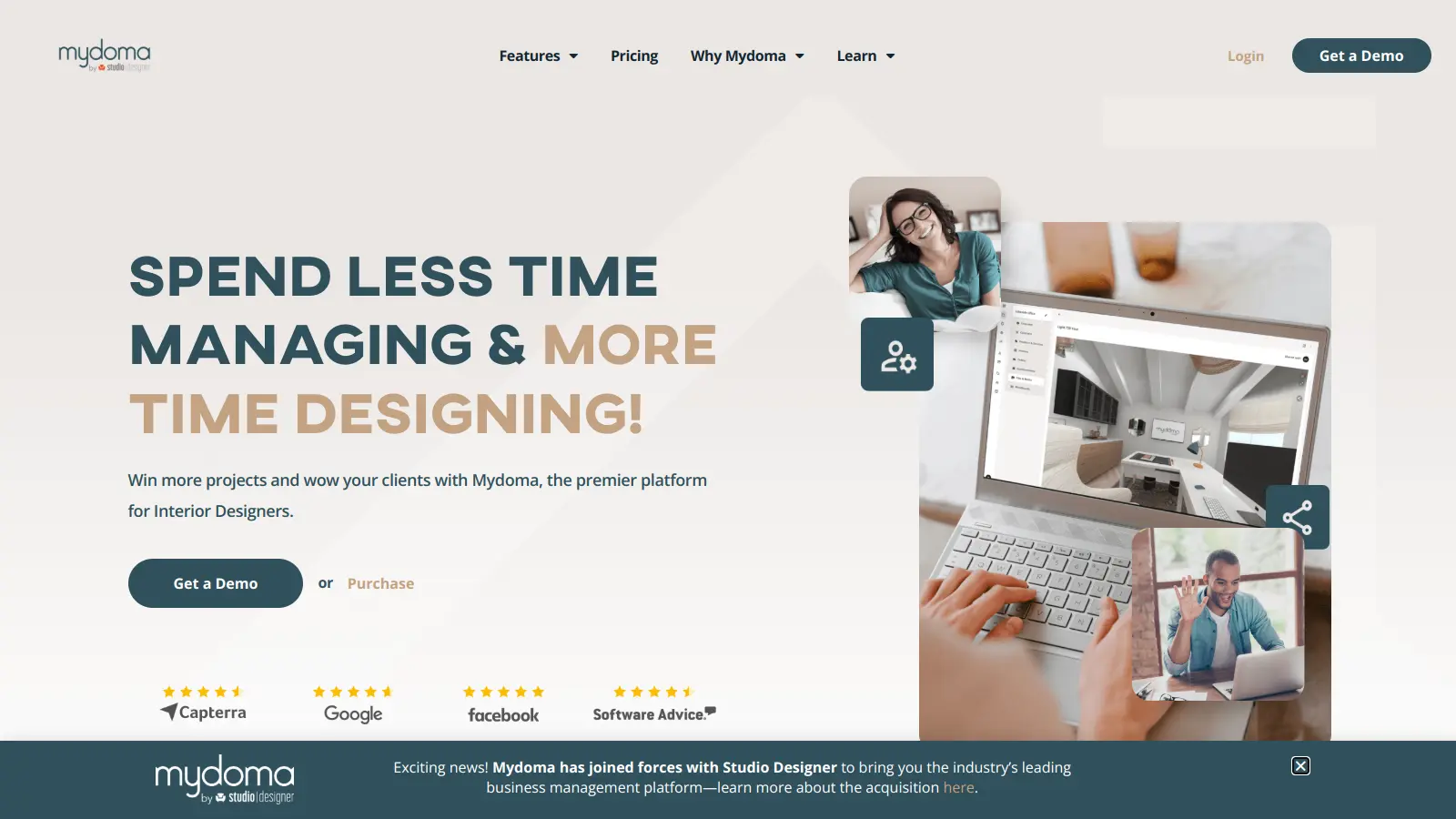
Mydoma Studio is a cloud-based project management platform created specifically for interior designers, decorators, and home stagers. The software helps professionals streamline their daily operations while making it easier to work with clients and manage projects.

The platform combines project management, client collaboration, and financial tracking in one hub. Users can create mood boards with 3D photorealistic renderings, handle invoicing, and maintain product catalogs while their clients get access to a portal for viewing progress, signing contracts, and approving designs.

Available on both desktop and mobile devices, the software includes task management, time tracking, calendar integration, and a product clipper tool for sourcing. It works with QuickBooks, Stripe, and Zapier to help designers run their businesses more efficiently.

The annual plan costs $58 per month with a one-time onboarding fee of $300. The platform offers a free trial and a free version for single users with one project.

Who is Mydoma Studio for?

Mydoma Studio is built for interior design professionals who need to manage projects while delivering polished client experiences. The platform saves time by centralizing project management, client communication, and financial tools in one system.

  • Solo Interior Designers who handle everything from mood boards to invoicing can manage multiple clients without hiring additional staff.
  • Boutique and Growing Design Firms can coordinate team members, track billable hours, and maintain consistent client communication through the shared platform with custom user permissions.
  • Home Stagers who need to showcase their vision and simplify procurement use the product catalog features and client presentation tools.
  • Decorators with Multiple Projects find value in the mobile accessibility and calendar integration that keeps them organized while working across client locations.
  • Design Professionals Seeking Growth use the financial tracking tools and embeddable design packages to identify profitable services and expand their online presence.

The software works for professionals throughout the residential design industry, from boutique decorating services to multi-designer interior firms handling commercial and residential projects.

Online Reviews (Last 6 Months Summarised)

Users praise Mydoma Studio for its user-friendly interface and invoice designs that clients appreciate. The 3D photorealistic rendering and visualizer features stand out, and many designers find it provides a one-stop shop for project management. Customer support gets consistently positive mentions for being helpful, quick to respond, and accessible through live chat and video tutorials. The mood board creation tools make it easy to upload, resize, and layer images, and designers appreciate having everything organized in one place with a professional look.

The client-facing side draws the most criticism. Multiple users report that the client experience for reviewing and commenting on products is labor-intensive and confusing for both designers and clients. Clients complain about small text that can't be enlarged and difficulty navigating the platform. The product clipper can be clunky, and some users find clients lose their approvals or have trouble seeing posts. The interface has a learning curve, especially around project organization and finding the right logic and sequence. Back-end accounting functionality for QuickBooks reconciliation is rough. Invoices don't automatically revise when changes are made.

Features

  • Project Management and Organization: Manage your design workflow with task tracking, customizable checklists, project linking, and a unified calendar that organizes projects, deadlines, and team assignments across multiple clients.
  • Client Portal and Communication: Give clients access to a portal where they can view design boards, approve products, sign contracts digitally, make payments, and communicate with you throughout the project lifecycle.
  • Invoicing and Financial Tracking: Create branded proposals and invoices, track billable time, manage product pricing and markups, and automate accounting through QuickBooks integration to simplify your financial management.
  • 3D Visualization and Design Boards: Create photorealistic 3D renderings with the visualizer tool, build mood boards with image uploading and layering, and present design boards that clients can review and approve.
  • Product Sourcing and Catalogs: Build a product library with the product clipper tool, catalog favorite sources with vendor references, track purchase orders, and embed design packages on your website for automated discovery.
  • Mobile Access: Manage your design business from anywhere using cross-platform mobile apps that sync with desktop features, whether you're in the studio or on-site with clients.
  • Business Tool Integrations: Connect Mydoma Studio with QuickBooks for accounting automation, Stripe for payment processing, Zapier for workflow automation, and scheduling platforms to create a unified business ecosystem.

Pricing

  • Annual Plan costs $58 per user per month, billed annually, including project management, client portal, reporting, product sourcing and curation, design boards, invoices, and orders.
  • One-time onboarding fee of $300 applies when starting with the annual plan.
  • Free trial available to test the platform before committing to a paid plan.
  • Free version available for single users managing one project, suitable for those just starting out or testing the software.

Frequently Asked Questions

What's the difference between the old Mydoma Studio and the new "Mydoma Next" platform?

Mydoma Next is the updated version of the platform with an improved client portal called "The Client Experience." The new version offers better workflow optimization, updated mood board features, and improved navigation. Some longtime users have reported an adjustment period when switching to the new interface. The core functionality remains similar, but the layout and certain features have been modernized to improve usability and collaboration options.

Do I need QuickBooks if I use Mydoma Studio?

It depends on your needs. Mydoma Studio includes built-in invoicing and payment tracking, but integrates with QuickBooks for more detailed accounting automation. If you need accounting capabilities beyond basic invoicing, the QuickBooks integration can help. However, some users report issues with the back-end accounting functionality for QuickBooks reconciliation, so test the integration during the free trial to see if it meets your requirements.

Can clients access their projects on mobile devices?

Yes. Both you and your clients can access projects on mobile devices. Mydoma Studio has mobile apps for Android and iOS, making it easy to manage projects on the go. The client portal is also mobile-friendly, allowing your clients to view designs, approve items, sign contracts, and communicate with you from their phones or tablets. This flexibility helps keep projects moving forward even when everyone isn't at their desk.

How does the 3D visualizer feature work?

The 3D visualizer lets you create photorealistic renderings of your designs directly in the platform. You can add product details, generate 3D visuals, and present them to clients through design boards in the client portal. This feature is popular with users who want visualization tools built in rather than needing separate design software. The renderings help clients better understand your vision before making purchasing decisions.

Is there a limit to how many clients or projects I can manage in Mydoma?

There's no limit to the number of clients or projects you can manage in the paid annual plan. The free version is limited to a single user and one project, but once you're on the paid plan, you can handle unlimited projects and clients. This makes Mydoma scalable for both small studios and larger design firms without worrying about outgrowing your subscription or hitting capacity restrictions.

Other Tools To Check Out

Best Deal

Try ITONICS free with a demo or trial (no credit card required) and scale your innovation management from 10 to 10,000 users starting at $500/month

Redeem Now

Best Deal

Try Microsoft Project free for 30 days with full access to all plan features, or start with Planner Plan 1 at $10/month for premium templates and project goals

Redeem Now

Best Deal

Get a custom innovation platform demo for your specific business needs

Redeem Now

Find Out How Best To Utilise Tools

Our newsletter comes with exclusive discounts, trials and practical insights from within the industry

Sign Up Today