ClickCease Review 2026 - Features, Pricing & Deals

Last Updated
Feb 13, 2026

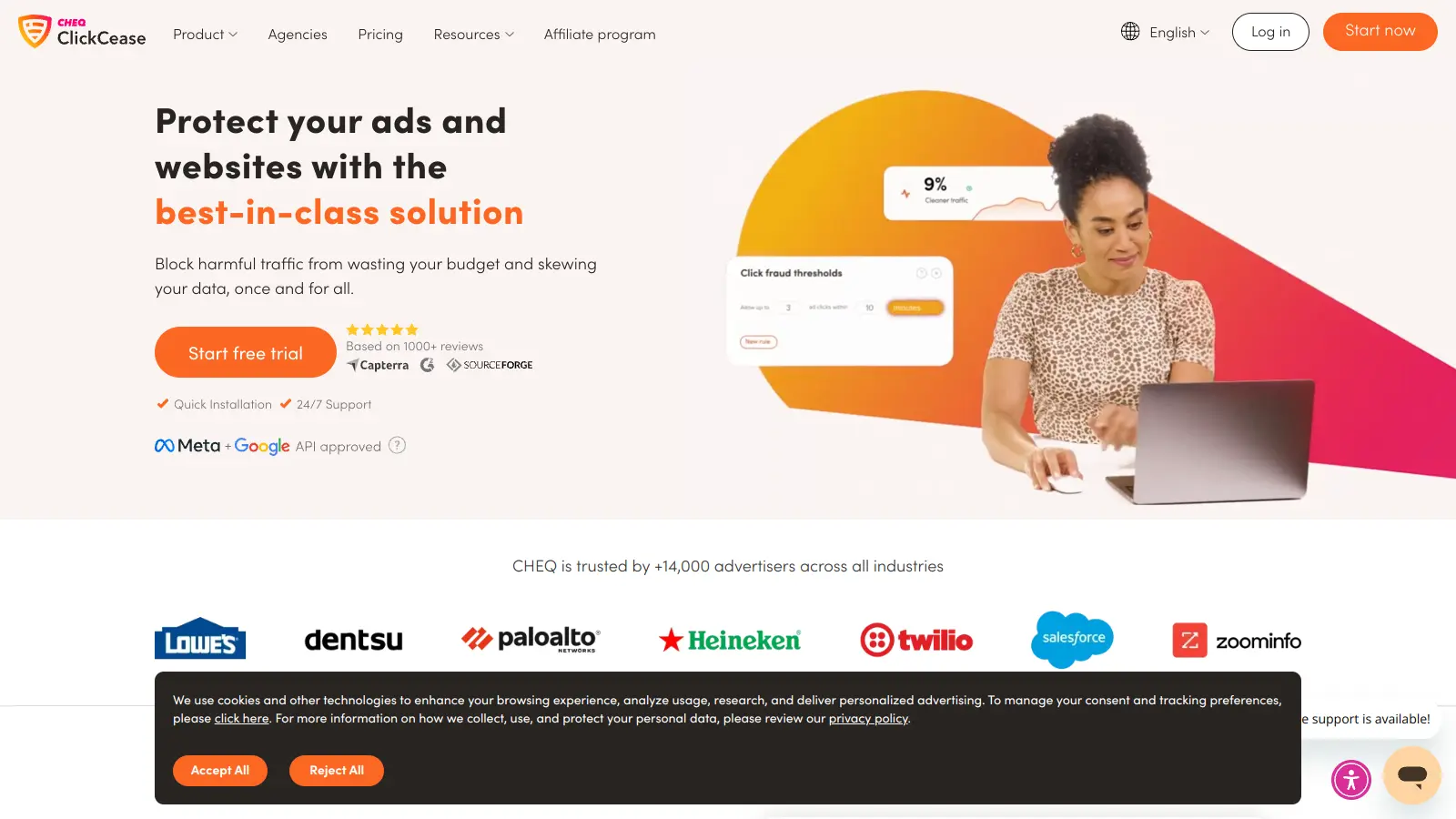
ClickCease helps businesses protect their pay-per-click advertising campaigns from fraudulent clicks and invalid traffic. The platform monitors ad campaigns across major networks like Google Ads, Facebook Ads, Microsoft Ads, and YouTube, automatically blocking suspicious activity in real-time.

At its core, the tool uses AI-powered algorithms to analyze data points including IP addresses, geolocation, click frequency, session duration, device type, and browser information. It conducts over 2,000 behavior tests on each click and automatically blocks suspicious IPs within 3 seconds of detection. When fraudulent activity is identified, ClickCease automatically adds those IPs to exclusion lists, preventing future invalid clicks from the same sources.

The platform provides analytics about who's clicking your ads, their location, devices used, and frequency of visits. Users can customize protection levels by setting click thresholds and specific blocking rules based on campaigns, keywords, landing pages, or devices. The tool includes session recordings and heatmaps to visualize fraudulent patterns, along with VPN and proxy detection capabilities. For agencies and marketing teams, the tool offers white-label reporting capabilities and agency permissions.

Plans start from $99 per month for up to 5,000 visits on one website, with larger options available for campaigns managing multiple sites. The tool integrates easily with popular ad platforms through HTML code snippets, WordPress plugins, or tag managers. ClickCease currently protects over 2 million campaigns and offers a 7-day free trial with no credit card required.

Who is ClickCease for?

ClickCease works for digital marketers and business owners who run paid advertising campaigns and want to protect their ad spend from fraud. This platform helps companies save money and improve ROI by automatically detecting and blocking invalid clicks on their online ads.

  • PPC Advertisers using Google Ads, Facebook Ads, or Microsoft Ads who face high costs per click in competitive niches and need to reduce fraudulent click costs
  • Digital Marketing Agencies managing client campaigns at scale and needing white-label reporting to demonstrate the value they provide through fraud prevention
  • E-commerce Managers in industries where competitors frequently click each other's ads to drain budgets
  • Local Service Providers (plumbers, attorneys, contractors) who rely heavily on PPC advertising where a single fake click can cost $50-$200
  • Businesses Managing Multiple Ad Campaigns that need centralized fraud protection across different platforms and want to block IPs across their entire account
  • Companies Concerned About Competitor Click Fraud who want to track competitor activity and protect their campaigns from deliberate attacks
  • Small Business Owners managing their own ad campaigns who need automated protection without technical complexity

The tool is most valuable for professionals in highly competitive industries like real estate, legal services, insurance, and retail where click fraud is common and ad costs are high.

Online Reviews (Last 6 Months Summarised)

ClickCease gets positive feedback from PPC advertisers who appreciate its ability to block click fraud and invalid traffic across multiple platforms. Users consistently praise the easy integration with Google Analytics and ad platforms, along with the reporting and analytics dashboard. Many report that it helps reduce wasted ad spend on fraudulent clicks and find the pricing affordable compared to competitors. Customer support responsiveness is another frequently mentioned strength.

False positives block legitimate traffic more often than users expect. The dashboard has a learning curve. Fraud detection can be delayed rather than instant. Some find the documentation incomplete. The tool requires time to configure properly for optimal results. Integration with certain niche ad platforms remains limited. More customization options for certain rules would help.

Features

  • AI-Powered Fraud Detection: Conducts over 2,000 behavior tests on each click using AI algorithms that analyze IP addresses, click frequency, session duration, device type, and browser information to identify and block fraudulent clicks within 3 seconds.
  • Automated IP Blocking: Automatically blocks suspicious IPs with permanent blocking options and adds them to exclusion lists on Google Ads, Facebook, and Microsoft Ads, preventing repeated invalid clicks from problematic sources.
  • Customizable Detection Rules: Allows users to set specific rules by campaign, keyword, landing page, or device, with options to block JavaScript disabled browsers, filter VPN traffic, and apply geo-blocking capabilities for tailored fraud prevention.
  • Session Recordings and Heatmaps: Provides session recordings and heatmaps to visualize fraudulent patterns, along with reports on click origins, visitor behavior, device information, and threat levels to help advertisers understand traffic quality.
  • Multi-Platform Compatibility: Integrates with major advertising platforms including Google Ads, Facebook Ads, Instagram, Microsoft Ads, and YouTube, with protection across 13 marketing platforms on Enterprise plans.
  • Advanced Agency Features: Offers white-label reporting, agency permissions, Pixel Guard Connector, audience exclusion features, and in-person onboarding for Advanced plans, along with 24/7 customer support.
  • Cross-Campaign Protection: Blocks fraudulent IPs across all campaigns in your account with keyword tracking to identify fraud trends, bot detection, competitor tracking, and multi-website management for up to 30 sites depending on plan.

Pricing

  • Starter Plan starts at $99 per month, protecting up to 5,000 visits monthly on 1 website with ad protection for Google, Meta, and Microsoft, plus WordPress bot protection and built-in marketing optimization rules.
  • Pro Plan priced at $149 per month, protecting 10,000-40,000 visits monthly on 5-10 websites with white-label reporting, custom optimization rules, Pixel Guard Connector, multiple domain setup, and agency permissions.
  • Advanced Plan available at $349 per month, protecting 50,000-80,000 visits monthly on 20 websites with all Pro features plus in-person onboarding and advanced reporting.
  • Enterprise Plan offers custom pricing with protection for 13 marketing platforms, IP blocking, AI bot detection, unlimited websites, unlimited yearly visits, 24/7 support, and custom reporting.
  • 7-day free trial available with no credit card required, allowing businesses to test the platform before committing to a paid plan.

Frequently Asked Questions

What exactly does ClickCease protect me from?

ClickCease shields your PPC campaigns from invalid clicks that waste your ad budget. It blocks competitors who repeatedly click your ads, click farms, bots, web scrapers, and other malicious traffic. The tool conducts over 2,000 behavior tests on each click to spot suspicious activity like multiple clicks from the same IP, clicks from known fraud centers, VPN and proxy traffic, and users with disabled JavaScript. By stopping these unwanted clicks within 3 seconds, you'll spend money only on real potential customers.

How does ClickCease install on my website?

Getting ClickCease up and running is simple. You can add it to your site in three ways: paste a small HTML code snippet into your website header, install the WordPress plugin if you use WordPress, or add it through Google Tag Manager. Most users complete the setup in under five minutes, and you don't need any technical skills. Once installed, ClickCease starts protecting your ads right away without slowing down your website.

Will ClickCease work with my ad platforms?

ClickCease works with all major PPC platforms. It fully supports Google Ads, Facebook Ads, Instagram Ads, Microsoft Ads, and YouTube campaigns. The tool automatically syncs with these platforms to update your IP exclusion lists. This means once ClickCease identifies a fraudulent source, it not only blocks future clicks from your website but also prevents those IPs from seeing your ads again, saving you money before clicks even happen. Enterprise plans support up to 13 different marketing platforms.

How can I tell if ClickCease is actually saving me money?

The dashboard shows you exactly how many bad clicks ClickCease has blocked and how much money you've saved. You'll see reports about who clicked your ads, their location, what device they used, and how many times they clicked. The tool provides session recordings and heatmaps so you can watch suspicious behavior yourself and visualize fraudulent patterns. Most users report saving between 10-30% of their ad spend within the first month, which typically covers the cost of the service many times over.

Can I customize how strict the click protection is?

Yes! ClickCease lets you set custom rules based on your campaigns, keywords, landing pages, or devices. You can adjust click thresholds (like allowing up to 3 clicks per user in 24 hours), block specific countries or regions you don't serve, filter out VPN users, and create custom IP blacklists with permanent blocking options. This flexibility helps you balance between blocking fraud and allowing legitimate repeat visitors. You can also whitelist important IPs like your office or agency to make sure they're never blocked.

Other Tools To Check Out

Best Deal

Get a 14-day free trial and save 20% with annual billing on Instapage plans starting at $99/month

Redeem Now

Best Deal

14-day free trial with no credit card required; save 7% on yearly plans

Redeem Now

Best Deal

Try QR Code AI's Starter Plan for just $4/month - unlimited QR codes, smart links & instant redirects!

Redeem Now

Find Out How Best To Utilise Tools

Our newsletter comes with exclusive discounts, trials and practical insights from within the industry

Sign Up Today