Best Connecteam Alternatives in 2026: For Deskless Teams
7 alternatives reviewedlast reviewed 7 april 2026
Editorial note:this was originally published in april of 2026
Connecteam bundles scheduling, time tracking, task management, and messaging into one app — but that breadth is also its biggest problem. Teams that only need one or two of those functions end up paying for a suite they don't use, and the per-hub pricing adds up fast as you scale.
This page covers seven alternatives worth considering in 2026, including scheduling-focused tools, SMS-first platforms, and employee communication apps. Each one is reviewed for pricing clarity, mobile usability, and how well it fits specific team types — from small restaurants to multi-location field crews.
Picks were chosen based on real use cases where Connecteam falls short: app adoption friction, cost at scale, communication gaps, and feature overload for teams with simple needs.
We collect first-hand reviews from people who use these tools every day — what works, what doesn't, whether it's worth paying for. We research pricing, features, and comparisons so that feedback has real context behind it. For this guide, we prioritised tools with clear per-user pricing, real mobile usability for hourly workers, and at least one concrete advantage over Connecteam's all-in-one model. Read our full research methodology.
looking for a Connecteam alternative?
tell us what you're considering and why — it helps others in the same position.
What is Connecteam?
Connecteam is a mobile-first workforce management platform built for deskless employees in industries like retail, hospitality, construction, and logistics. It combines employee scheduling, GPS time tracking, task management, training, and internal messaging in a single app. Pricing starts at $29/month for up to 30 users on the Basic plan, with costs rising significantly when you add hubs or move to higher tiers.
The platform targets operations managers who want to replace several single-purpose tools with one system. For teams with genuinely complex needs across multiple functions, it can reduce tool sprawl. But it requires employees to download and regularly open the app, which creates adoption barriers for hourly and field workers who aren't tied to a device during shifts.
Teams typically look for alternatives when Connecteam's pricing outgrows their budget, when they only need one function (like scheduling or messaging) and don't want to pay for the rest, or when low app adoption among frontline workers makes the investment hard to justify.
Employee app for frontline engagement and internal communication.
Mid-size frontline teams wanting strong communication and engagement
PaidFrom $3.40/user/mo
vs ConnecteamBetter than Connecteam for teams in Australia or the UK that need automatic award/compliance calculations built into payroll exports.
our top pick
1
Deputy
Scheduling and time tracking built around labor compliance.
Paid
Best for · Multi-location teams in retail, hospitality, and healthcarePricing · From $4.50/user/mo
Deputy handles shift scheduling, time and attendance, and team messaging with a strong focus on labor law compliance — including award interpretation for Australia, overtime rules, and break enforcement. It integrates directly with payroll platforms like Xero, ADP, and QuickBooks. The interface is clean and mobile-friendly, and most managers can set up a working schedule in under an hour.
Pros
✓Built-in award interpretation for AU/UK labor law
✓Direct payroll integrations with 30+ providers
✓Demand-based scheduling using sales or foot traffic data
Cons
✗No free plan — costs add up for large hourly teams
✗Task management is limited compared to Connecteam
vs ConnecteamBetter than Connecteam for single-location small businesses that want scheduling and time clocks without paying anything.
2
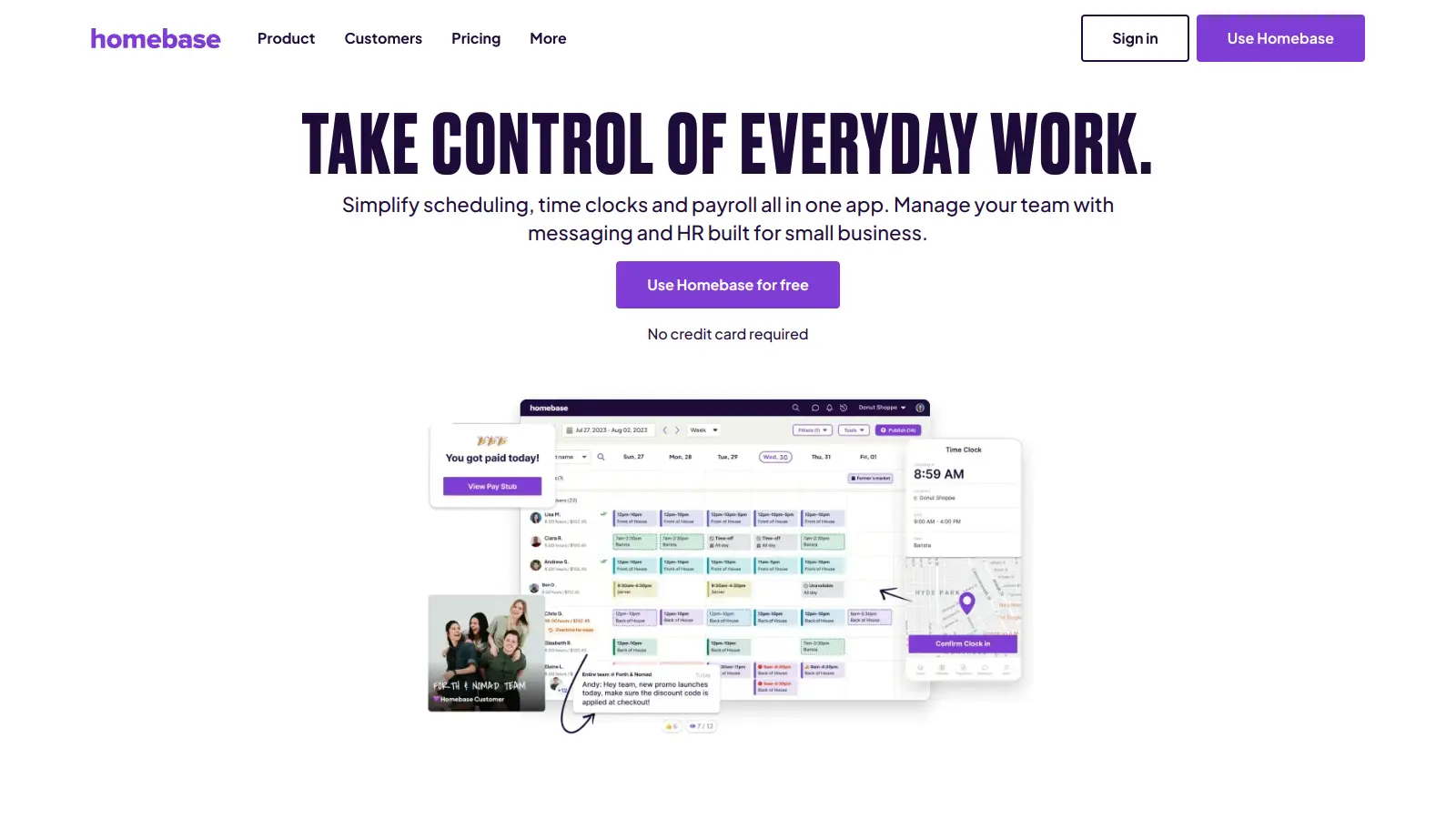
Homebase
Free scheduling and time tracking for one-location teams.
Freemium
Best for · Small businesses with a single locationPricing · Free plan available; paid from $24.95/location/mo
Homebase gives small businesses a genuinely usable free tier: scheduling, time clocks, team messaging, and basic hiring tools at no cost for a single location. Paid plans add labor cost tracking, PTO management, and HR compliance tools. It's a popular pick for independent restaurants, retail shops, and salons that want to move off spreadsheets without paying enterprise prices.
Pros
✓Genuinely useful free plan with no user caps
✓Flat per-location pricing — predictable cost as you hire
✓Built-in hiring and applicant tracking on paid plans
Cons
✗Free plan covers only one location
✗Weaker task management and training features than Connecteam
vs ConnecteamBetter than Connecteam for small hourly teams that want scheduling and messaging only, without paying for task management or training modules.
3
When I Work
Simple shift scheduling with solid mobile apps for hourly workers.
Paid
Best for · Hourly teams in food service, retail, and healthcarePricing · From $2.50/user/mo
When I Work focuses tightly on shift scheduling, time tracking, and team messaging. It's designed for hourly workforces and keeps the interface straightforward enough that employees can view schedules, pick up shifts, and request time off without training. The manager-facing scheduling view is fast and drag-and-drop. Pricing is per-user with no location caps.
vs ConnecteamBetter than Connecteam for restaurant operators who need labor cost forecasting tied to POS sales data and integrated tip management.
4
7shifts
Restaurant-specific scheduling with labor cost and tip tools.
Freemium
Best for · Restaurants and food service businessesPricing · Free for 1 location, up to 30 employees; paid from $29.99/location/mo
7shifts is built specifically for the restaurant industry. It handles scheduling, time clocking, and team communication, but also includes labor cost percentage tracking against sales, tip pooling, and integrations with POS systems like Toast and Square. The dashboard gives managers a live view of labor spend versus revenue, which general workforce tools don't offer.
Pros
✓Labor cost vs. sales tracking in real time
✓POS integrations with Toast, Square, and Lightspeed
✓Built-in tip pooling and tip payouts
Cons
✗Only relevant for food and beverage businesses
✗Advanced features locked behind higher-tier plans
vs ConnecteamBetter than Connecteam when your workforce won't reliably open an app and you need critical messages read within minutes, not hours.
5
Udext
SMS-first workforce communication that skips the app entirely.
Custom
Best for · Frontline teams with low app adoption ratesPricing · Pricing on request
Udext sends messages directly to employees via native SMS, so workers don't need to download or log into anything. It supports two-way messaging, mass broadcasts with custom fields like name and shift, scheduled sends, and SMS surveys. The platform claims a 98% message read rate within 10 minutes — a meaningful difference from app-based tools where unread notifications pile up.
vs ConnecteamBetter than Connecteam for large organizations that need branded internal communications with deep analytics, not scheduling or task management.
6
Staffbase
Enterprise internal comms platform for large frontline workforces.
Custom
Best for · Enterprise teams with 500+ employees across multiple sitesPricing · Pricing on request
Staffbase is an employee communications platform used by large organizations to push news, policies, and updates to frontline and desk-based workers through a branded app. It includes a news feed, push notifications, a document library, surveys, and analytics on content engagement. It's not a scheduling or time tracking tool — it's specifically for communication and employee experience at scale.
Pros
✓Fully branded app with your company's identity
✓Detailed content analytics and segment targeting
✓Handles 10,000+ employee deployments without issues
Cons
✗Enterprise pricing — not viable for teams under 500 people
✗No scheduling, time tracking, or task management features
vs ConnecteamBetter than Connecteam for teams that prioritize two-way employee engagement, pulse surveys, and recognition over shift scheduling features.
7
Blink
Employee app for frontline engagement and internal communication.
Paid
Best for · Mid-size frontline teams wanting strong communication and engagementPricing · From $3.40/user/mo
Blink combines a news feed, direct and group messaging, a document hub, surveys, and HR integrations into a mobile app aimed at frontline workers. It's positioned as an employee experience platform rather than a pure scheduling tool. The interface is closer to a consumer social app, which helps with adoption among workers who resist traditional HR software.
Connecteam charges per hub — operations, communications, HR. If you only need scheduling or only need messaging, a focused tool will cost less and be simpler to roll out. Don't pay for a platform with ten features when you need two.
Will your workers actually use it?
Any app-based platform requires download, login, and regular engagement. If your workforce is seasonal, hourly, or tech-averse, look at tools with SMS delivery or browser-based access that don't depend on app installs.
How does pricing scale?
Connecteam's pricing looks attractive for small teams but can jump sharply as you add users and hubs. Check whether alternatives charge per user, per location, or flat-rate — and model out what you'd pay at your actual team size, not the minimum.
Do you need industry-specific features?
General workforce tools handle shift scheduling and messaging, but restaurants need tip pooling and labor cost forecasting, while construction teams need certifications tracking and job site check-ins. An industry-specific tool often handles these out of the box where Connecteam requires workarounds.
What does migration look like?
Moving shift data, employee records, and communication history is rarely simple. Check whether the alternative imports from your current system, what the onboarding process involves, and whether you'll need IT support or can do it yourself.
frequently asked questions
Deputy and When I Work are the closest substitutes. Both handle shift scheduling, time tracking, and basic team messaging. Deputy has stronger compliance features for Australia and the UK; When I Work is cheaper and simpler for US-based small teams.
Homebase has a genuinely useful free plan for a single location — it includes scheduling, time clocks, and basic messaging at no cost. When I Work also has a limited free tier. Connecteam's free plan exists but caps users and strips out most advanced features.
The most common reasons are cost (especially after adding hubs or scaling past 30 users), low app adoption from frontline workers who won't download another app, and feature overload for teams that only need scheduling or only need messaging. Some teams also find the setup and training requirements slow deployment.
Expect to pay $2–$5 per user per month for scheduling-focused tools like Deputy or When I Work. SMS-first platforms like Udext use custom pricing based on workforce size. Employee communication platforms like Staffbase are enterprise-priced and typically require a sales call. Free plans exist at Homebase but cover only basic features for one location.
For scheduling data and employee records, most alternatives accept CSV imports — budget half a day for a clean setup. The harder part is re-establishing communication habits: employees need to adopt a new app or channel, which can take 2–4 weeks for full adoption. Avoid switching mid-scheduling cycle if possible.
tools for humans
toolsforhumans editorial team
Reader ratings and community feedback shape every score. Since 2022, ToolsForHumans has helped 600,000+ people find software that holds up after launch. The picks here come from that.