You-TLDR review — youtube video summaries

last reviewed 24 march 2026
how we review

We start with direct ratings from our readers, then look at what real users are saying in practitioner forums and community spaces. We pair that with search demand data and profession-level persona analysis.

full methodology →

Editorial note: this was originally published in april of 2025

quick take

  • Best for: students and professionals previewing long YouTube lectures
  • Skip if: you need reliable non-English support or high-accuracy output
  • £Best value: free tier for occasional use; Pro at $9.50/month only if you're processing videos daily
3.0/ 5 — editorial rating

based on real user feedback, community sentiment, pricing value, and fit for target audience. see our full methodology

used You-TLDR? we'd love to know your thoughts

reader ratings shape our score

You-TLDR is a web application that helps users get quick summaries of YouTube videos without watching the entire content. By entering a video URL, the AI analyzes the video and generates a summary in seconds, pulling out the main points and key information.

The tool offers several features for working with video content. Users can download transcripts and summaries, search for specific keywords, and interact with an AI chatbot to ask questions about the video. The platform also includes content conversion tools that turn videos into blog posts, LinkedIn articles, or Twitter threads. It works best with English videos but supports over 100 languages.

A free version provides basic summarization features with daily limits. The premium plan costs $19 per month and includes unlimited transcriptions, advanced summaries, interactive Q&A, custom quizzes, and an ad-free experience. New users can get 50% off for the first two months with the code SAVE50, bringing the price down to $9.50 monthly.

Whether you're a student reviewing lectures, a professional staying current in your field, or someone who wants to decide if a video is worth watching, You-TLDR offers tools to consume video content faster. The platform combines AI summarization with download options and interactive features to help users process YouTube content without watching everything in full.

how popular is You-TLDR?

monthly search interest

90/mo now

02975949002023202420252026
peak interest880/moMay 2023
searches now90/moFeb 2026
1-month change— steadyvs prev month

You-TLDR rode the early 2023 wave of interest in AI productivity tools, peaking at nearly 900 monthly searches before dropping sharply as the category filled up with better-known competitors. Search volume has been drifting downward ever since, settling around 90 to 110 searches per month. The hype has clearly passed, so you're getting the real product now — a niche tool with a small but stable user base rather than a growing one.

who is You-TLDR for?

Whether You-TLDR is worth your time depends almost entirely on what you're trying to do with it. Pick your role below to see the honest breakdown.

overall sentiment

select your role to see what people like you are saying

Student

mixed

You-TLDR is useful as a first filter: paste in a lecture recording and decide in seconds whether it's worth watching in full. The free tier is enough for occasional use. Where it falls short is on dense technical content — summaries can flatten or skip the nuance that actually matters for exams. Don't rely on it as a substitute for watching; use it to prioritise what you watch.

strengths

  • Saves significant time reviewing lecture recordings and educational content
  • Easy-to-use interface requires no setup or technical knowledge
  • Helps decide which videos are worth watching in full before committing time

concerns

  • Summaries may miss important technical details or nuanced explanations crucial for learning
  • Inconsistent performance across different educational content types
  • Limited reliability could lead to misunderstanding course material

what users are saying

A tool that's been around since 2019 and peaked at nearly 900 monthly searches in mid-2023 has remarkably little independent community discussion to show for it.

Community coverage of You-TLDR is thin. The main available sources are a single promotional-style blog post from a content site and one Reddit thread in r/automation where the tool appears as a passing mention in a broader roundup of YouTube summarisation tools. The Reddit thread's author was more enthusiastic about Recall (getrecall.ai) as their go-to, with You-TLDR not surfacing as a standout recommendation. The blog review frames the tool positively for content repurposing but reads more like a guided walkthrough than an independent stress test. There's very little in the way of independent, critical community feedback to work from, which is itself a signal: a tool that's been around since 2019 and peaked at nearly 900 monthly searches in mid-2023 has remarkably little discussion to show for it.

Our take: You-TLDR solves a real problem — long YouTube videos nobody has time for — but it's operating in a category that has gotten genuinely crowded since its 2023 spike. At $9.50/month (currently discounted from $19), it's not expensive, but tools like Recall offer a browser extension workflow that's faster for most people without the daily limit friction of the free tier. The 'since 2019' claim on the homepage is doing a lot of work for a tool with almost no active community. Don't pay for the Pro plan before testing the free tier thoroughly on the specific video types you need it for, especially if you're working with non-English content.
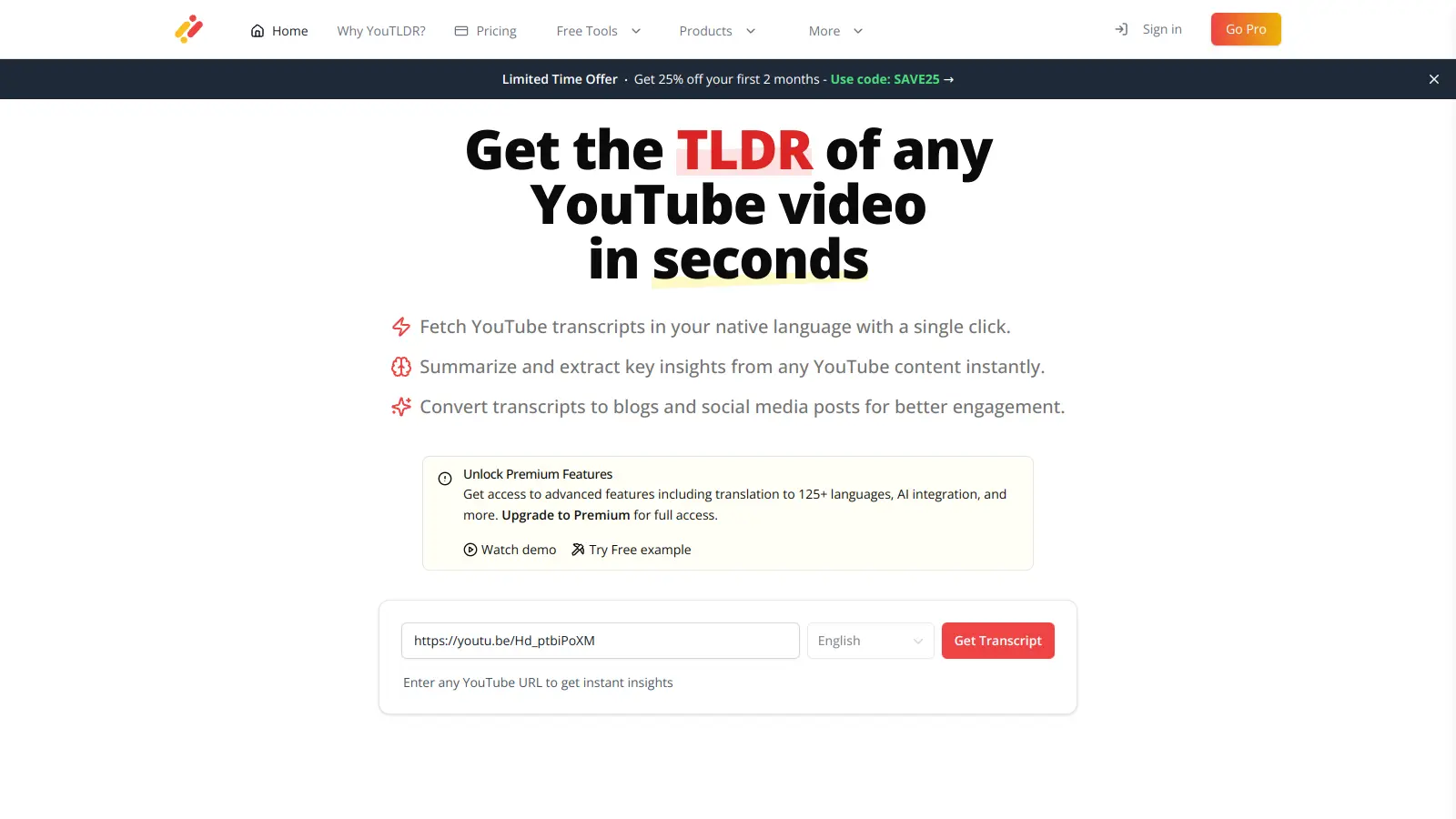

features

  • Fast AI Summarization: Enter a YouTube video URL and get a summary in seconds using AI algorithms that analyze and extract the main points from video content.
  • Multilingual Support: Access summaries in over 100 languages, though the tool works best with English videos and may have limited reliability with non-English content.
  • Downloadable Content: Save videos, transcripts, and summaries for offline viewing and future reference.
  • Interactive Q&A Chatbot: Ask questions about video content and get answers from an AI chatbot that understands the context of the summarized video.
  • Content Conversion Tools: Transform video content into blog posts, LinkedIn articles, and Twitter threads to repurpose videos into written formats.
  • Visual Timeline Navigation: View key beats and timestamps that let you jump to specific moments in videos.
  • Custom Quiz Creation: Generate quizzes based on video content to test comprehension or create study materials from educational videos.

pricing

  • Free tier provides basic summarization features with daily limits on the number of videos you can process.
  • Pro Plan costs $19/month and includes unlimited transcriptions, advanced summarization and highlights, visual timeline with timestamps, over 100 languages, interactive Q&A chatbot, custom quizzes, video-to-blog/article/thread conversion, transcript and video downloads, TLDR Academy access, multi-video comparison, Lofi music while working, and no daily limits or ads.
  • New users can get 50% off for the first two months with code SAVE50, reducing the Pro plan to $9.50/month before reverting to the standard $19/month rate.
  • All paid plans come with a 30-day money-back guarantee.

frequently asked questions

At the current discounted rate of $9.50/month for Pro, it's a reasonable price if YouTube video summarisation is a daily part of your workflow. If you're only processing a few videos a week, the free tier's daily limits might be enough to get by. The $19/month standard price is harder to justify given the inconsistent summarisation quality reported by users, particularly on non-English content. Test the free tier first and only upgrade if you're hitting the daily cap regularly.

It's most useful for students reviewing lecture recordings who need to decide which videos merit a full watch, and for professionals who need quick previews of long conference talks or industry tutorials. Content creators who want to convert videos to blog posts or LinkedIn threads will find the repurposing features useful, but only if they're willing to edit the output rather than publish it directly.

Two stand out. First, multilingual support is inconsistent — despite the '125+ languages' marketing, the tool works best with English videos and performance degrades noticeably on non-English content. Second, summarisation quality varies enough across different video types that you can't rely on it for anything where accuracy actually matters, like technical lectures or detailed how-to content. There's also very little independent community feedback to benchmark reliability against.

Recall has a browser extension that integrates directly into your workflow, which for most people is faster than tab-switching to paste a URL. You-TLDR's edge is in content repurposing — the blog post, LinkedIn, and Twitter thread conversion features are more developed than Recall's. If you want to summarise for personal note-taking and knowledge management, Recall is the better pick. If you're specifically trying to turn YouTube videos into publishable written content, You-TLDR's Pro plan gives you more tools for that job.

No, not on their own. The summaries are good enough to help you decide whether a video is worth watching in full, or to jog your memory on something you've already watched. For technical or detailed educational content, the tool can miss important nuance or misrepresent complex explanations. Use it as a first filter, not as a replacement for watching the actual lecture.

tools for
humans

toolsforhumans editorial team

Reader ratings and community feedback shape every score. Since 2022, ToolsForHumans has helped 600,000+ people find software that holds up after launch. how we research →

is this your tool?

claim your listing to update details, respond to our review, or upgrade to a featured partnership.

claim this listing →

other tools to check out

ChatGPT screenshot
online buzz124M
trend (1M)steady
4.0based on real user feedback, community sentiment, pricing value, and fit for target audience. see our full methodology

ChatGPT

ChatGPT is an AI chatbot by OpenAI that uses language models to hold conversations, generate content, and complete tasks. It includes web browsing, image generation and analysis, voice interaction, autonomous task automation, and custom GPT creation. Available in multiple pricing tiers from free to enterprise, ChatGPT handles creative writing, data analysis, coding, and real-world automation.

best deal

Try ChatGPT Free: Basic AI conversations with GPT-5.2 Instant access (around 10 messages every 5 hours) at no cost.

Gemini screenshot
online buzz20.4M
trend (1M)23%
3.5based on real user feedback, community sentiment, pricing value, and fit for target audience. see our full methodology

Gemini

Gemini is an advanced AI assistant by Google that processes text, code, images, audio, and video across Google's ecosystem. It offers content creation, coding assistance, research capabilities, and workflow automation through the Gemini app, web interface, and integrations with Google Workspace, Pixel phones, and Chrome.

best deal

Google AI Plus: Get 50% off at $3.99/month for the first 2 months (new subscribers); Google AI Pro: Try free for one month.

Copilot AI screenshot
online buzz4.1M
trend (1M)steady
3.0based on real user feedback, community sentiment, pricing value, and fit for target audience. see our full methodology

Copilot AI

Microsoft 365 Copilot is an AI-powered productivity tool that integrates seamlessly with Microsoft 365 apps like Word, Excel, PowerPoint, and Outlook. It uses advanced language models and Microsoft Graph to provide intelligent, context-aware suggestions, automate tasks, and enhance collaboration by generating content, analyzing data, and offering real-time insights across various work processes.

best deal

Try Copilot Free: Experience basic AI assistance without Office integration

Claude screenshot
online buzz3.4M
trend (1M)83%
4.2based on real user feedback, community sentiment, pricing value, and fit for target audience. see our full methodology

Claude

Claude is an AI assistant developed by Anthropic that handles coding, writing, and analysis tasks. It uses Constitutional AI for safety-focused interactions, supports multiple languages, and offers models like Sonnet and Opus with different capabilities. Claude prioritizes user privacy and context-aware responses.

best deal

Try Claude Free - 30-100 daily messages with code generation, image analysis, web search, and access to Claude's latest models

Perplexity screenshot
online buzz1.8M
trend (1M)22%
3.8based on real user feedback, community sentiment, pricing value, and fit for target audience. see our full methodology

Perplexity

Perplexity AI is an AI-powered search engine that provides real-time, conversational responses to user queries. Founded in 2022, it uses natural language processing and large language models to deliver answers with source transparency. The platform offers multiple search modes, supports file and image uploads, and provides both free and paid plans for individual users and businesses.

best deal

Try Perplexity Free - Get unlimited basic searches with citations, 5 daily Pro Searches, and save your search history with access to basic AI models.

Photo AI screenshot
online buzz1M
trend (1M)steady
3.0based on real user feedback, community sentiment, pricing value, and fit for target audience. see our full methodology

Photo AI

PhotoAI.me is an AI-powered platform that transforms personal photos into unique, high-resolution images across 100+ styles for various social media platforms. Users can upload a photo, select a themed package, and receive AI-enhanced images within hours, making profile personalization simple and quick for those seeking professional or creative profile pictures without advanced editing skills.

best deal

Transform your profile photo with 100+ AI styles starting at $19/month


