tools for
humans

Tensor Art reviews — what users really think

last reviewed 24 march 2026
how we review

We start with direct ratings from our readers, then look at what real users are saying in practitioner forums and community spaces. We pair that with search demand data and profession-level persona analysis.

full methodology →

Editorial note: this was originally published in april of 2025

quick take

  • Best for: anime and character design artists building styles with LoRA on a tight budget
  • Skip if: you need reliable watermark-free outputs for client or brand work
  • £Best value: free tier for experimentation; Pro at $9.90/month only if you need 4K resolution regularly
3.0/ 5 — editorial rating

used Tensor Art? we'd love to know your thoughts

reader ratings shape our score

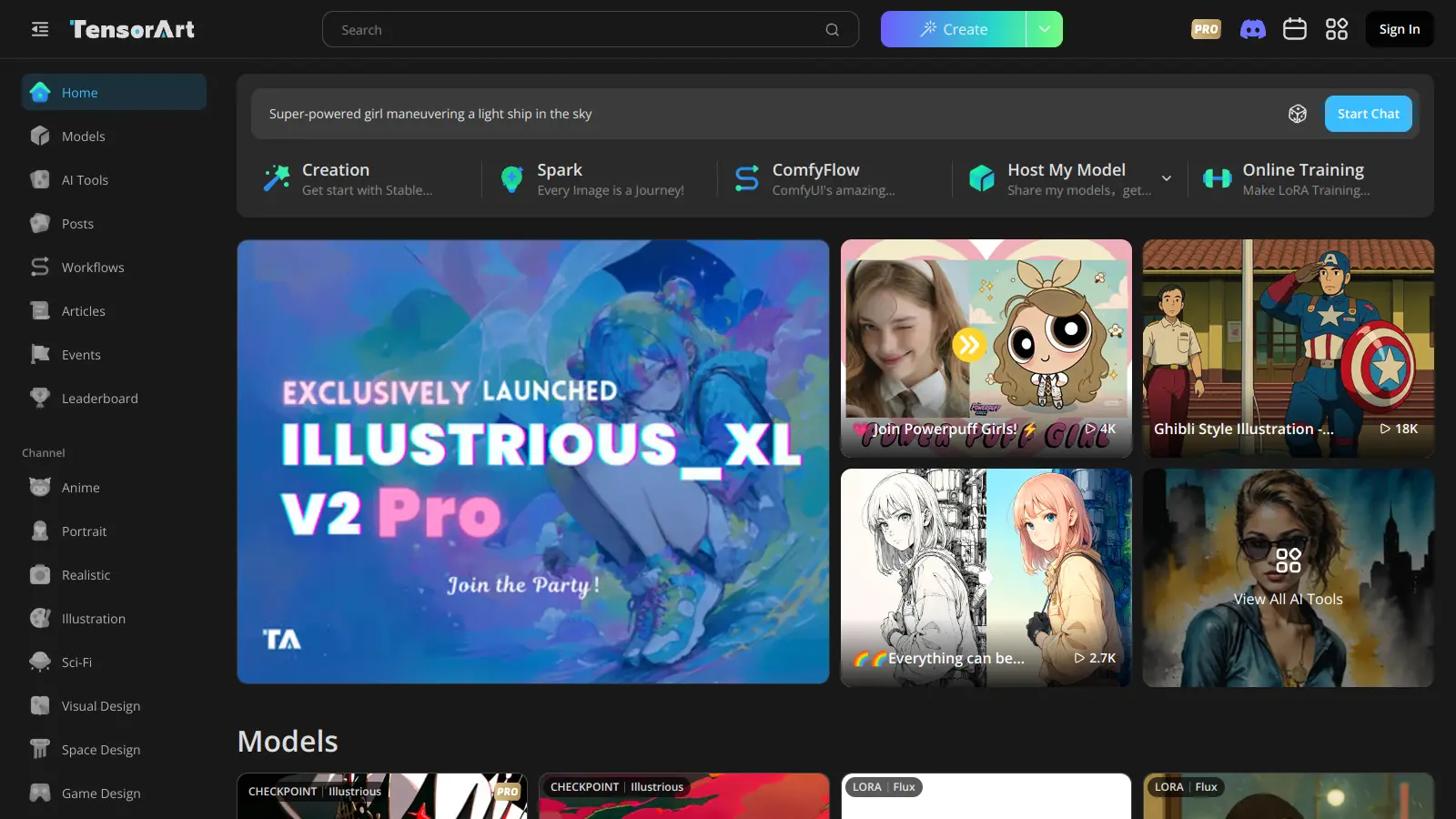
Tensor Art is an AI image and video generation platform that transforms text prompts into visual artwork using Stable Diffusion and LoRA technology. Users can create photorealistic portraits, abstract compositions, anime-style characters, and more, while having access to a large community with over 3 million users.

The platform gives users 50 free credits daily to experiment with content creation. Through its marketplace, creators can share or sell custom models from a library of over 400,000 options. The tool includes practical features like upscaling, background removal, face swapping, and detailed image enhancement options to help users achieve their desired results.

Beyond basic image generation, users can fine-tune models using LoRA training, work with Comfy UI workflows for advanced control, and apply ControlNet for better structure. The platform offers different subscription tiers starting at $9.90 monthly, with options for quarterly and yearly plans that include bonus credits and higher resolution limits.

New users face a learning curve to master the more advanced features. The platform requires a stable internet connection and some understanding of AI art concepts to make the most of its capabilities.

how popular is Tensor Art?

monthly search interest

9.9k/mo now

013.2k26.4k40k202420252026
peak interest33k/moJun 2025
searches now10k/moFeb 2026
1-month change33%vs prev month

Tensor Art grew steadily from late 2023 through early 2025, then spiked sharply to its peak in mid-2025 before dropping 70% in just a few months. That kind of spike-and-drop pattern usually means a viral moment or algorithm boost that brought in a wave of curious users who didn't stick around. The current trajectory is still declining, so if you're picking this up now you're getting the product after the hype passed, which is actually fine: the tool is what it is, not what the spike made it seem.

who is Tensor Art for?

Whether Tensor Art is worth your time depends almost entirely on what you're trying to make and how you're making money from it. Pick your role below to get the honest breakdown for your situation.

overall sentiment

select your role to see what people like you are saying

Indie Digital Artist

mixed

If you're experimenting with styles and can't afford a local GPU setup, Tensor Art's free tier is a legitimate starting point. The LoRA training and 400,000+ model library give you real creative range at no cost. The watermarks will push you toward the $9.90/month Pro plan eventually, and the session timeouts are genuinely annoying during long creative runs.

strengths

  • Free unlimited image generations with competitive quality
  • Extensive customizable model library with easy training for personal styles
  • Fast generation speeds even on free tier enabling rapid iteration
  • Intuitive UI that's more accessible than Midjourney or Stable Diffusion alternatives

concerns

  • Watermarks on free tier outputs force users toward paid plan for client-ready work
  • Frequent login/session timeout issues disrupt creative momentum during long sessions
  • Mobile app lacks parity with web version limiting on-the-go creation

what users are saying

For those wondering if you can download 'exclusive' models once you have payed for pro: You can't. If the download button is greyed out then you can pay as much money as you want you won't be able to get the mode.

Reddit r/StableDiffusion

The most pointed community criticism of Tensor Art comes from r/StableDiffusion, where a thread titled 'exclusive models and how tensor.art sucks' lays out a specific frustration: paying for the Pro plan does not unlock the ability to download models marked as exclusive. The download button stays greyed out regardless of your subscription tier. That's a meaningful bait-and-switch for anyone who signed up specifically to access those models. An independent review notes that while the model library is large, quality is uneven, image results aren't consistent across sessions, and the platform struggles to let you reliably recreate a result you've already generated. The free tier friction is real too: 50 daily credits reset every 24 hours, watermarks appear on free outputs, and server overloads during peak hours are a recurring complaint from users trying to hit deadlines. Across commercial review platforms, Tensor Art sits in the average range, with reliability and the gap between marketing promises and actual feature access being the most repeated themes.

Our take: Tensor Art is a genuinely decent free playground for experimenting with Stable Diffusion models without setting up a local environment. But the free tier is designed to frustrate you into upgrading, and the Pro tier at $9.90/month has its own trap: you're renting access to a cloud generator, not buying the models. If you want to actually own and run models locally, Automatic1111 or ComfyUI on your own hardware will cost you more upfront but give you full control. If you're seriously considering the Pro plan, do a hard check on whether the specific models you want are actually downloadable before paying.

features

  • AI Image and Video Generation: Create images and videos using advanced AI models like Stable Diffusion and LoRA, with support for text-to-image, image-to-image, text-to-video, and image-to-video generation.
  • Massive Model Library: Access over 400,000 community models from a platform with 3 million users, with options to train and share custom LoRA models for unique artistic expressions.
  • Comfy UI Workflows: Use ComfyFlow for advanced customization and control over image generation, allowing complex multi-step creation processes.
  • Image Enhancement Tools: Utilize upscaling, background removal, face swapping, and detailer features to refine AI-generated images, correcting details and improving overall quality.
  • ControlNet Support: Guide AI image structure with precision using ControlNet technology, giving you greater control over composition and form.
  • Community Model Sharing: Upload, manage, and monetize custom AI models in a collaborative marketplace, connecting with other creators and exploring different artistic styles.
  • Free Daily Credits: Get 50 free credits every day, allowing users to experiment and explore AI image generation without initial investment.

pricing

  • Free tier provides 50 daily credits that reset every 24 hours, 1-2 regular creation tasks, max resolution 1536×1024, and 14-day image storage.
  • Monthly Pro Subscription costs $9.90 and includes 300 daily credits plus 1,000 bonus credits, 10 regular creation tasks, 3 priority tasks, 1 video task, max resolution 3840×2160 or 8.3 Megapixels, and 60-day image storage.
  • Quarterly Pro Subscription is priced at $21.90-$29.70 and offers 300 daily credits plus 5,000 bonus credits, with all Monthly Pro features.
  • Yearly Pro Subscription ranges from $59.90-$118.80 and provides 300 daily credits plus 25,000 bonus credits, all Monthly Pro features, and 50% savings compared to monthly billing.
  • Small Credit Pack costs $9.90 for 3,000 credits, available for purchase without subscription.
  • Medium Credit Pack is priced at $29.90 for 10,000 credits, available for purchase without subscription.
  • Large Credit Pack costs $59.90 for 30,000 credits, available for purchase without subscription.

frequently asked questions

The free tier is worth using for casual experimentation: 50 daily credits and access to a huge model library costs you nothing. The Pro plan at $9.90/month is harder to justify unless you're hitting the free tier's resolution cap (max 1536x1024 on free vs 3840x2160 on Pro) regularly and need watermark-free exports. Don't subscribe expecting to download exclusive models for local use. You can't. You're paying for cloud generation access, not model ownership.

Anime and character design enthusiasts get the most out of it: the community model library skews heavily toward that aesthetic and the LoRA training tools are well-suited to building consistent character styles. Indie digital artists who want to experiment without a budget will also find real value in the free tier. Social media content creators can use it for quick concept visuals, but the watermarks and server reliability make it a poor choice for anything deadline-sensitive.

First: exclusive models aren't downloadable even on Pro, which makes the 'exclusive' label misleading at best. Second: image quality is inconsistent across sessions and recreating a specific result you've already generated is genuinely difficult. Third: session timeouts and server queue delays during peak hours make it unreliable if you're working to a deadline. The mobile app is also notably weaker than the web version, which limits on-the-go use.

Both are cloud-based Stable Diffusion platforms with free tiers and community model libraries. SeaArt is the more polished choice if brand-safe, watermark-free outputs matter to you from the start. Tensor Art wins on raw model variety and community size. If you're an anime artist or character designer, Tensor Art's model depth is hard to beat. If you're a small business owner generating marketing visuals and need clean outputs without upgrading, SeaArt is the safer starting point.

You can get close, but it takes work. The free tier lets you train and use custom LoRA models, which is the right approach for building a repeatable aesthetic. The catch is that free tier image storage is only 14 days, so you need to download outputs as you go. Session inconsistency means you'll get variation even with the same prompt and model. For a truly locked-in brand look, the Pro plan's extended storage and higher resolution give you a more stable foundation.

tools for
humans

toolsforhumans editorial team

Reader ratings and community feedback shape every score. Since 2022, ToolsForHumans has helped 600,000+ people find software that holds up after launch. how we research →

other tools to check out

ChatGPT screenshot
online buzz124M
trend (1M)steady
4.0

ChatGPT

ChatGPT is an AI chatbot by OpenAI that uses language models to hold conversations, generate content, and complete tasks. It includes web browsing, image generation and analysis, voice interaction, autonomous task automation, and custom GPT creation. Available in multiple pricing tiers from free to enterprise, ChatGPT handles creative writing, data analysis, coding, and real-world automation.

best deal

Try ChatGPT Free: Basic AI conversations with GPT-5.2 Instant access (around 10 messages every 5 hours) at no cost.

Gemini screenshot
online buzz20.4M
trend (1M)23%
3.5

Gemini

Gemini is an advanced AI assistant by Google that processes text, code, images, audio, and video across Google's ecosystem. It offers content creation, coding assistance, research capabilities, and workflow automation through the Gemini app, web interface, and integrations with Google Workspace, Pixel phones, and Chrome.

best deal

Google AI Plus: Get 50% off at $3.99/month for the first 2 months (new subscribers); Google AI Pro: Try free for one month.

Copilot AI screenshot
online buzz4.1M
trend (1M)steady
3.0

Copilot AI

Microsoft 365 Copilot is an AI-powered productivity tool that integrates seamlessly with Microsoft 365 apps like Word, Excel, PowerPoint, and Outlook. It uses advanced language models and Microsoft Graph to provide intelligent, context-aware suggestions, automate tasks, and enhance collaboration by generating content, analyzing data, and offering real-time insights across various work processes.

best deal

Try Copilot Free: Experience basic AI assistance without Office integration

Claude screenshot
online buzz3.4M
trend (1M)83%
4.2

Claude

Claude is an AI assistant developed by Anthropic that handles coding, writing, and analysis tasks. It uses Constitutional AI for safety-focused interactions, supports multiple languages, and offers models like Sonnet and Opus with different capabilities. Claude prioritizes user privacy and context-aware responses.

best deal

Try Claude Free - 30-100 daily messages with code generation, image analysis, web search, and access to Claude's latest models

Perplexity screenshot
online buzz1.8M
trend (1M)22%
3.8

Perplexity

Perplexity AI is an AI-powered search engine that provides real-time, conversational responses to user queries. Founded in 2022, it uses natural language processing and large language models to deliver answers with source transparency. The platform offers multiple search modes, supports file and image uploads, and provides both free and paid plans for individual users and businesses.

best deal

Try Perplexity Free - Get unlimited basic searches with citations, 5 daily Pro Searches, and save your search history with access to basic AI models.

Photo AI screenshot
online buzz1M
trend (1M)steady
3.0

Photo AI

PhotoAI.me is an AI-powered platform that transforms personal photos into unique, high-resolution images across 100+ styles for various social media platforms. Users can upload a photo, select a themed package, and receive AI-enhanced images within hours, making profile personalization simple and quick for those seeking professional or creative profile pictures without advanced editing skills.

best deal

Transform your profile photo with 100+ AI styles starting at $19/month


