Teal review — ai resume & job search optimization

last reviewed 24 march 2026
how we review

We start with direct ratings from our readers, then look at what real users are saying in practitioner forums and community spaces. We pair that with search demand data and profession-level persona analysis.

full methodology →

Editorial note: this was originally published in august of 2023

quick take

  • Best for: career changers and tech professionals optimizing resumes for ATS
  • Skip if: you only need basic tracking or can't justify $13/week for occasional use
  • £Best value: free tier for tracking; Teal+ weekly plan during an active application sprint only
½3.7/ 5 — editorial rating

based on real user feedback, community sentiment, pricing value, and fit for target audience. see our full methodology

used Teal? we'd love to know your thoughts

reader ratings shape our score

Teal bundles AI resume building, job tracking, and cover letter generation into one dashboard, with a Chrome extension that lets you bookmark jobs directly from any job board without breaking your flow. Career changers and busy professionals in tech, marketing, and design get the most out of it, since the platform is built around tailoring applications to specific job descriptions rather than sending one generic resume everywhere. It does the ATS optimization and centralized tracking better than most free tools, but the features that make it genuinely useful, the AI writing and keyword matching, sit behind a weekly subscription.

The free plan covers unlimited resume creation and job tracking with no credit card required, which is a fair place to start. Teal+ runs $13 a week and is best used as a short sprint subscription during an active job search rather than a rolling monthly cost. Before you upgrade, confirm that the AI writing features are what you actually need: if you're mainly tracking applications rather than generating new content, you may not need to pay at all.

how popular is Teal?

monthly search interest

301k/mo now

0132k264k400k2023202420252026
peak interest368k/moJan 2026
searches now301k/moFeb 2026
1-month change18%vs prev month

Teal's search volume has been remarkably stable since 2022, sitting in the 246k to 301k range for most of that period before pushing up to 368k in 2025. That late surge suggests the platform is still growing its audience rather than coasting on an established user base. The pattern looks like sustained, genuine demand from active job seekers rather than a viral moment, which means you're getting a product that's been battle-tested across multiple years of real use.

who is Teal for?

Teal works quite differently depending on where you are in your career and how intensively you're applying. Pick your role below to see whether the free tier is enough or whether Teal+ is actually worth it for your situation.

overall sentiment

select your role to see what people like you are saying

Career Changer

positive

If you're pivoting industries, Teal's keyword matching and AI bullet point rewriter are the most directly useful tools for your situation: they help reframe your existing experience in the language of your target field. The free tier gets you started, but you'll need Teal+ at $13 a week to unlock the full optimization features. Run it for a focused two or three week sprint during heavy applications rather than paying indefinitely.

strengths

  • Highlights transferable skills effectively across different industries
  • Generates targeted resumes that reframe experience for new career paths
  • All-in-one platform reduces friction when managing multiple job applications
  • ATS optimization helps bridge the gap when applying outside current field expertise

concerns

  • Premium features needed for full resume optimization functionality are behind paywall
  • Generic course content may not address specific industry transition strategies
  • Learning curve with multiple tools could overwhelm someone already managing career pivot stress

what users are saying

At $13 a week, Teal+ is only worth it as a short sprint subscription during an active job search, not a rolling cost you carry month after month.

Community discussion about Teal is generally positive but comes with consistent caveats. A detailed 2026 walkthrough on an independent job search blog describes the platform as treating job hunting like a project, with templates, timelines, and checkpoints that simplify the chaos of managing dozens of listings. That framing holds up across user feedback: people who stick with Teal tend to appreciate the centralized approach. The free tier gets particular praise for offering unlimited resume creation and job tracking without a credit card, which is genuinely unusual in this category. Where users push back is on the paywall: the AI bullet point generator, keyword matching, and cover letter tools that make Teal actually useful for ATS optimization are all locked behind Teal+, which runs $13 a week. Several users describe discovering this mid-application, which creates friction at exactly the wrong moment. A competitor comparison piece notes that Huntr and Careerflow offer overlapping functionality at different price points, and that the right choice depends heavily on how much you need the AI writing features versus pure tracking.

Our take: Teal's free tier is one of the more honest free tiers in the job search space, and the Chrome extension for bookmarking jobs is genuinely useful. But $13 a week is $52 a month, which is a steep ask for a tool you'll likely only need for a few months during a job search. If you're actively applying and need ATS optimization plus cover letter generation, the weekly plan is defensible for a short sprint. If you're mostly tracking applications and don't need the AI writing features, the free tier is enough and you don't need to pay at all. For anyone who finds the pricing hard to justify, Careerflow and Huntr are worth a direct comparison before you commit.

features

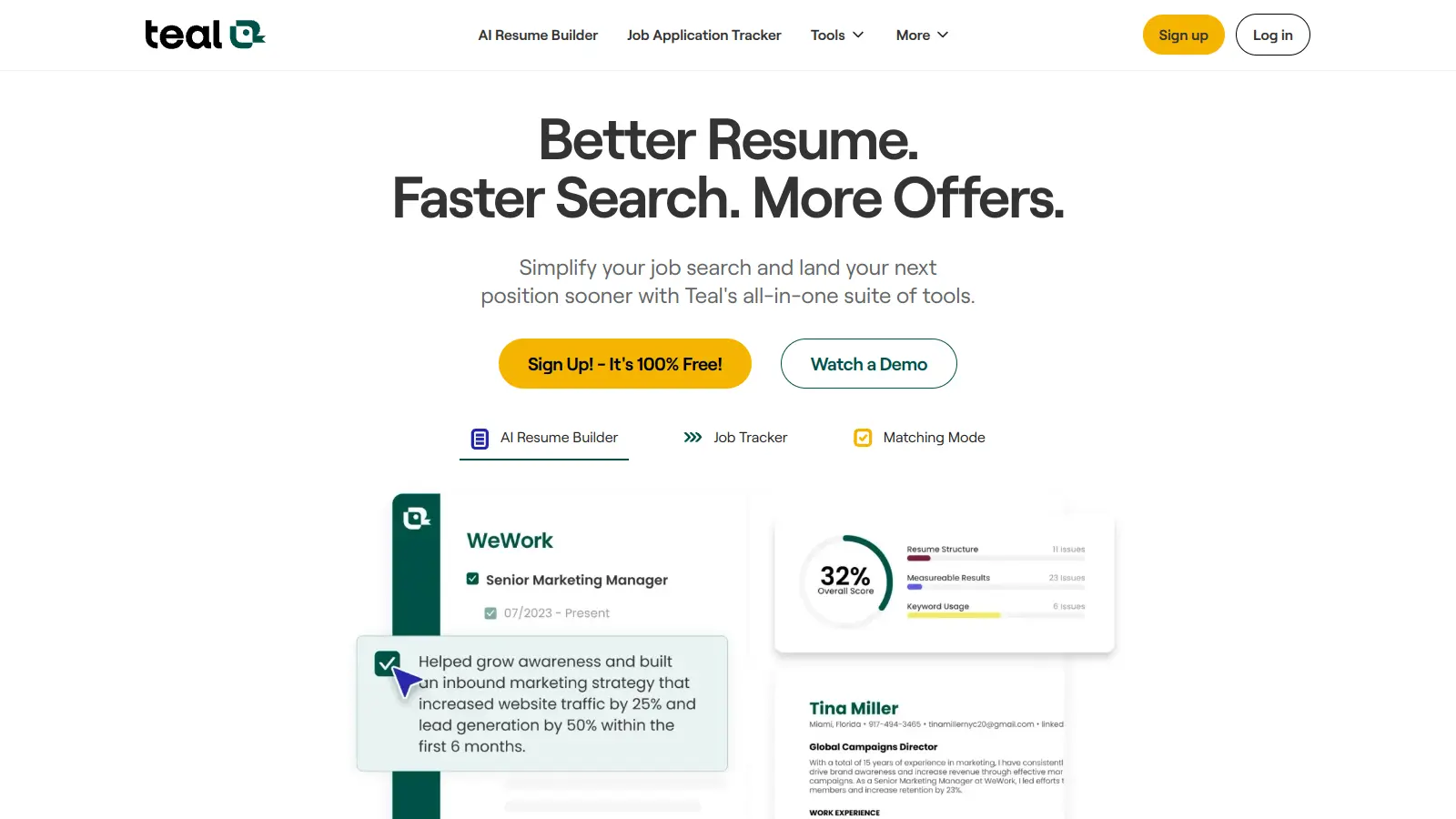
  • AI Resume Builder with Job Matcher: Generates customized resumes using AI technology with features like Bullet Point Generator, Summary Generator, Skills Generator, and real-time Job Matcher for optimizing resumes with strong action verbs and ATS compatibility.
  • Job Tracker: Manages job applications across external job boards, allowing users to bookmark opportunities, track application stages, add notes and follow-ups, and rate job excitement with a Chrome extension.
  • Resume Job Description Match Tool: Compares resume to job descriptions, providing match scores, identifying keyword alignment, and offering actionable steps to improve resume compatibility with applicant tracking systems.
  • Cover Letter Generation: Drafts tailored cover letters using AI technology, ensuring each letter is directly aligned with specific job requirements.
  • AI Interview Practice: Provides interview preparation tools to help users practice responses and improve their interview skills.
  • Job Search with Filters: Allows searching across external job boards with filtering options to find relevant opportunities quickly.
  • Advanced Resume Analysis: Offers detailed resume scoring, keyword matching, and insights to improve job application effectiveness and increase interview opportunities.

pricing

  • Free Forever plan provides unlimited resume creation and downloads, basic resume builder, job tracker, and most core tools at no cost.
  • Teal+ premium version offers unlimited advanced resume analysis, keyword matching, AI features including bullet points and summaries, unlimited cover letters, and premium templates with advanced design options.
  • Pricing options include: Weekly Plan at $9 (also listed as $13/week for some features), Monthly Plan at $29, and Quarterly Plan at $79.
  • Quarterly and annual plans provide more cost-effective options compared to weekly or monthly subscriptions.

frequently asked questions

The free tier is genuinely worth using: unlimited resumes, job tracking, and basic templates at no cost. Teal+ at $13 a week is only worth it if you're in an active, intensive job search and need the AI bullet point generator, keyword matching, and cover letter tools regularly. Run the weekly plan for two or three weeks during a focused application sprint, then cancel. Paying monthly long-term doesn't make financial sense for most job seekers.

Career changers get the most out of it because the resume tailoring and keyword optimization help reframe existing experience for unfamiliar industries. Busy professionals in tech, marketing, and design benefit from the Chrome extension and automated cover letter generation when time is tight. Recent graduates can use the free tier to stay organized, but may find the full feature set more than they need early on.

The most useful AI features, including bullet point generation, keyword matching, and cover letters, are all behind the $13/week paywall. Customer support response times have been flagged as slow, which is a real problem when you're facing an application deadline. The platform can also feel overwhelming for first-time job seekers who are still figuring out the basics, since there's a lot here and it's not always obvious where to start.

Teal has a stronger resume builder and a more polished job tracking interface. Careerflow competes directly on ATS optimization and also includes a LinkedIn profile optimizer, which Teal doesn't offer. If your priority is resume tailoring and application management, Teal is the better fit. If you're also trying to optimize your LinkedIn presence or want a lower-cost AI writing option, Careerflow is worth testing before you commit to Teal+.

Yes, within limits. Teal's AI resume tools are good at surfacing transferable skills and rewriting bullet points to match job description keywords, which is exactly what you need when applying outside your current field. The keyword matching feature flags what's missing from your resume before you submit. That said, it's a writing assistant, not a career coach: it can help you frame what you have, but it can't tell you whether your background is realistically competitive for a specific role.

tools for
humans

toolsforhumans editorial team

Reader ratings and community feedback shape every score. Since 2022, ToolsForHumans has helped 600,000+ people find software that holds up after launch. how we research →

is this your tool?

claim your listing to update details, respond to our review, or upgrade to a featured partnership.

claim this listing →

other tools to check out

ChatGPT screenshot
online buzz124M
trend (1M)steady
4.0based on real user feedback, community sentiment, pricing value, and fit for target audience. see our full methodology

ChatGPT

ChatGPT is an AI chatbot by OpenAI that uses language models to hold conversations, generate content, and complete tasks. It includes web browsing, image generation and analysis, voice interaction, autonomous task automation, and custom GPT creation. Available in multiple pricing tiers from free to enterprise, ChatGPT handles creative writing, data analysis, coding, and real-world automation.

best deal

Try ChatGPT Free: Basic AI conversations with GPT-5.2 Instant access (around 10 messages every 5 hours) at no cost.

Gemini screenshot
online buzz20.4M
trend (1M)23%
3.5based on real user feedback, community sentiment, pricing value, and fit for target audience. see our full methodology

Gemini

Gemini is an advanced AI assistant by Google that processes text, code, images, audio, and video across Google's ecosystem. It offers content creation, coding assistance, research capabilities, and workflow automation through the Gemini app, web interface, and integrations with Google Workspace, Pixel phones, and Chrome.

best deal

Google AI Plus: Get 50% off at $3.99/month for the first 2 months (new subscribers); Google AI Pro: Try free for one month.

Grammarly screenshot
online buzz3.4M
trend (1M)22%
3.8based on real user feedback, community sentiment, pricing value, and fit for target audience. see our full methodology

Grammarly

Grammarly is an AI-powered writing assistant that provides real-time grammar, spelling, and punctuation checks, tone adjustments, and generative AI features for composing, rewriting, and proofreading text. It integrates with platforms like Google Docs, Gmail, Microsoft Word, Slack, and web browsers, offering both free and paid versions with features ranging from basic corrections to plagiarism detection and AI writing tools.

best deal

Try Grammarly's Free Version Today - Get Basic Grammar Checks & 100 AI Prompts Per Month Across Your Favorite Apps

Claude screenshot
online buzz3.4M
trend (1M)83%
4.2based on real user feedback, community sentiment, pricing value, and fit for target audience. see our full methodology

Claude

Claude is an AI assistant developed by Anthropic that handles coding, writing, and analysis tasks. It uses Constitutional AI for safety-focused interactions, supports multiple languages, and offers models like Sonnet and Opus with different capabilities. Claude prioritizes user privacy and context-aware responses.

best deal

Try Claude Free - 30-100 daily messages with code generation, image analysis, web search, and access to Claude's latest models

Perplexity screenshot
online buzz1.8M
trend (1M)22%
3.8based on real user feedback, community sentiment, pricing value, and fit for target audience. see our full methodology

Perplexity

Perplexity AI is an AI-powered search engine that provides real-time, conversational responses to user queries. Founded in 2022, it uses natural language processing and large language models to deliver answers with source transparency. The platform offers multiple search modes, supports file and image uploads, and provides both free and paid plans for individual users and businesses.

best deal

Try Perplexity Free - Get unlimited basic searches with citations, 5 daily Pro Searches, and save your search history with access to basic AI models.

QuillBot screenshot
online buzz823k
trend (1M)steady
3.5based on real user feedback, community sentiment, pricing value, and fit for target audience. see our full methodology

QuillBot

QuillBot is an AI-powered writing tool that helps users improve their writing through features like paraphrasing, grammar checking, summarization, plagiarism detection, citation generation, translation, and AI detection. It offers a web-based interface, Chrome extension, and Google Docs integration, with pricing plans ranging from a free version to monthly, semi-annual, and annual premium subscriptions. The tool uses advanced natural language processing to provide contextually appropriate text modifications.

best deal

Try QuillBot free or upgrade to Premium for just $8.33/month with unlimited paraphrasing and advanced tools. 3-day money-back guarantee included.