Liner review — AI research assistant & web highlighter
last reviewed 24 march 2026how we review
We start with direct ratings from our readers, then look at what real users are saying in practitioner forums and community spaces. We pair that with search demand data and profession-level persona analysis.
Editorial note:this was originally published in april of 2025
quick take
✓Best for: students and researchers organising sources across web, PDFs, and YouTube
✗Skip if: you just want AI search with no extras and don't need a highlighting workflow
£Best value: Pro at $14.99/month billed annually, or free tier to test the highlighting tools first
★★★½★3.5/ 5 — editorial rating
based on real user feedback, community sentiment, pricing value, and fit for target audience. see our full methodology
used Liner? we'd love to know your thoughts
reader ratings shape our score
Liner is an AI-powered search engine and research assistant that helps users find, organize, and analyze information. It uses GPT-4o, Claude 3, and other AI models to deliver search results, instant answers, and research insights with references.
The core features include web highlighting, content management tools, and AI-driven search. Users can highlight text across websites, YouTube videos, and images while organizing findings with custom tags and labels. The tool also analyzes PDFs, PowerPoints, and Word documents, with AI summarization that condenses lengthy texts.
Students, researchers, and professionals can access Liner through browser extensions for Chrome, Safari, Opera, Edge, and Whale, or mobile apps on iOS and Android. The platform supports content export to productivity tools like Evernote. It also includes a Word Assistant for improving writing tone and grammar, an Image Reader for analyzing images, and code generation features.
A free plan offers basic functionality with limited AI calls and highlighting capabilities. Paid subscriptions unlock unlimited AI agent calls, access to all AI models including GPT-4o and Claude 3, and an AI image generator. New users might need some time to learn all its features.
how popular is Liner?
monthly search interest
22.2k/mo now
peak interest110k/moApr 2025
searches now22k/moFeb 2026
1-month change−45%vs prev month
Liner sat in a stable 14,000-22,000 monthly search range for nearly two years, then exploded to 110,000 searches in April 2025 before dropping back to current levels within months. That's a classic AI hype spike: the product caught a wave, likely from coverage comparing it to Perplexity and ChatGPT, and is now settling back toward its real organic audience. The current 22,000 figure is close to where it was before the spike, which suggests the tool has a genuine but modest core user base rather than lasting mainstream traction.
who is Liner for?
Whether Liner clicks for you depends almost entirely on how you actually do research. Pick your role below to see the honest breakdown.
what users are saying
“If you just want AI search without the research toolkit, Perplexity's free tier covers most of that ground without a subscription commitment.”
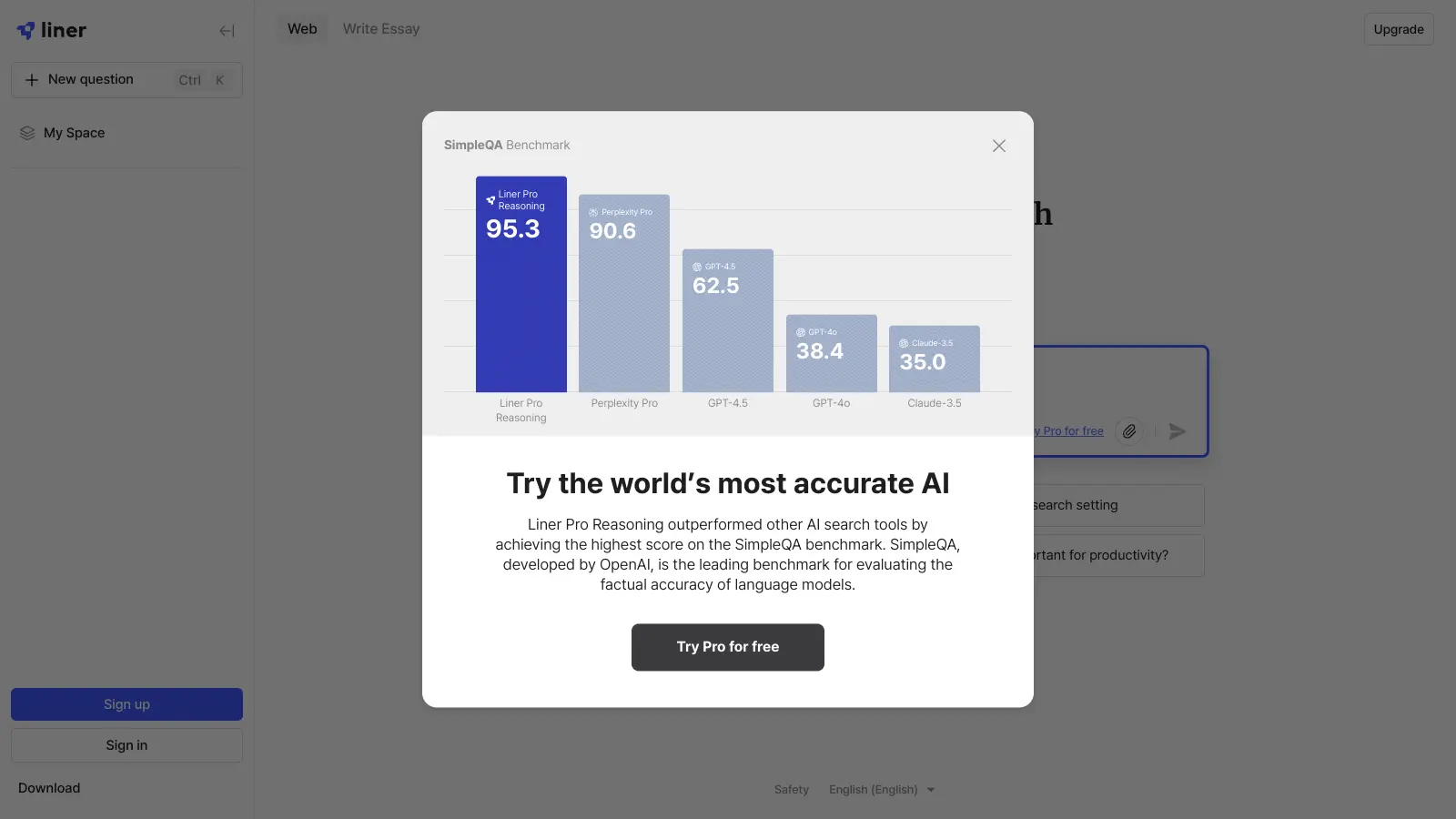
Community discussion about Liner is sparse enough that there's no strong consensus to report from forums or review threads. What the tool's own positioning makes clear is that it's pitching itself against Perplexity and ChatGPT on research accuracy, citing OpenAI's SimpleQA benchmarks to back that claim. That's a specific, testable differentiator rather than vague marketing copy, which is worth noting. The free tier is genuinely usable for light research: 25 Copilot chats per day and unlimited web highlighting are more than most competitors offer at zero cost. The friction shows up at the paid tier, where $14.99 a month (billed annually) gets you Deep Research and unlimited file uploads, but caps Deep Research at 25 runs per month on the Pro plan. Heavy users hit that ceiling fast.
Our take: Liner's case rests on two things: a web highlighter that actually works across YouTube and PDFs, and AI search that claims better sourcing than Perplexity. The second claim is plausible but unverified by independent community testing we could find. If you're a student or researcher who spends serious time collecting sources, the Pro plan at $14.99/month is defensible. If you just want AI search without the research toolkit, Perplexity's free tier covers most of that ground without a subscription commitment. Don't pay for Liner Max at $29.99/month unless you're doing daily heavy-volume research and need unlimited file uploads.
features
AI-Powered Search Engine: Choose from multiple AI models including GPT-4o and Claude 3 to get research results across complex queries, with answers generated from references and recommendations for what to search next.
Smart Content Highlighting: Mark and tag information from web pages, YouTube videos, and images with customizable colors and themes.
Multi-Format File Processing: Analyze PDF, PPT, and DOCX files with the PDF Assistant and AI Summarizer, extracting key information and generating summaries to condense lengthy documents.
Image Text Extraction: Extract text and information directly from images with the Image Reader feature.
Multi-Device Accessibility: Access your research across browser extensions for Chrome, Safari, Opera, Edge, and Whale, plus iOS and Android mobile apps, with content export to tools like Evernote.
Team Collaboration Tools: Share highlights, annotations, and research findings with colleagues, with custom team pricing for organizations.
AI Writing and Coding Help: Get help with email drafting, code generation, and writing improvements through the Word Assistant that enhances tone and grammar, plus AI agents tailored to your needs.
pricing
Basic Plan is free with limited features including 1 AI model access, 1 AI agent, 25 Copilot Chat per day, 5 Liner AI on Google per day, 25 PDF Copilot per day, unlimited web/YouTube/image highlights, 6 highlight colors, 8 highlight color themes, and unlimited highlight comments.
Essential Plan is $19.58 per month with all Basic AI agents, unlimited AI agent calls, unlimited Copilot Chat, unlimited Liner AI on Google, unlimited PDF Copilot, and unlimited highlights with all basic features.
Professional Plan is $27.08 per month with all AI model access including GPT-4o and Claude 3, all Pro agents, unlimited AI agent calls, 300 AI image generator images per day, unlimited Copilot Chat, unlimited Liner AI on Google, unlimited PDF Copilot, and unlimited highlights.
Team Plan is available with custom pricing for organizations needing collaboration features.
frequently asked questions
The free Basic plan is worth trying first: 25 Copilot chats a day and unlimited highlighting is a genuinely useful starting point. The Pro plan at $14.99/month (billed annually) makes sense if you regularly process PDFs, need Deep Research, and want citations without ads. The Max plan at $29.99/month is hard to justify unless you're doing daily intensive research that burns through the 25 Deep Research limit on Pro.
Students writing literature reviews and academics collecting sources across multiple papers and web pages get the clearest return. Anyone who does heavy PDF analysis or needs to track where information came from will also find the highlighting and citation tools genuinely useful. Casual searchers who just want quick answers won't need to move past the free tier, if they stick around at all.
Deep Research is capped at 25 runs per month on the Pro plan, which runs out quickly if research is a daily activity. The Max plan removes that ceiling but nearly doubles the cost. There's also almost no independent community discussion about Liner's real-world accuracy, so the benchmark claims versus Perplexity and ChatGPT remain difficult to verify outside Liner's own marketing.
Perplexity's free tier handles most general AI search needs without any account setup friction, and its Pro plan at $20/month includes unlimited file uploads and a broader model selection. Choose Liner if the web highlighting tool, YouTube annotation, and research organisation features are central to your workflow. Choose Perplexity if you primarily want fast, cited AI search without the document management layer.
For early-stage research, yes: Deep Research produces structured reports with references that genuinely compress the time needed to survey a topic. For final-stage academic work where citation accuracy is high-stakes, you'd still want to verify every source manually. Liner helps you find and collect; it doesn't replace critical reading.
tools for humans
toolsforhumans editorial team
Reader ratings and community feedback shape every score. Since 2022, ToolsForHumans has helped 600,000+ people find software that holds up after launch. how we research →
is this your tool?
claim your listing to update details, respond to our review, or upgrade to a featured partnership.
★★★★★4.0based on real user feedback, community sentiment, pricing value, and fit for target audience. see our full methodology
ChatGPT
ChatGPT is an AI chatbot by OpenAI that uses language models to hold conversations, generate content, and complete tasks. It includes web browsing, image generation and analysis, voice interaction, autonomous task automation, and custom GPT creation. Available in multiple pricing tiers from free to enterprise, ChatGPT handles creative writing, data analysis, coding, and real-world automation.
★★★★★3.5based on real user feedback, community sentiment, pricing value, and fit for target audience. see our full methodology
Gemini
Gemini is an advanced AI assistant by Google that processes text, code, images, audio, and video across Google's ecosystem. It offers content creation, coding assistance, research capabilities, and workflow automation through the Gemini app, web interface, and integrations with Google Workspace, Pixel phones, and Chrome.
★★★★★3.0based on real user feedback, community sentiment, pricing value, and fit for target audience. see our full methodology
Copilot AI
Microsoft 365 Copilot is an AI-powered productivity tool that integrates seamlessly with Microsoft 365 apps like Word, Excel, PowerPoint, and Outlook. It uses advanced language models and Microsoft Graph to provide intelligent, context-aware suggestions, automate tasks, and enhance collaboration by generating content, analyzing data, and offering real-time insights across various work processes.
★★★★★4.2based on real user feedback, community sentiment, pricing value, and fit for target audience. see our full methodology
Claude
Claude is an AI assistant developed by Anthropic that handles coding, writing, and analysis tasks. It uses Constitutional AI for safety-focused interactions, supports multiple languages, and offers models like Sonnet and Opus with different capabilities. Claude prioritizes user privacy and context-aware responses.
★★★★★3.8based on real user feedback, community sentiment, pricing value, and fit for target audience. see our full methodology
Perplexity
Perplexity AI is an AI-powered search engine that provides real-time, conversational responses to user queries. Founded in 2022, it uses natural language processing and large language models to deliver answers with source transparency. The platform offers multiple search modes, supports file and image uploads, and provides both free and paid plans for individual users and businesses.
★★★★★3.0based on real user feedback, community sentiment, pricing value, and fit for target audience. see our full methodology
Photo AI
PhotoAI.me is an AI-powered platform that transforms personal photos into unique, high-resolution images across 100+ styles for various social media platforms. Users can upload a photo, select a themed package, and receive AI-enhanced images within hours, making profile personalization simple and quick for those seeking professional or creative profile pictures without advanced editing skills.