tools for
humans

Krea reviews — what users really think

last reviewed 24 march 2026
how we review

We start with direct ratings from our readers, then look at what real users are saying in practitioner forums and community spaces. We pair that with search demand data and profession-level persona analysis.

full methodology →

Editorial note: this was originally published in april of 2025

quick take

  • Best for: motion artists needing Video Lipsync and real-time canvas iteration
  • Skip if: you need reliable client deliverables or responsive billing support
  • £Best value: free tier for exploration; Basic at $8-10/month only if you hit daily generation limits
3.2/ 5 — editorial rating

used Krea? we'd love to know your thoughts

reader ratings shape our score

Krea is an AI-powered platform that helps creative professionals generate and enhance visual content in real-time. Photographers, motion artists, designers, and content creators can produce images and videos through text prompts, sketches, and a canvas interface.

The platform uses multiple AI models including Krea 1, Flux, Google's Veo 3, and OpenAI's ChatGPT image generation. The Realtime feature lets you draw shapes on a canvas or use webcam feeds to see AI-generated interpretations update in milliseconds. Specialized tools include video generation with keyframe-based motion control, AI-powered upscaling that adds detail, and features like Motion Transfer and Video Lipsync for character animation.

The free plan offers 50 daily image generations and 10 video generations. The Pro subscription at $28-35 monthly unlocks unlimited generations and full access to all video models including Veo3, Sora, and Kling. The platform shines in its real-time feedback and creative control, though it can be resource-intensive on lower-end hardware.

Generation glitches happen. The subscription is pricey for casual users. But Krea provides accessible tools for anyone looking to create visual content with instant feedback and multiple AI model options.

how popular is Krea?

monthly search interest

14.8k/mo now

09.9k19.8k30k2023202420252026
peak interest27k/moApr 2025
searches now15k/moFeb 2026
1-month change— steadyvs prev month

Krea went from near-zero interest in 2022 to a peak of 27,100 monthly searches in April 2025 — a sharp rise driven by real feature differentiation in a crowded market. The 45% drop since that peak suggests the initial wave of curiosity has settled, but 14,800 monthly searches is a stable floor, not a collapse. The hype phase is over, which means you're evaluating the real product now rather than a viral moment.

who is Krea for?

Whether Krea clicks for you depends a lot on where it fits in your workflow. Pick your role below to get the honest breakdown.

overall sentiment

select your role to see what people like you are saying

Motion Artist/Video Creator

positive

If you're animating characters or experimenting with motion concepts, Krea's Video Lipsync and Motion Transfer tools are genuinely hard to find elsewhere at this price. The real-time feedback loop speeds up iteration in a way traditional software doesn't. Generation glitches are real and can cost you time, but for rapid prototyping and short-form video work, this is one of the stronger options available.

strengths

  • Specialized Video Lipsync and Motion Transfer tools for character animation
  • Real-time generation allows immediate feedback on motion iterations
  • Faster workflow compared to traditional animation software
  • Multiple AI models provide creative flexibility for video outputs

concerns

  • Generation glitches and inconsistencies impact video quality and usability
  • Expensive subscription pricing for professional video production workflows
  • Resource demands may strain production pipelines on standard hardware

what users are saying

There is no contact form, no email, no phone number—nothing. The only 'support' they offer is a Discord server.

Reddit r/customerexperience

The most pointed community criticism around Krea centres on customer support and billing, not the product itself. A Reddit post in r/customerexperience describes the experience as feeling 'like a scam' because there is no contact form, no email, and no phone number — just a Discord server — when billing problems arise. Across commercial review platforms, Krea sits around 2.7 stars across 70 reviews, with recurring complaints about charges continuing after cancellation and no way to escalate. The independent review at videoinu.com frames the core tension well: Krea is flexible and creative, but real-world usability depends heavily on how much control you actually need, and the platform prioritises fast visual output over reliable production consistency. A Reddit comparison thread on Freepik vs Krea surfaces a familiar question: whether paying for Krea's broader feature set makes sense when Freepik covers more commercial use cases at a lower price point for some users.

Our take: Krea is a genuinely interesting creative tool that has been let down by infrastructure: billing issues you can't resolve and generation inconsistencies you can't predict are real problems for anyone relying on it professionally. The real-time canvas and Motion Transfer features are legitimately differentiated, and the Flux integration produces photorealistic results that compete with Midjourney. But until the support situation improves, you'd be taking a risk on the Pro plan at $28-35 a month. If you primarily need image generation with solid commercial rights, Freepik's plan is safer. If motion and video are your focus, test Krea's free tier thoroughly before committing to anything paid.
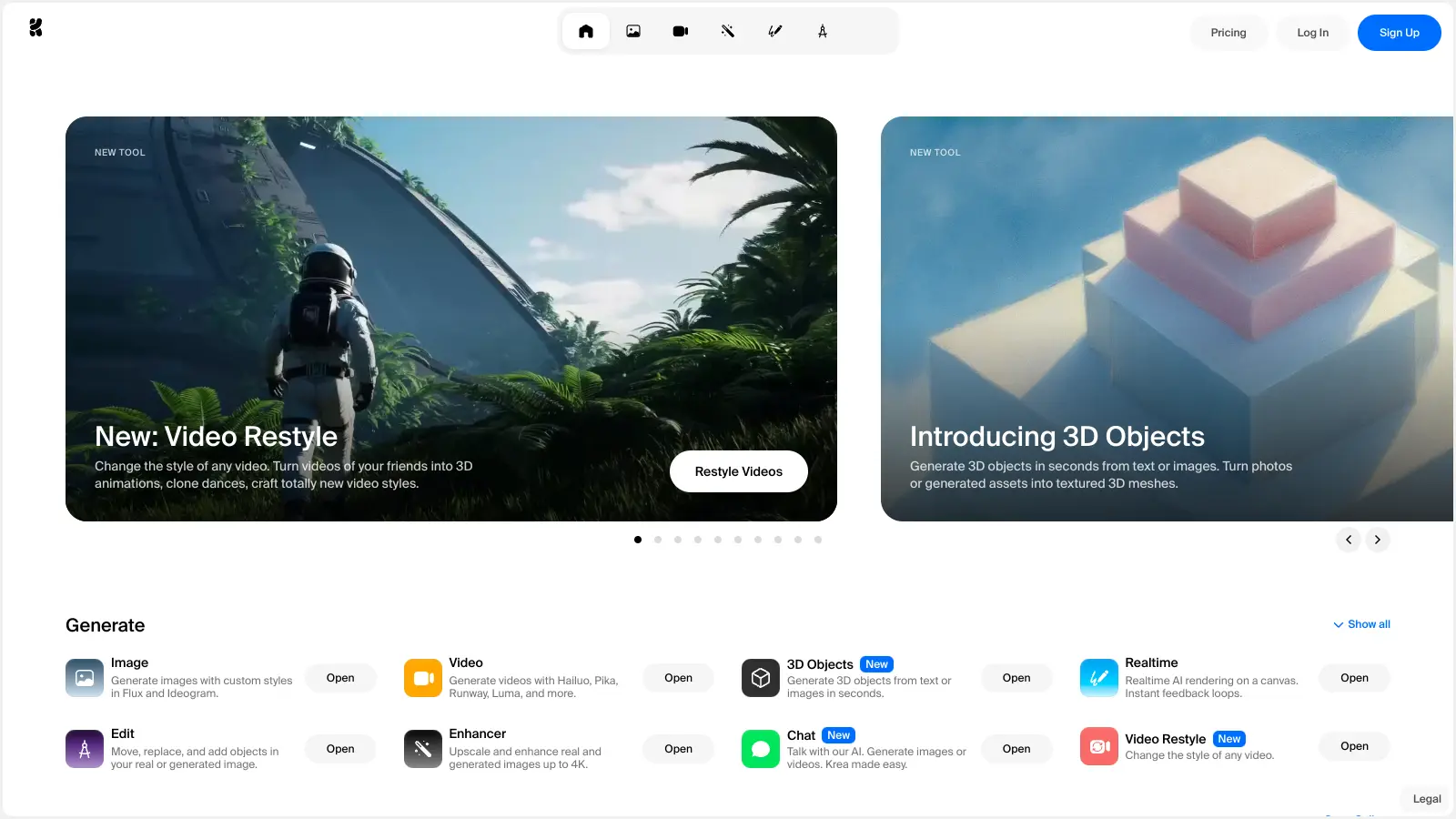

features

  • AI-Powered Visual Generation: Uses AI models including Krea 1, Flux, Google's Veo 3, and OpenAI's ChatGPT image generation to produce images and videos from text prompts, sketches, and photos.
  • Real-Time Image Generation: Lets you draw shapes on a canvas or input webcam feeds and see AI-generated interpretations update in milliseconds for instant creative feedback.
  • AI-Powered Upscaling: Adds detail to images rather than just sharpening, creating outputs up to 4K with hallucinates detail for enhanced clarity.
  • Video Generation with Keyframe Control: Creates videos up to 60 seconds long with keyframe-based motion control, giving you precise timing and movement options.
  • Motion Transfer and Video Lipsync: Animates characters based on video or webcam input and syncs character speech for realistic animation work.
  • Video Restyle: Changes the visual style of existing videos using text prompts, letting you transform footage without starting from scratch.
  • 3D Object Generation: Creates 3D objects from photos or text prompts for work beyond 2D visuals.
  • Custom Model Training: Trains custom character and style generation models for personalized creative workflows and consistent visual branding.
  • Image Editing Tools: Edits images using prompts and reference images, with features for object removal and lighting adjustment.
  • Flux Integration: Provides streamlined image creation with photorealistic results that rival Midjourney or DALL-E outputs.

pricing

  • Free plan includes 50 image generations per day, 10 video generations per day, 3 AI trainings after sign-in, up to 2K resolution, and up to 2 concurrent image generations.
  • Basic plan costs $8-10 monthly with around 36,000 real-time images per month, 200 video generations per month, up to 4K resolution, 3 AI trainings per month, and 2 concurrent generations.
  • Pro plan costs $28-35 monthly with unlimited image and video generations, full access to all video models including Veo3, Sora, and Kling, around 180,000 real-time images per month, 1,000 video generations per month, up to 4K resolution, 5 AI trainings per month, 4-8 concurrent generations, and early feature access.
  • Max plan costs $48-60 monthly with around 540,000 real-time images per month, 3,000 video generations per month, unlimited LoRA model training, unlimited concurrent generations, premium nodes access, and volume discounts on additional compute units.
  • Annual subscriptions receive a 20% discount across all paid tiers.

frequently asked questions

The free plan's 50 image and 10 video generations per day is genuinely usable for exploration, so start there. The Basic plan at $8-10 per month is reasonable if you hit the free cap regularly. The Pro plan at $28-35 per month is only worth it if you need unlimited real-time generations and LoRA training for client work — and even then, the billing and support issues documented by users are a real risk. Don't subscribe until you've tested the free tier for at least a week.

Motion artists and video creators get the most out of it because the Video Lipsync and Motion Transfer tools are genuinely specialised. Graphic designers and digital artists benefit from the rapid prototyping canvas and beginner-friendly interface. Professional photographers and creative directors can use it for mood boards and client concepts, but should treat outputs as drafts rather than finals given the consistency issues.

Two specific problems come up repeatedly. First, generation inconsistencies mean you can't reliably reproduce a result, which matters if you're handing deliverables to clients. Second, upscaling introduces artifacts that can degrade images you've spent time generating. On top of that, the customer support situation is a real operational risk: if billing goes wrong, there is no direct support channel — just Discord.

If your priority is commercial-safe assets and stock image replacement, Freepik's all-in-one plan covers more ground with clearer licensing. If you specifically want real-time generation, Motion Transfer, or LoRA finetuning, Krea has no direct equivalent at a similar price point. The decision is straightforward: content creators who need broadly safe commercial assets should start with Freepik; motion artists and designers who want hands-on generative control should test Krea's free tier first.

Not without a backup workflow. The generation inconsistencies and upscaling artifacts mean professional photographers and creative directors treating Krea outputs as final deliverables are taking a risk. Use it for concepting, mood boards, and rapid iteration — but plan to finish anything client-facing in a more controlled tool. If a client asks for revisions, reproducing the exact same result in Krea is harder than it should be.

tools for
humans

toolsforhumans editorial team

Reader ratings and community feedback shape every score. Since 2022, ToolsForHumans has helped 600,000+ people find software that holds up after launch. how we research →

other tools to check out

ChatGPT screenshot
online buzz124M
trend (1M)steady
4.0

ChatGPT

ChatGPT is an AI chatbot by OpenAI that uses language models to hold conversations, generate content, and complete tasks. It includes web browsing, image generation and analysis, voice interaction, autonomous task automation, and custom GPT creation. Available in multiple pricing tiers from free to enterprise, ChatGPT handles creative writing, data analysis, coding, and real-world automation.

best deal

Try ChatGPT Free: Basic AI conversations with GPT-5.2 Instant access (around 10 messages every 5 hours) at no cost.

Gemini screenshot
online buzz20.4M
trend (1M)23%
3.5

Gemini

Gemini is an advanced AI assistant by Google that processes text, code, images, audio, and video across Google's ecosystem. It offers content creation, coding assistance, research capabilities, and workflow automation through the Gemini app, web interface, and integrations with Google Workspace, Pixel phones, and Chrome.

best deal

Google AI Plus: Get 50% off at $3.99/month for the first 2 months (new subscribers); Google AI Pro: Try free for one month.

Copilot AI screenshot
online buzz4.1M
trend (1M)steady
3.0

Copilot AI

Microsoft 365 Copilot is an AI-powered productivity tool that integrates seamlessly with Microsoft 365 apps like Word, Excel, PowerPoint, and Outlook. It uses advanced language models and Microsoft Graph to provide intelligent, context-aware suggestions, automate tasks, and enhance collaboration by generating content, analyzing data, and offering real-time insights across various work processes.

best deal

Try Copilot Free: Experience basic AI assistance without Office integration

Claude screenshot
online buzz3.4M
trend (1M)83%
4.2

Claude

Claude is an AI assistant developed by Anthropic that handles coding, writing, and analysis tasks. It uses Constitutional AI for safety-focused interactions, supports multiple languages, and offers models like Sonnet and Opus with different capabilities. Claude prioritizes user privacy and context-aware responses.

best deal

Try Claude Free - 30-100 daily messages with code generation, image analysis, web search, and access to Claude's latest models

Perplexity screenshot
online buzz1.8M
trend (1M)22%
3.8

Perplexity

Perplexity AI is an AI-powered search engine that provides real-time, conversational responses to user queries. Founded in 2022, it uses natural language processing and large language models to deliver answers with source transparency. The platform offers multiple search modes, supports file and image uploads, and provides both free and paid plans for individual users and businesses.

best deal

Try Perplexity Free - Get unlimited basic searches with citations, 5 daily Pro Searches, and save your search history with access to basic AI models.

Photo AI screenshot
online buzz1M
trend (1M)steady
3.0

Photo AI

PhotoAI.me is an AI-powered platform that transforms personal photos into unique, high-resolution images across 100+ styles for various social media platforms. Users can upload a photo, select a themed package, and receive AI-enhanced images within hours, making profile personalization simple and quick for those seeking professional or creative profile pictures without advanced editing skills.

best deal

Transform your profile photo with 100+ AI styles starting at $19/month


